
A Founder's Guide to Turning Design Into Code

You’ve done it. Your no-code MVP found a hungry market, you’ve got traction, and things are looking up. But now, you’re starting to feel the growing pains. The app lags, workarounds are piling up, and maybe investors are starting to ask tough questions about your tech. This isn’t failure—it's the signal you’ve been waiting for. It’s time to turn that validated design into code.
Knowing When It's Time to Leave No-Code Behind
There’s a moment every successful founder using no-code tools experiences. The platform that felt like a superpower suddenly feels more like a straitjacket. It’s a classic sign of growth: the very tools that gave you the speed to find product-market fit are now what’s slowing you down. Don’t worry, you’re in good company. This is a well-worn path.
The signs usually start small before becoming impossible to ignore. Maybe your app grinds to a halt when user traffic spikes. Or a critical Zapier workflow breaks, throwing a wrench into your operations. Perhaps you've outgrown your Airtable base for the third time this quarter and are tired of the clunky workarounds. These aren't just little headaches; they’re symptoms that you've pushed the platform past its limits.
The Tell-Tale Signs of Scaling Pains
This shift isn't about chasing shiny new technology. It's about real, tangible business needs. As you grow, the web of interconnected no-code tools that once felt so clever starts to look fragile and risky. The global no-code market is on track to hit $84.47 billion by 2027, which shows just how powerful these tools are for getting ideas off the ground. But as this analysis of no-code statistics points out, that initial speed can come at the cost of a solid foundation for long-term growth.
You’ll know it’s time to make the move when you see these red flags:
- Lagging Performance: Your app just can't keep up with more users. Slow load times and a clunky user experience are starting to cost you customers.
- Spiraling Integration Costs: Your monthly bills for services like Zapier or Make are getting out of hand. You're starting to suspect it would be cheaper to just build the integrations yourself.
- Security and Data Headaches: You need tighter control over your data, better security, or have to meet compliance standards like GDPR. No-code platforms often give you a one-size-fits-all solution that just isn't enough.
- Hesitant Investors: VCs get nervous about businesses built entirely on rented infrastructure. They see it as a risk and question your long-term scalability and defensibility.
As your startup matures, the trade-offs you made early on become more apparent. The very platforms that enabled your launch can become the biggest obstacles to your growth.
Let's break down how these challenges manifest in the real world compared to what a production-grade stack offers.
Scaling Pains No-Code vs Production Code
This table contrasts the limitations of common no-code platforms with the benefits of a production-grade tech stack as a company scales.
| Growth Challenge | No-Code Platform Limitation (Bubble/Webflow/Airtable) | Production Code Advantage (React/Next.js/PostgreSQL) |
|---|---|---|
| User & Data Volume | Performance degrades with more users/data. Arbitrary record limits (e.g., Airtable) force complex workarounds. | Architected for scale from day one. Can handle millions of users and records without performance hits. |
| Feature Complexity | Limited to pre-built elements and plugin functionality. Custom logic is difficult or impossible to implement. | Unlimited flexibility. Any feature, workflow, or business logic you can imagine can be built. |
| Integration Needs | Reliant on costly third-party connectors (Zapier, Make), which add latency and another point of failure. | Direct, custom API integrations are faster, more reliable, and significantly cheaper to run at scale. |
| Data Ownership & Security | Data is stored on a third-party platform with limited control. Harder to meet compliance standards like HIPAA or GDPR. | Full ownership and control over your data and infrastructure. You can implement custom security protocols and ensure compliance. |
| Intellectual Property | You don't own the underlying platform. Your "IP" is essentially a set of configurations on someone else's tech. | You own the codebase. This is a defensible, valuable asset that increases the company's valuation. |
| Investor Confidence | VCs often view a no-code stack as a technical risk, questioning its ability to scale and defend against competitors. | A custom, scalable tech stack is a clear signal to investors that the business is built for long-term, defensible growth. |
The takeaway here is clear: while no-code is fantastic for 0 to 1, the journey from 1 to 100 demands a more robust and ownable foundation.
Moving from no-code to a custom stack isn't just a technical upgrade; it's a strategic business decision. It’s about building defensible intellectual property, gaining investor confidence, and creating a stable platform for sustainable, long-term growth.
Preparing Your Project for a Code Handoff
The secret to a smooth transition from a no-code platform to a custom-coded application doesn't start with the first line of code. It actually begins much earlier, with a careful, methodical breakdown of your existing project. Think of it as creating a detailed blueprint for your engineering team. Honestly, this prep work is the single most critical factor in getting your design into code without headaches and delays.
No-code tools are fantastic for speed, which is why their adoption is exploding—some analysts predict 70% of new applications from large companies will use them by 2026. But that speed can come at a cost, creating technical debt and vendor lock-in that eventually slow you down. Founders usually hit this wall when they need to scale, handle more users, or tighten up security. You can dig deeper into these trends with these insights on no-code transformations.
This is the typical journey we see: rapid growth on a no-code platform, followed by hitting an inevitable ceiling that forces a move to custom code.
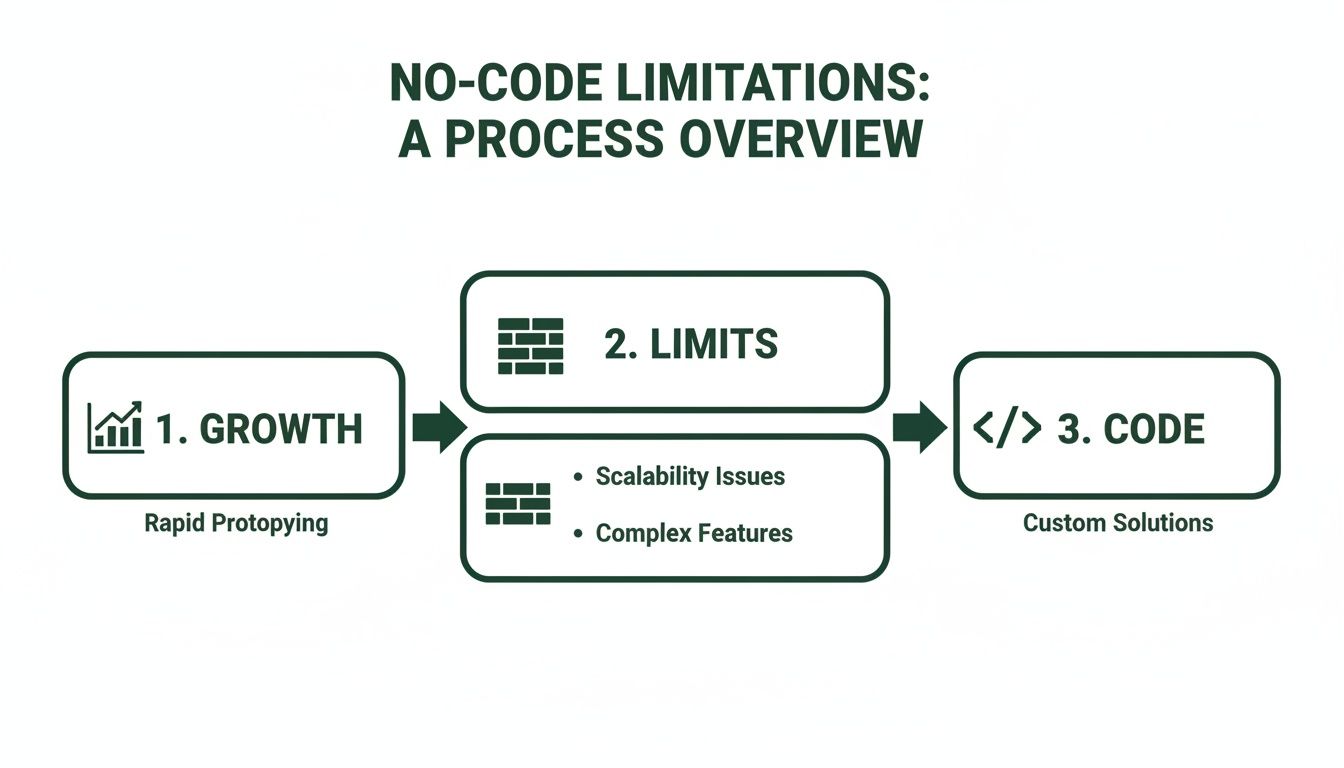
As the chart shows, that initial velocity eventually exposes the platform's limits. For any project with serious growth ambitions, making the leap to code isn't a matter of if, but when.
Deconstructing Your Design and Assets
First things first, you need to pull every visual and functional piece out of your current application. Your job here is to be an archaeologist, carefully unearthing and cataloging everything that makes your app look and feel the way it does. This goes way beyond taking a few screenshots; it's about building a complete inventory for the developers.
Start by exporting all your design assets. If you used a tool like Figma, great. If not, you can often pull them directly from a platform like Webflow. Make sure you get everything:
- UI Components: Every single button, form field, card, and modal. Don't forget to document their different states—what do they look like on hover, when active, or when disabled?
- Design Tokens: Get a clear list of your color palette (hex codes and all), typography scales (font sizes, weights, line heights), spacing rules, and border radii. This is the foundation of a consistent design system.
- Static Assets: Pull out all your icons, logos, and images. Export them in a web-ready format like SVG or WebP and organize them into folders that make sense.
A well-organized asset library is a huge time-saver for your dev team. When an engineer can grab the exact icon or font style they need without having to ask you, it saves hours of back-and-forth and prevents little visual bugs from creeping in.
Mapping Your Data and Business Logic
Okay, this is where the real detective work begins. Your Bubble database or Airtable bases are the brains of your operation. They hold the business logic that makes your app tick, and translating this logic accurately is absolutely critical.
You’ll want to start by mapping your current data into a proper relational model that can be used for a database like PostgreSQL. This means identifying your core entities (e.g., "Users," "Products," "Orders") and clearly defining how they relate to each other (for instance, a "User" can have many "Orders"). This exercise alone often uncovers hidden complexities you didn't even realize were there.
Next, you have to document all the "workflows" or "automations" that power your app. What exactly happens when a user signs up? What's the sequence of events triggered when a payment goes through? Write these out as simple, step-by-step user stories.
It's a great practice to keep all this documentation organized in one place. A version control system is perfect for this. If that's new territory, our guide on how to update a GitHub repository is a good place to get your bearings.
This documentation becomes your team's single source of truth. It prevents costly assumptions and ensures the new, coded version of your application is a faithful, and improved, reflection of your vision.
Building Your Modern Frontend and Backend
Alright, with your designs and logic mapped out, this is where the magic really happens. We're moving beyond the guardrails of no-code and building a real, scalable tech stack from the ground up. The point isn't just to copy-paste your MVP. It’s to lay a solid foundation that can support thousands of users, keep your product humming, and give investors the confidence they need to see.
Think of this as two parallel projects: one focused on creating a beautiful, responsive frontend that users will actually enjoy using, and another on engineering a rock-solid backend that can handle whatever you throw at it.
Crafting a Component-Based Frontend
Your frontend is the bridge between your design vision and your user. Instead of being stuck with the limitations of a Bubble or Webflow editor, we'll rebuild your interface using a modern, component-based framework like React. We're big fans of Next.js in particular, mostly for its killer performance features like server-side rendering, which makes for incredibly fast page loads.
Every single element from your design system—buttons, input fields, modals, navbars—gets coded as its own reusable React component. This might sound like a lot of work up front, but the payoff is massive:
- Ironclad Consistency: A component like
<Button variant="primary" />will look and act the exact same way no matter where you drop it in the app. No more rogue styling issues. - Painless Updates: Decide to change your brand's primary color? You just update the component in one file, and that change instantly appears everywhere.
- Faster Development: Building new features becomes like playing with LEGOs. Your developers can assemble complex pages from these pre-built, pre-tested blocks, which dramatically speeds up the whole process.
This approach turns your static Figma files into a living, breathing application that’s not just nice to look at, but also efficient to grow and manage. If you want to dive deeper into the pros and cons, check out our guide on finding the best React framework for your project.
By rebuilding your UI as modular React components, you're not just coding a design; you're creating a maintainable and scalable design system. This is the difference between a simple website and a true software product.
Engineering a Scalable Backend
While the frontend gets all the attention, the backend is the real workhorse. This is where we swap out those expensive, often-brittle integrations for a powerful, custom-built architecture that you own completely.
It all starts with a proper relational database like PostgreSQL. That data model you carefully extracted from Airtable or Bubble’s database is now implemented as a formal database schema. This gives you the power to run complex queries, ensure your data is always clean and consistent, and achieve performance levels that no-code databases just can't touch.
From there, we build a custom API to handle all your business logic. This API becomes the central command center for your entire application, managing everything from user sign-ups and permissions to payment processing and email notifications. It completely replaces that tangled web of Zapier or Make automations you've been relying on.
What does this get you?
- Total Control: You’re no longer limited by a third-party tool's features. The logic is yours, and you can customize any workflow to fit your exact business needs.
- Lower Costs: Say goodbye to those escalating monthly subscription fees for automation platforms.
- Serious Reliability: A custom API is far more stable and performs infinitely better under pressure than a chain of external services that could break at any time.
Ultimately, building a custom frontend and backend is about taking true ownership of your technology. It’s the definitive step from a promising prototype to a defensible, scalable, and valuable business.
5. Locking Down Your App: Automated Testing and Security
Turning your design into real, production-ready code is more than just a copy-paste job. It’s about building a stable, secure foundation for your business. This is a huge step up from the no-code world, where you’re basically renting your foundation from platforms like Bubble or Webflow. Now, you’re in the driver's seat—which means you're also responsible for making sure the doors are locked and the engine won't stall.
A real-world app has to be tough. You simply can't have your payment flow breaking because a developer pushed a small change. That's where automated testing comes in; think of it as your 24/7 quality control team. These are scripts that constantly check your code for bugs, catching them long before a customer ever sees them.
Building a Safety Net with Different Test Layers
I like to think of testing as a pyramid. The bottom is filled with lots of small, fast checks, and the top has fewer, more complex tests that simulate a full user experience. A smart strategy uses a healthy mix of all three.
Unit Tests: These are hyper-focused. They check one tiny piece of code at a time. For instance, a unit test would verify that your
calculateSubscriptionPrice()function always spits out the right number, no matter the inputs. They’re fast and simple.Integration Tests: This is where you check if the pieces fit together. An integration test might confirm that when a user fills out your sign-up form, their details actually make it into the correct table in your PostgreSQL database.
End-to-End (E2E) Tests: This is the big one. E2E tests mimic a real user's entire journey. A script will literally open a browser, log into your app, add a product to the cart, and go through checkout, ensuring that whole critical path works flawlessly.
This automated safety net is your first line of defense. Every time a developer commits new code, these tests run automatically, acting as a gatekeeper. They prevent old bugs from reappearing and make sure new features don't break something else. It's a level of confidence you just don't get in a typical no-code setup.
Weaving in Security from the Start
If testing ensures your app works, security ensures it can’t be broken. With data breaches making headlines almost daily, building a secure application isn't just a "nice-to-have"—it's a requirement for earning user trust. When you leave the walled garden of a no-code platform, security becomes your job.
This starts with the basics, the absolute non-negotiables. Solid user authentication is first on the list, using battle-tested libraries to handle things like password hashing and managing user sessions. Don't try to reinvent the wheel here.
Another critical habit is rigorous input validation. The golden rule is to never trust data coming from a user's browser. Every single piece of information, whether from a contact form or an API call, needs to be cleaned and checked to block common attacks like SQL injection or cross-site scripting (XSS).
By making these practices a core part of your development from day one, you’re not just shipping features. You’re building a resilient, trustworthy product that can scale—and that investors can get behind.
Executing a Seamless Go-Live Strategy
This is it—the final, most critical phase of turning your design into code. The cutover from your no-code setup to the new, production-grade system is where all your careful planning truly pays off. The goal is simple: zero downtime and a transition so smooth your users don't even notice it happened.
Getting this right requires a precise, scripted approach, especially when your data is on the line. Migrating your entire user base and operational history from a platform like Bubble or Airtable into your new PostgreSQL database isn’t a simple copy-paste job. It demands custom scripts that not only move the data but also transform and validate it to fit your new, more structured schema.
This scripted migration is your guarantee that nothing gets lost in translation. Every user, every order, every interaction—it's all accounted for, preserving the business intelligence you’ve worked so hard to build.
Staging a Zero-Downtime Deployment
The single riskiest moment in any go-live is when you switch from the old system to the new one. A well-executed strategy de-risks this moment by creating a brief period of overlap. Instead of a single, high-stakes "flip the switch" event, you'll run both systems in parallel for a short time.
Here's how it works: you deploy the new application to its permanent home on a platform like Vercel or AWS, but you point it to a temporary domain for now. Meanwhile, your old no-code app continues to serve live user traffic, which acts as a fantastic safety net.
While both systems are live, you perform one final, comprehensive data sync. A script pulls any new data created on the old platform since the initial migration—think new sign-ups or purchases—and merges it into the new PostgreSQL database. This ensures complete data parity right up to the moment of the switch.
The parallel run strategy is your ultimate insurance policy. It lets you conduct a final, real-world validation of the new system with live data, all while your users continue to have an uninterrupted experience on the old platform.
With the data synchronized and the new application thoroughly vetted, the final step is a simple DNS update. You just point your primary domain away from the old no-code provider to your new server. For users, the change is instant and invisible. If you need a refresher on the basics, our guide on how to publish a web page covers the fundamentals of domain configuration.
The culmination of this process is the complete transfer of ownership. You receive the keys to the private GitHub repository holding your entire codebase. The infrastructure is moved to your cloud account, and all intellectual property is formally handed over. You now own a scalable, defensible technology asset, built to last.
A Few Common Questions About Moving From No-Code to Code
Deciding to jump from no-code to a custom build is a big deal, and it's totally normal to have a few questions swirling around. This isn't just about switching technologies; it's a strategic pivot that touches your budget, your timeline, and the entire future of your product. Let's tackle the most common concerns we hear from founders who are standing right where you are.
So, How Much Will This Cost Compared to My No-Code Subscriptions?
I won't sugarcoat it: the upfront investment for a full migration is going to be a lot more than your monthly no-code bills. But you have to shift your thinking. This isn't another operational expense; it's a capital expenditure that creates a real, valuable asset for your company.
Right now, you might be paying a few hundred dollars a month for your stack of Bubble, Webflow, Airtable, and Zapier. A full-stack build is a one-time project cost that, over time, frees you from those endlessly escalating subscription fees and sneaky per-transaction charges.
The real return on investment, though, comes from owning your intellectual property. That directly boosts your company's valuation in a way a no-code project simply can't.
How Long Does a Migration Like This Usually Take?
A big fear for many founders is that the move from design to code will drag on for months, killing all momentum. While the timeline absolutely depends on how complex your app is, a well-managed project doesn't have to take forever.
For most SaaS platforms or marketplaces we see, a focused, dedicated development sprint can get you a production-ready application in about six to eight weeks.
The secret to a fast timeline is doing the prep work. A rock-solid handoff, complete with clearly documented data models and component behaviors, can slash development time by taking all the guesswork off the engineering team's plate.
Can I Still Make Changes to My Product Quickly?
One of the undeniable joys of no-code is how fast you can iterate. It’s fair to worry that moving to code means every little tweak now requires a developer and a whole production cycle.
While you won't be dragging and dropping UI elements anymore, a modern, component-based architecture is built for speed. With a well-organized React/Next.js frontend, your developers can assemble new features from pre-built components like LEGO bricks.
Small updates—like changing button text or adjusting colors—can often be done in minutes. Bigger features get built on a stable foundation, which makes development far more predictable than trying to jam new functionality into a rigid no-code tool. You're essentially trading drag-and-drop convenience for sustainable, scalable speed.
At First Radicle, we specialize in turning promising no-code MVPs into scalable, investor-ready software in just six weeks. If you're hitting the limits of your current platform, let's talk about building your future on a foundation you truly own. Learn more about our fixed-scope migration process.