
How to Build a Database: how to build a database for beginners
So, what does "building a database" actually mean? It’s about creating a solid, structured home for your business data—a system designed from the ground up to store, manage, and find information without breaking a sweat.
For a lot of founders I talk to, this journey starts the moment their favorite no-code tools, like Airtable or Bubble, start to groan under the weight of success. That’s your cue: it’s time for a real backend, and PostgreSQL is almost always the answer.
Recognizing When Your No-Code App Needs a Real Backend

If your app feels slow, your monthly bills are making you wince, or you’re constantly hitting weird platform limits, congratulations. You've just hit a major growth milestone. This isn't a failure—it's the clearest sign that you're succeeding.
The very tools that helped you get off the ground and prove your concept are now the bottlenecks holding you back. What once felt like freedom now feels like a cage. This moment of truth doesn’t usually arrive with a formal invitation; it shows up as frustrating lag times and costs that spiral out of control.
The Tell-Tale Signs of Outgrowing Your Tools
The move from no-code to a custom backend is often a slow burn that suddenly erupts into a fire. For an e-commerce site, it might be product pages that take an eternity to load. For a SaaS platform, it could be the Zapier bill that triples overnight without warning.
These aren't just little glitches. They're symptoms of a foundation that can no longer support the structure you've built on top of it. Keep an eye out for these classic growing pains:
- Performance is tanking: Your app gets sluggish as more users sign up and more data piles in, creating a terrible user experience.
- You're hitting platform ceilings: You’re constantly bumping up against Airtable’s record limits or Bubble's API call caps, forcing you to engineer bizarre, fragile workarounds.
- Automation costs are out of control: Your reliance on tools like Zapier is leading to unpredictable and totally unsustainable monthly bills.
- You can't get the data you need: Simple questions about your business require complex exports and spreadsheet gymnastics because you can't run the queries you really want to.
The decision to build a real database is a strategic pivot. You're moving from just operating your business to owning its core technology. This creates a defensible asset that investors love and competitors can't just copy.
When you're wrestling with the limitations of no-code tools, it's easy to feel stuck. The jump to a "real" database like PostgreSQL can seem daunting, but the differences in capability and business impact are stark.
No-Code Limits vs. PostgreSQL Capabilities
| Feature | Typical No-Code Platform (e.g., Airtable) | Production-Grade PostgreSQL | Business Impact |
|---|---|---|---|
| Record/Row Limit | Hard cap (50k-100k records) | Virtually unlimited (billions of rows) | Unlocks true scalability. You never have to worry about hitting a data ceiling again. |
| Query Performance | Slows down significantly with complex filters/joins | Optimized for complex queries; sub-second responses | Fast user experience, powerful analytics, and the ability to build sophisticated features. |
| Relational Data | "Linked Records" (often messy and hard to query) | True foreign keys, joins, and data integrity constraints | Ensures data is clean, consistent, and reliable. Prevents orphaned records. |
| API Rate Limits | Strict limits (5 requests/sec) | No inherent limits; defined by your server capacity | Frees you to build high-throughput integrations and handle viral traffic spikes. |
| Cost Model | Per-user, per-record, per-automation | Based on server resources (CPU/RAM); highly predictable | Dramatically lower operational costs (60-80% reduction is common). |
| Data Ownership | Data is hosted on a third-party platform | You own the data and the infrastructure | Full control, portability, and compliance with data privacy regulations (GDPR, etc.). |
This isn't just a technical upgrade; it's a fundamental business decision that lays the groundwork for sustainable growth. The freedom and power you gain are well worth the initial effort.
A Real-World Scenario
I see this all the time. A founder builds an online marketplace on Bubble, uses Airtable as the "database," and stitches it all together with Zapier. In the beginning, it’s magical. It works! But then a marketing campaign takes off, and suddenly sign-ups and new listings explode.
The search queries start timing out. The Airtable base hits its record limit, and the frantic "Zaps" trying to sync data are costing them a small fortune. The team is spending all their time patching the system instead of building new features. This is the breaking point—where a real database shifts from a "nice-to-have" to a "we-need-this-yesterday."
This story is incredibly common. The global market for database platforms is projected to grow from USD 124.24 billion to USD 316.50 billion by 2033. Why? Because founders are realizing that genuine scale requires moving past no-code limits. It's a harsh truth that around 70% of startups fail due to issues of scale. Moving to a powerhouse like PostgreSQL doesn't just fix these problems—it can slash your integration costs by 60-80% and give you a rock-solid foundation for the future. You can explore the market trends to see how this shift is playing out across the industry.
Designing a Future-Proof Database Schema
This is where you graduate from spreadsheets to systems. A database schema is the blueprint for your data’s home—it’s how you translate messy business logic into a clean, organized structure that an engineer can actually build on.
If you’ve been living in Airtable, you already get the basics. But we're going to formalize that structure for a production-ready database. Forget about fragile linked records and clunky workarounds. We’re building a solid foundation that your application can rely on for years.
The goal is to create a crystal-clear map showing how every piece of your business data connects.
Identifying Your Core Entities
Before you touch any database tools, grab a pen and paper. You need to identify the core "nouns" of your business. These are your entities, and each one will become a table in your database.
Think about the main concepts you track. If you're coming from Airtable or Bubble, each primary sheet or "Data Type" is likely an entity.
For a typical e-commerce app, it's pretty straightforward:
- Customers: The people buying your stuff.
- Products: The items you actually sell.
- Orders: The transactions connecting customers to products.
These are the fundamental building blocks. Get these wrong, and everything downstream becomes a tangled mess. Keep it simple and focus only on the distinct, high-level objects in your business model for now.
Defining Attributes for Each Entity
Once you've got your entities, you need to list their attributes. These are the specific details you need to store about each entity, and they will become the columns in your database tables.
Think of it this way: if 'Customers' is a table, what do you absolutely need to know about each customer?
customer_id(a unique identifier, more on this later)first_namelast_nameemailcreated_at(the exact timestamp they signed up)
And for the 'Products' table, you might have:
product_idnamedescriptionpricestock_quantity
This process forces you to be deliberate. Every column needs a clear purpose, a specific data type (like text, number, or date), and a sensible name. This isn't just about neatness; it's about data integrity.
A well-designed schema enforces your business rules at the lowest level. By defining a
pricecolumn as a numeric type, you make it impossible for someone to accidentally enter "twenty dollars" instead of20.00. The database itself rejects bad data.
Establishing Clear Relationships
This is the step that truly separates a professional database from a glorified spreadsheet. Relationships define how your entities connect to one another. In PostgreSQL, we use primary and foreign keys to forge these links, guaranteeing that your data makes sense.
You'll mostly encounter two types of relationships:
- One-to-Many: One customer can have many orders, but each order belongs to just one customer. This is the most common relationship you'll build.
- Many-to-Many: One order can contain many products, and one product can be a part of many different orders. This is a bit more complex and requires a special "join table" to connect them.
Let's wire up our e-commerce example. To link Customers and Orders, we'd add a customer_id column to the Orders table. This customer_id is a foreign key—a pointer that refers back to the unique customer_id (the primary key) in the Customers table. Just like that, every order is now permanently and reliably tied to a specific customer.
The Power of Normalization
You might be tempted to just cram all your data into one giant table, spreadsheet-style. Don't. This is one of the costliest mistakes you can make.
The process of breaking down your data into separate, related tables is called normalization. Its primary goal is to kill data redundancy.
Imagine you stored the customer’s name and shipping address directly in the Orders table. If a customer places 100 orders, you’ve just repeated their address 100 times. If they move, you now have to find and update 100 different records. It's a recipe for data corruption and a performance nightmare.
Normalization fixes this. You store customer information in exactly one place (the Customers table) and simply reference it from the Orders table using the customer_id. You store the data once and link to it as many times as you need.
This feels like more work upfront, but it pays off massively down the road. Properly normalized databases are faster, more reliable, and infinitely easier for developers to work with. You'll end up with a clean, logical diagram of your database—a schema that any engineer can pick up and immediately start building with.
Executing a Smooth Data Migration Plan
Moving your live customer data from a tool like Airtable into a fresh PostgreSQL database can feel like open-heart surgery for your app. It’s a delicate process. Mistakes have real consequences.
But with a methodical, three-phase approach, you can eliminate the drama and ensure a seamless transition.
The secret isn’t some complex bit of code; it's just rigorous preparation. A successful migration is determined long before you move a single byte of data. It all starts with cleaning up the mess you’ve inevitably accumulated in your no-code setup.
Phase One: The Data Preparation Checklist
Before you even think about transferring data, you need to get it clean, consistent, and ready for its new, more structured home. This is the most critical phase. Rushing it is a recipe for disaster.
Your goal is to fix problems at the source—right inside your existing Airtable or Bubble app.
Start by meticulously going through every table and every field. No shortcuts.
- Standardize data formats: Are all your dates in
YYYY-MM-DDformat? Are phone numbers consistent? Pick a standard for everything and enforce it. Inconsistent date formats are probably the #1 cause of migration script failures I see. - Fix broken relationships: Hunt down any "linked records" in Airtable that point to deleted entries. Your new PostgreSQL database will use foreign key constraints, and it absolutely will not tolerate these orphaned records.
- Validate critical data: Make sure every user has a unique email. Check for typos or garbage data in important fields like names and addresses. This is your last, best chance to clean house easily.
This whole process—defining how you identify, connect, and detail your data—is the absolute foundation of a reliable database.
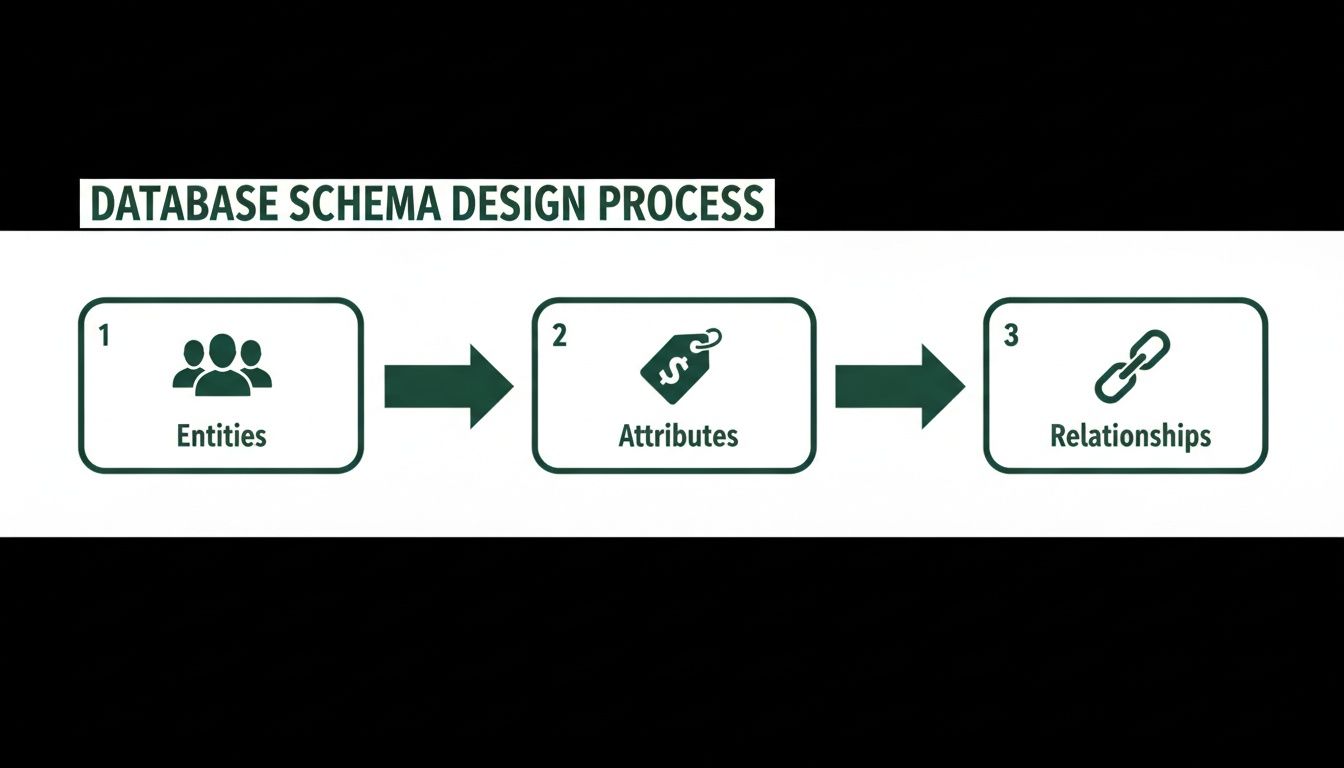
This visual shows the core logic: first, identify your main business concepts (Entities), then define their specific details (Attributes), and finally, establish the connections between them (Relationships).
Phase Two: Executing the Transfer
Once your source data is pristine, it’s time to actually move it. This is not a manual copy-paste job. We're talking about writing simple scripts (usually in Python or JavaScript) that read data from your no-code tool's API and insert it into your new PostgreSQL tables.
This is where all that schema design work pays off. Your script will map old fields to new columns, transforming data as it goes. For instance, a "Status" field that was just a text string in Airtable ('Active', 'Inactive') might become a more efficient boolean (true, false) in your new PostgreSQL table.
Pro Tip: Never, ever, ever run your first migration on live, production data. Always perform a full "dry run" using a staging server—a complete, isolated copy of your production environment. This is your playground to find and fix all the bugs in your scripts without affecting a single real user.
A dry run will immediately reveal the hidden issues you missed, like API rate limits from your no-code tool or subtle data type mismatches. Honestly, you should expect to do several dry runs before you’re confident enough for the real thing.
Phase Three: Validation and the Final Cutover
After your migration script finishes, how do you know it actually worked? You validate. This final phase is all about running a series of checks to confirm data integrity. Don't skip this.
Here’s a simple validation checklist:
- Row Counts: Does the number of rows in your new PostgreSQL
userstable exactly match the number of users in Airtable? Do this for every single table. - Spot Checks: Manually pull up a few specific records (like your own user account) in both the old and new systems. Do all the fields match perfectly?
- Relationship Integrity: Run some SQL queries to check that relationships are intact. For example, verify that a specific order is correctly linked to the right customer and all the right products.
Only after these checks pass with 100% accuracy are you ready for the final cutover. This usually involves putting your application into a brief maintenance mode, running the final migration script one last time, and then pointing your application to the new PostgreSQL database.
The result? A seamless transition with zero data loss and minimal downtime for your users.
Unlocking Speed with Smart Database Indexing
A perfectly designed database schema is a fantastic start, but a well-indexed one is what makes your app feel fast. Once your database is built, performance is the next frontier.
Think of an index like the index in the back of a textbook. Instead of flipping through every single page to find a topic, you go straight to the index, find the term, and get the exact page number instantly.
A database index works the same way. Without one, when you ask your database to find a user by their email, it has to perform a "full table scan." It literally reads every single row, one by one, until it finds a match. For a small table of 100 users, that's fine. For a table with 100,000 users, it’s a performance disaster that brings your app to a grinding halt.
Identifying Your High-Traffic Columns
The key is to be strategic. You don't just add indexes to every column. That would be like creating a separate index for every single word in a book—it would make the book enormous and actually slow things down.
Instead, you need to pinpoint the columns your app will use most frequently for lookups.
Think about how your app actually works. Which pieces of information are constantly used to find things?
- Primary Keys: These are automatically indexed. Your
user_idorproduct_idis already optimized for fast retrieval. No action needed here. - Foreign Keys: Columns that link tables, like the
customer_idin yourOrderstable, are prime candidates for indexing. These are the joints of your database. - Commonly Queried Fields: What do users search for? What fields do you filter by in your admin dashboard? User emails, usernames, and product SKUs are classic examples of columns that benefit immensely from an index.
By creating an index on the email column, for instance, you're giving the database a pre-sorted, lightning-fast reference list. A lookup that once took seconds now takes milliseconds.
The difference an index makes isn't a minor tweak; it's often a 100x to 1000x performance improvement for specific queries. This is the low-hanging fruit of database optimization and the first place any developer will look when your app feels slow.
The Real-World Impact of Indexing
Let's look at a simple, practical example. You want to find a user with a specific email address.
Without an Index:
SELECT * FROM users WHERE email = 'jane.doe@example.com';
PostgreSQL has to read the entire users table, row by row. If you have a million users, this query could take several seconds, locking up resources and making your user stare at a loading spinner. Not great.
With an Index:
First, a developer would run a simple command to add the index:
CREATE INDEX idx_users_email ON users(email);
Now, that same lookup query becomes almost instantaneous. The database uses the highly optimized index to find the exact location of that user's data without scanning the whole table.
This single change can dramatically improve user experience. Investors often hesitate at a startup's black-box IP on platforms like Bubble, but owning your backend is key, especially as the database market is projected to grow to over $400M by 2033.
Migrating to PostgreSQL can deliver 5x query speed gains on its own, but poor indexing—the cause of 50% of slowdowns—can completely wipe out those benefits. PostgreSQL's advanced data handling capabilities make it a modern choice for building scalable, defensible tech. Get more insights into the growing database market to understand the strategic value.
Understanding the Trade-Offs
So why not just index everything? Because there's a cost.
While indexes make reading data (SELECT queries) incredibly fast, they slightly slow down writing data (INSERT, UPDATE, DELETE).
Every time you add a new user, the database has to write the user's data to the users table and update the index on the email column. This extra step adds a tiny bit of overhead.
For most applications, this trade-off is a no-brainer. You almost always read data far more often than you write it. The massive speed boost for lookups is well worth the fractional slowdown for writes. Your job as a founder is to understand this balance so you can have a productive conversation with your developer about which columns are worth indexing for maximum impact.
Your Data is Your Most Valuable Asset. Now, Protect It.

Now that your data is migrated, the real work begins. A production database isn't just a container for information; it’s a vault. Thinking about security and backups from day one is completely non-negotiable.
This isn’t about becoming a cybersecurity expert overnight. It's about putting practical, layered defenses in place to protect your users, stay compliant, and have a clear recovery plan when—not if—things go sideways.
Lock the Doors: Foundational Database Security
Most database breaches aren’t sophisticated hacks you see in movies. They're the result of basic, preventable oversights. Your first job is to lock the digital doors and windows that attackers love to find open.
Here are the absolute must-haves:
- Never, Ever Hard-Code Credentials: Your database username and password should never be written directly into your application's code. Use environment variables instead. These are secure placeholders loaded by the server when your app starts, preventing your keys from being accidentally leaked in your codebase.
- Implement Role-Based Access Control (RBAC): Your application doesn’t need god-mode access to the database. Create specific roles with the bare minimum permissions they need to function. For example, a "webapp_role" might only need to read and write customer data, but should be forbidden from deleting tables. This "principle of least privilege" dramatically limits the blast radius if a single part of your system is ever compromised.
- Encrypt Everything: Data needs protection both when it's moving and when it's sitting still. Encryption in transit (using SSL/TLS) secures data traveling between your app and the database. Encryption at rest protects the actual data files on the server's disk. Most managed providers like AWS RDS or Heroku Postgres make enabling both as easy as checking a box.
Building a secure database isn't just a technical task—it's a critical business function. For founders, integrating modern security from day one is essential for building a defensible asset and establishing trust with both customers and investors.
Have a Plan B: Your Backup Strategy
Data loss can happen for countless reasons—hardware failure, a clumsy engineer, a malicious attack. Without a solid backup plan, a single incident could be an extinction-level event for your business.
A robust strategy isn’t just about having a backup; it’s about having the right kind of backups on a schedule that makes sense for your business.
You'll be dealing with two primary methods:
- Full Backups: This is exactly what it sounds like—a complete copy of your entire database. It’s simple and comprehensive, but also slow and storage-hungry. Running one every five minutes is completely impractical.
- Incremental Backups: These only save the changes made since the last backup. They are much faster and smaller, allowing you to take snapshots of your data far more frequently.
The most effective strategy combines both. You might schedule a full backup once a day (usually during off-peak hours) and then run incremental backups every hour. This approach gives you a fantastic balance, ensuring you can restore your database to a very recent state without the massive overhead of constant full backups.
How often should you back up? It depends on your tolerance for data loss. For a high-transaction e-commerce site, losing an hour of orders could be a disaster. For a simple blog, a daily backup might be perfectly fine.
The database market is projected to hit USD 248.19 billion by 2034, highlighting just how valuable this data is. By moving to a secure, professionally managed backend, you can push your application's uptime to 99.9%. More importantly, getting security and backups right from the start helps you comply with regulations like GDPR and CCPA, avoiding fines that can reach a staggering 4% of global revenue. Find out more about the database management systems market trends and you'll see why this is a crucial investment.
Preparing a Seamless Handover to Your Developer
You've done the hard part—translating your business into a logical data structure. Now it’s time to bring in your technical partner to pour the concrete and build the real thing. This handover is a critical moment. Get it right, and you set a collaborative, efficient tone for the entire project.
A well-prepared package isn't just about being organized; it's your first major step in de-risking the project. It slashes ambiguity, drastically cuts down on back-and-forth, and prevents those costly "Oh, I thought you meant..." moments down the line. It signals you're a prepared founder and lets your developer hit the ground running with confidence.
Creating the Essential Handover Documents
Think of this as your project's briefing book. Your developer shouldn't have to spend the first week trying to decode how your business operates. The goal is to give them a package so complete that it answers questions they haven't even thought to ask yet.
Here’s what every solid handover package needs:
- The Finalized Schema Map: This is your visual blueprint. The diagram you built showing every table, column, and the relationships tying them all together. It's the single source of truth for the database architecture.
- A Comprehensive Data Dictionary: This is where you add the color and context. For every single column in your schema, you need to explain its purpose, data type (text, number, boolean, etc.), and any specific rules. For a
statuscolumn in anOrderstable, your dictionary would specify the only allowed values, like'pending','shipped', or'cancelled'. - Clear User Stories: These are crucial because they explain why the data exists. A simple story like, "As a user, I need to update my shipping address on the profile page, which should change the
addressandzip_codefields in thecustomerstable," connects the abstract schema to a real-world action.
A detailed handover package is your best insurance against scope creep. When a developer can see not just what to build but why, the final product aligns much more closely with your vision.
Documenting Your Business Logic
Beyond the structure of the data, you need to spell out the unwritten rules of your business. These are the processes and sequences of events that are second nature to you but totally new to your developer.
For instance, what really happens when a user cancels an order? You can't just say "cancel the order." You need to provide the exact sequence of events, almost like a recipe:
- First, the
statusin theOrderstable must change from'processing'to'cancelled'. - Then, the
stock_quantityfor each product in that order must be increased by the amount ordered. - Finally, a refund must be initiated by calling the Stripe API with the original transaction ID.
This level of detail is the difference between a simple data store and the intelligent engine that actually runs your application. It’s how you guarantee the transition from your no-code prototype to robust, custom software is a massive success.
A Few Common Questions
If you’re thinking about making the leap from no-code, you’re probably wrestling with a few key questions. We hear the same ones from founders all the time, so let’s tackle them head-on.
When Is It Really Time To Ditch Airtable for PostgreSQL?
You’ll feel it before you can prove it with data. The tipping point isn't a specific number; it's the friction.
It’s when your app starts to feel sluggish, when you’re constantly bumping up against Airtable’s API rate limits, or when your Zapier and Make bills start to look like a payroll expense.
If you’re trying to build complex queries that feel like you're fighting the tool, or if the thought of your user base doubling keeps you up at night, that’s your sign. It’s time to start planning the move to a real database.
Can I Just Build The Database Myself?
Short answer: No.
Longer, more helpful answer: You, as the founder, should absolutely own the design of the database schema and business logic—that’s what this guide is all about. You know the business better than anyone.
But the actual hands-on-keyboard work of implementing, securing, and maintaining a production-grade PostgreSQL database is a specialized engineering skill. Your job is the architect; you need a technical partner to be the builder.
Trying to manage a live database without a deep technical background is a recipe for security holes, data loss, and performance nightmares that could sink your business. For more on this, feel free to check out other articles on our startup tech blog.
The single biggest mistake we see is founders trying to copy-paste their messy Airtable base structure directly into a SQL database. This just builds a slower, more expensive Airtable. Taking the time to properly design clean, logical relationships from scratch will save you from a mountain of technical debt down the road.
Getting that initial schema right is the most valuable thing a founder can bring to the table.
At First Radicle, we turn fragile no-code MVPs into scalable, production-grade software in about six weeks. If you’re ready to build a real backend that can handle your growth, let's talk. https://www.firstradicle.com