
How to Clone Websites From MVP to Production-Ready App
When someone talks about "cloning a website," they could mean a few different things. It might be a simple visual copy—a static scrape of the front-end—or it could be a full-blown re-implementation of the site's backend logic, database, and all.
For a startup founder, this process is often a crucial strategic move. It's how you migrate a successful prototype, often built on a no-code platform, onto a scalable, ownable tech stack. Think of it as graduating from a fragile Minimum Viable Product (MVP) to a true production-grade asset.
Why Founders Rebuild Websites From No-Code Platforms
When founders are looking to clone a website, they aren't usually trying to rip off a competitor. Far more often, it's a mission-critical escape plan. They're trying to break free from the very no-code platform that helped them get off the ground in the first place.
Don't get me wrong, tools like Bubble, Webflow, and Replit are brilliant for building an MVP and finding product-market fit. But what happens when you actually succeed?
The very success that validates your business idea often shatters the tool that built it. Suddenly, your user base explodes, and the platform's performance starts to buckle under the pressure. The brittle automations you pieced together with Zapier and Airtable start to fail, creating a cascade of errors that erodes user trust.
This nightmare scenario is more common than you'd think. Imagine launching, seeing users flood in, and then watching your site grind to a halt when traffic spikes. Founders who take the leap and rebuild on a custom stack can dodge the staggering 53% bounce rate that comes from pages loading in more than three seconds. A specialist agency can often migrate a project to a robust stack like React/Next.js and PostgreSQL in as little as six weeks, slashing operational costs and guaranteeing reliability.
To give you a clearer picture, here's a quick rundown of the common methods we'll be covering.
Website Cloning Methods At a Glance
| Cloning Method | Best For | Complexity | Outcome |
|---|---|---|---|
Static Site Scrapers (e.g., HTTrack, wget) |
Capturing simple, non-interactive sites; archiving; offline viewing. | Low | A static HTML/CSS/JS copy. No backend functionality. |
| Manual Copy (View Source) | Grabbing specific visual elements or simple page structures. | Low | Isolated code snippets. Not a functional site clone. |
| No-Code Rebuild (e.g., Webflow, Framer) | Recreating a simple site on a new no-code platform for easier management. | Medium | A new, editable site on a different platform. Still has platform limitations. |
| Full Re-Implementation (Custom Code) | Migrating a successful MVP to a scalable, ownable tech stack. | High | A production-grade, fully functional application with a custom backend. |
Now, let's dig into why moving beyond no-code becomes so essential.
The Scaling Ceiling of No-Code Tools
No-code platforms offer incredible speed out of the gate, but they all come with a built-in "scaling ceiling." This isn't just about raw performance—it's about control, cost, and ultimately, ownership.
- Unsustainable Costs: As you grow, that patchwork of third-party tools like Zapier and Airtable becomes a serious financial drain. Every "zap" and API call adds up, turning your operational budget into an unpredictable monster.
- Brittle Infrastructure: Your core business logic ends up scattered across multiple subscription services. If one of them has an outage or pushes a breaking API change, your entire application can fall apart. This creates a house of cards that's a nightmare to debug and maintain.
- Lack of Ownable IP: When you build on someone else's platform, you don't truly own your technology. This is a massive red flag for venture capitalists, who want to invest in defensible, proprietary assets—not in a company that's just renting its core infrastructure.
The moment you start prepping for a funding round, your tech stack goes under a microscope. Investors need to see a clear path to scale, and a subscription-based platform where you don't own the underlying code is often a deal-breaker.
From Prototype to Production-Grade Asset
The decision to clone your no-code site is a strategic pivot. You're moving from a temporary prototype to a permanent, valuable asset. You're taking back control.
By rebuilding on a modern stack like React, Next.js, and PostgreSQL, you gain complete ownership of your intellectual property. This isn't just a technical upgrade; it's a business evolution.
You shift from being dependent on external platforms to standing on a foundation you command. You can fine-tune performance, build custom features without hitting a wall, and secure your application properly. Better yet, a custom stack makes it much easier to turn your site into an app, opening up powerful new channels for growth and user engagement.
Ultimately, rebuilding your successful MVP is one of the smartest investments you can make in your company's future. It's the step you have to take to ensure your technology can support your ambition, attract serious investment, and deliver a rock-solid experience as you grow.
Quick & Dirty: Cloning Static Sites with Simple Scrapes
Sometimes, a full-scale rebuild is overkill. If all you need is a site's front-end visuals—its HTML, CSS, and images—then a simple "scrape" is the fastest way to get it. Think of it like taking a high-resolution photograph of a building's facade. You capture what it looks like perfectly, but you don't get any of the internal wiring, plumbing, or structural supports.
This approach is perfect for legitimate use cases. Maybe you're archiving your own portfolio before a major redesign, saving a research site for offline analysis, or just trying to understand the basic structure of a site for educational purposes. It's a fantastic starting point for a design teardown.
What you're getting is a static snapshot: the rendered HTML, CSS, JavaScript files, and assets like images. What you're not getting is anything that makes a site dynamic—no databases, no server-side logic, no user accounts.
Using HTTrack for a User-Friendly Scrape
If you're not a command-line wizard, HTTrack is your best friend. It’s a free, open-source tool with a simple graphical interface that’s been a go-to for years. It walks you through the process of downloading an entire website to a local folder.
Getting started is easy:
- Fire it up and start a new project, giving it a name and picking a spot on your hard drive to save the files.
- Paste in the full URL of the website you want to copy.
- Tweak the settings. HTTrack gives you control over scan rules and download depth, so you can decide how much of the site you actually want to grab.
Once you hit go, HTTrack does its thing, mirroring the site structure and neatly rewriting all the internal links so you can browse the entire cloned site offline without a hitch.
A Quick Word of Caution: Always be mindful of a site's
robots.txtfile. This is the site owner's way of telling crawlers which areas are off-limits. While you can often configure tools to ignore these rules, it's good practice—and good etiquette—to respect them. It also keeps you from hammering someone's server with unwanted requests.
wget: For Those Who Prefer the Command Line
If you live in the terminal, you already know the power of wget. It's a command-line utility that comes standard on most Linux and macOS systems, and it gives you surgical precision over the cloning process.
A battle-tested command for mirroring a site looks something like this:
wget --mirror --convert-links --adjust-extension --page-requisites --no-parent https://example.com
It looks a bit intimidating, but each flag has a clear purpose:
--mirror: This is the workhorse. It’s shorthand for a bunch of options that turn on recursive downloading for the whole site.--convert-links: Once everything is downloaded, this handy flag adjusts all the links in the HTML files to point to your local copies instead of the live website.--adjust-extension: Adds the right file extensions (like.html) where they might be missing.--page-requisites: Makes surewgetgrabs all the necessary bits to display a page correctly, like CSS files, images, and fonts.--no-parent: This is a crucial one. It keepswgetfrom wandering outside the directory you specified, so you don't accidentally start downloading the entire internet.
With one line, you can pull down a complete static version of a site, perfectly organized in a local folder that mirrors the original.
The Hard Limits of Static Scraping
Scraping is a useful trick to have up your sleeve, but it’s vital to understand its limitations. You're getting the "skin" of the website, but none of its "bones" or "brain."
Here’s a clear breakdown of what you absolutely cannot get with a static scrape:
- Server-Side Smarts: Any logic that runs on the server is gone. This means user logins, contact form submissions, search functions, and e-commerce checkouts simply won't work.
- The Database: All the rich content stored in a database—user profiles, product inventories, blog posts—is inaccessible. You only get the HTML that was spit out at the moment you ran the scrape.
- APIs & Integrations: Any connections to third-party services, like a payment processor or a social media feed, will be completely broken.
A static scrape is a starting point, not a final destination. It’s an excellent tool for archival and analysis, but if you need to replicate the interactive, data-driven experience of a modern web application, you'll have to go deeper. For that, it’s time to move on from scraping and into a full re-implementation.
Rebuilding Your Foundation for True Scalability
When a simple static scrape just won't cut it, you're entering the big leagues. This isn't about simply copying a website; it’s about a strategic re-implementation of your app's core functionality onto a modern tech stack that you own, end to end.
This is a classic founder's journey. Your no-code MVP, maybe built on Bubble, finds fantastic product-market fit. But then the growing pains start. Users flood in, your Airtable bases creak under the strain, and those Zapier bills start looking terrifying. Suddenly, you're not scaling—you're firefighting.
The data backs this up. With 71% of businesses needing a solid digital presence, the web development market is set to explode from $76.3 billion in 2025 to over $165 billion by 2035. This boom is driven by powerful frameworks like React, a favorite of over 40% of developers, which signals a major industry shift toward full-stack ownership. You can dig deeper into these trends over at NXTWAD.com.
A complete rebuild is your ticket out of these limitations. It lets you build a foundation that can actually handle viral growth and attract serious investor attention.
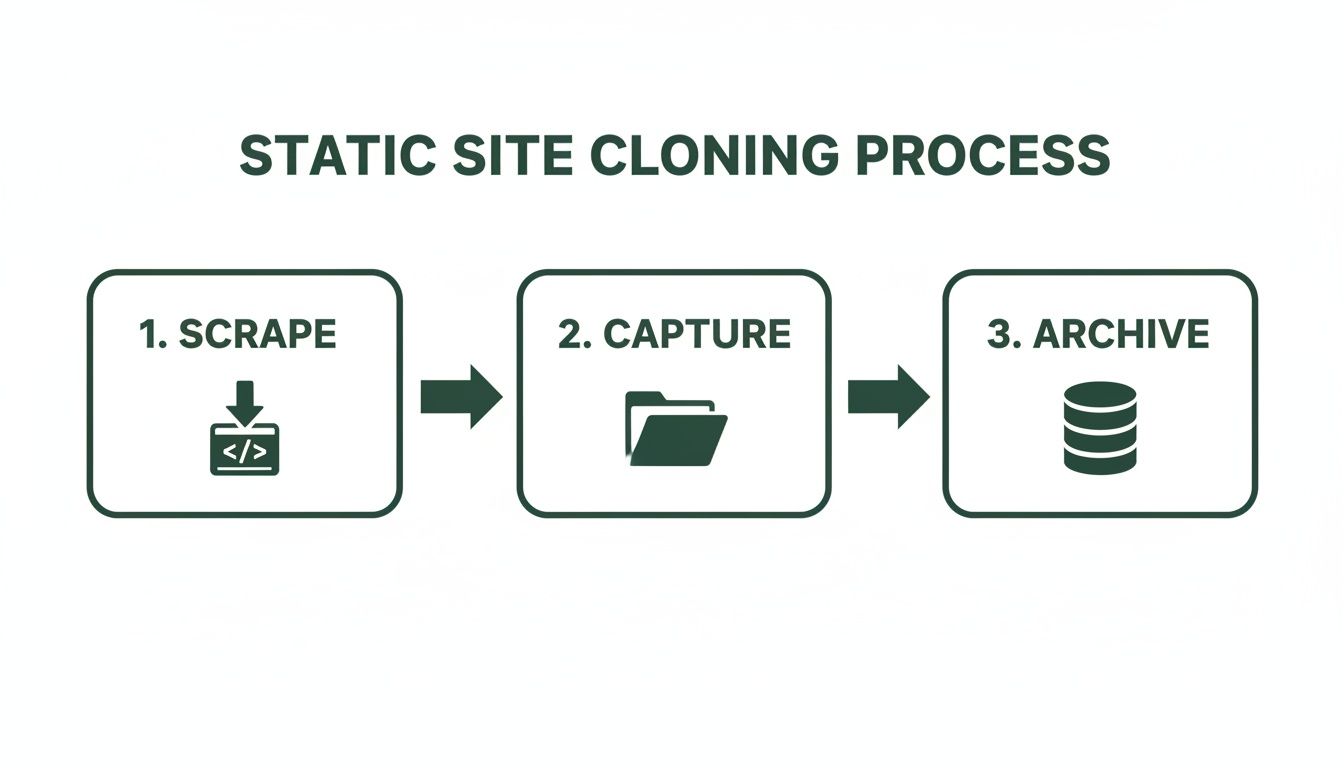
While a static scrape is a straightforward process, as shown above, it only captures the surface. A genuine rebuild means getting your hands dirty with the architecture underneath.
Deconstructing Your No-Code App
First things first: you need to perform an architectural deep dive. Before a single line of code gets written, you have to map out exactly what your current application does and, more importantly, how it does it. This goes way beyond listing features; it’s about understanding the data relationships and business logic that make it all tick.
Start by meticulously documenting your data schema. If you're on Airtable or using Bubble's internal database, that means getting granular:
- Data Tables: What are your core objects? Think Users, Projects, Invoices, etc.
- Field Types: What kind of information is in each table? Is it text, a number, a date, a file upload?
- Relationships: How do these tables connect? For instance, does one User have many Projects?
This mapping exercise becomes the literal blueprint for your new, far more scalable database. It’s an absolutely critical step to ensure no functionality gets left behind in the transition.
Designing a Scalable Database Architecture
With your data map complete, you can start designing a backend that's built to last. This is where you swap the inherent constraints of a no-code database for the raw power and flexibility of a true relational database like PostgreSQL.
A properly designed PostgreSQL schema gives you advantages you just can't get from a spreadsheet-style database:
- Data Integrity: You can enforce strict rules to keep your data clean, consistent, and reliable.
- Performance: Run complex queries across millions of records without breaking a sweat.
- Scalability: Grow your database without ever worrying about the arbitrary limits imposed by a no-code platform.
This is also the point where you'll plan out your backend logic, often with a versatile language like Python. You'll be designing API endpoints to handle everything from user authentication to complex business operations, finally replacing that fragile web of Zaps with clean, efficient, and maintainable code.
A common pitfall is trying to replicate the no-code structure one-for-one. Resist that urge. Use this as a chance to optimize. Ask yourself, "What's the right way to structure this data for the long haul?" That mindset shift is what separates a good rebuild from a great one.
Building Modular UI Components with React
Once the backend architecture is locked in, your focus can shift to the frontend. The goal here is to rebuild the user interface using a modern framework like React or Next.js. The secret sauce is thinking in terms of modular components.
Instead of building monolithic pages, you deconstruct the UI into small, reusable building blocks—a button, a user profile card, a data table. This component-based approach pays massive dividends:
- Consistency: That button component will look and behave identically no matter where you use it.
- Efficiency: You build a component once and can reuse it across the entire application.
- Maintainability: Need to update your branding? Change the component in one file, and the update propagates everywhere instantly.
This is a world away from many no-code editors, where a simple site-wide change might mean manually editing dozens of individual pages. If you're looking to turn your designs into a living, breathing application, our guide on the web design to code process offers a deep dive into bridging that gap.
Ultimately, by investing in this kind of strategic rebuild, you’re not just cloning a website—you're building a fortress. You secure 100% IP ownership, create a stable and secure platform for your users, and unlock the freedom to add any feature you can dream of, without ever being held back by a third-party platform again.
Managing Data Migration and Asset Handling

Okay, so you’ve rebuilt the site's foundation. You have a powerful, but totally empty, shell. All the stuff that actually makes your application valuable—the user data, the content, the history—is still stuck in your no-code platform. This next part, data migration, is where your clone truly comes to life.
The mission here is to carefully pull data out from sources like Bubble’s internal database or an Airtable base and move it into a solid, scalable PostgreSQL database. This is a delicate operation. One wrong move can lead to data loss or corruption, so precision is key to making sure everything works smoothly after the switch.
Tackling Data Cleaning and Transformation
Exporting from a no-code tool is almost never a clean, one-to-one transfer. You're going to find a mess. Think inconsistent formatting, duplicate entries, and data types that just don't play nice with your new, structured database schema.
This is where the real work begins. Before you import a single row, you need a strategy for cleaning and transforming that data. This means hunting down and fixing all the errors in the source files. For instance, a "status" field in Airtable might have entries like "Active," "active," and "ACTIVE." Your new system needs them all standardized to a single format.
The most common migration mistake is underestimating the cleanup. Seriously, assume your no-code data is messy. Dedicating time to sanitizing it upfront prevents a massive headache of corrupted records and broken functionality post-launch.
Automating the Migration with Python
Trying to migrate thousands of records by hand? Don't. It's not just mind-numbingly tedious; it's a recipe for errors. This is the perfect job for a script. Using Python and a couple of powerhouse libraries, you can build a repeatable process to handle the whole thing.
- Pandas: This library is a beast for data manipulation. You can load your exported CSV from Airtable into a DataFrame, which makes it incredibly easy to clean, filter, and reshape columns to match your new database schema.
- SQLAlchemy: Think of this as the bridge between your Python script and your PostgreSQL database. It lets you connect programmatically and push the cleaned data from your Pandas DataFrame straight into the right tables.
The beauty of a scripted approach is that it’s repeatable. You can run it over and over during testing, making sure the migration is flawless before you do the final transfer on launch day. If you're building from the ground up, our guide offers a great walkthrough on how to build a database that's ready for this kind of professional workflow.
Managing User-Uploaded Assets
Your data isn't just text. It’s also all the files your users have uploaded—profile pictures, project documents, you name it. These assets are often sitting on your no-code platform’s proprietary file storage, and leaving them there isn't an option. You’d still be chained to the old service.
The goal is to get all those files over to a scalable, independent cloud storage solution. Amazon Web Services (AWS) S3 is the go-to for this. It’s built for high availability and durability, so you can be confident your users' files are safe and always accessible.
The asset migration process usually looks something like this:
- First, you’ll need to export a list of all the file URLs from your old platform.
- Next, write a script that loops through that list, downloads each file, and then uploads it to your new S3 bucket.
- Finally, you have to update your database records with the new S3 URLs for each file. This is critical—it’s how your new application knows where to find them.
By carefully moving both your structured data and all those unstructured file assets, you complete the final, most crucial step of the clone. You’ve not only replicated the functionality but you’ve successfully liberated your most valuable asset: your data. Your new application now has a complete and accurate history, ready to go from day one.
Getting From Code to a Live Website: Testing, Deployment, and Beyond
Building your cloned site is a huge step, but getting it live and keeping it running is what separates a hobby project from a professional-grade application. This final push—covering testing, deployment, and what comes after launch—is where you really earn your stripes. It’s how you turn a folder of code on your local machine into a real, reliable website that people can actually use.
It all starts with testing. And no, I don't just mean clicking a few links to see if they work. A proper workflow needs both automated tests for the backend and meticulous, hands-on quality assurance (QA). Think of automated tests as your 24/7 security guard, constantly checking that core functions like user logins or payment gateways haven't broken with the latest code changes.
At the same time, manual QA is all about the human experience. Real people need to go through every possible user path, from signing up for a newsletter to checking out, making sure everything feels right, looks right, and works perfectly on Chrome, Safari, Firefox, and on both a phone and a desktop.
Why You Can’t Skip a Staging Environment
Before your site ever goes public, it needs a dress rehearsal. That’s what a staging environment is for. It's an exact, private copy of your live server setup—a perfect sandbox for final checks. This is non-negotiable for any serious project.
This is where you’ll catch those annoying bugs that somehow only show up in a real server environment. It's your chance to do a full-scale data migration practice run, ensuring everything will move over smoothly when it's go-time. Consider the staging server your final quality gate before launch.
Pushing From Staging to a Live Site
Once your site has passed every test on staging with flying colors, you're ready to deploy. This is the process of pushing your code to a cloud platform like AWS or Vercel and configuring the infrastructure to make it secure, fast, and scalable.
Here's what that usually involves:
- Setting Up the Infrastructure: This means configuring servers, databases, and maybe a load balancer to make sure your site can handle traffic without slowing down.
- Automating Future Deployments (CI/CD): A good setup includes a CI/CD pipeline. This is a system that automatically tests and deploys new code changes, which makes future updates much faster and safer.
- Locking Down Security: You'll need to implement firewalls, install SSL certificates (for that little padlock in the browser), and take other steps to protect your site and your users' data from threats.
Lots of founders start with a no-code MVP using tools like Lovable or v0. It's a great way to get off the ground. But when it's time to talk to investors, a no-code backend can look like a red flag—it suggests a lack of ownable IP and scalability. Making the leap to a custom stack is a critical move in a web development market that’s projected to hit $82.4 billion by 2026. A professional rebuild gives you a clean architecture and can dramatically cut costs by replacing clunky, expensive automations with a custom backend built for 99.9% uptime. You can find more stats on small business websites over on this Wix.com trends report.
After Launch: Monitoring and Making Improvements
Going live isn't the finish line; it's the starting line for the next phase. Now, it's all about keeping the site healthy and using your new, flexible foundation to iterate and improve.
From here on out, your focus shifts to two key activities:
- Monitoring: You'll set up tools to keep an eye on your site’s performance, server health, and any errors users might be seeing. This lets you find and fix problems before they become widespread.
- Maintenance: This is the ongoing work of applying security patches, keeping software up-to-date, and tuning your database to make sure everything stays fast and secure.
With a solid, custom-coded foundation, you’ve basically unlocked a new level of speed and agility. You're not stuck with the limitations of a third-party platform anymore. You can build new features, act on user feedback, and scale up your business, all with the confidence that your tech can keep up.
Your Top Website Cloning Questions, Answered
When it's time to graduate from a no-code MVP to a custom-coded platform, founders always have a ton of questions. It's a big move, and understanding the legal, practical, and strategic angles is crucial before you start. Let's be clear: this isn't about swiping a competitor's site. It’s about taking your own successful project and giving it a scalable foundation for future growth.
Let's dive into the common uncertainties founders run into when planning this critical business move.
Is It Legal to Clone a Website?
This is always the first question, and thankfully, the answer is straightforward. Cloning a website that you own is 100% legal. When you decide to rebuild your Bubble app or Webflow site on a custom stack, you're just re-platforming your own intellectual property. Think of it as moving your business from a rented storefront into a building you own outright.
Now, cloning a competitor's website—copying their unique branding, specific design elements, and copyrighted content—is a different story. That’s a clear violation of copyright and trademark laws, and it's not what we're talking about here. This guide is focused entirely on the legal and ethical migration of your own digital assets to a more powerful, ownable tech stack.
How Long Does a Full Website Rebuild Take?
The timeline really hinges on the complexity of your site. If you're just doing a simple static scrape with a tool like HTTrack, you could be done in minutes. But a full-stack rebuild of a real application with a database, user accounts, and unique business logic? That’s a serious development project.
For a typical startup MVP, a realistic timeframe for a quality rebuild is anywhere from one to three months. That period has to cover everything: discovery, design sprints, development, migrating all your data, and rigorous testing before you go live.
From our experience, we’ve been able to systemize this into a predictable six-week process. A tight schedule like that includes everything from the initial project handover and database schema mapping to weekly dev sprints, data migration, and final deployment. It ensures the whole transition is as smooth and efficient as possible.
Can I Clone a Website Myself Without Technical Skills?
For a basic, static site, you absolutely can. Tools like HTTrack are pretty user-friendly and were built for non-developers, making it simple to download an offline copy.
But a full-stack rebuild is a whole different beast. It demands real expertise in several specialized areas, and you can't just wing it.
- Frontend Frameworks: You need deep knowledge of libraries like React or Next.js to build a modern, fast user interface.
- Backend Development: This involves proficiency in languages like Python or Node.js to create the server-side logic and APIs that power the whole thing.
- Database Management: It takes skill to properly design and manage a robust PostgreSQL database that can scale with your user base.
- Cloud Infrastructure: You need hands-on experience with platforms like AWS or Vercel to deploy the application securely and make sure it stays online.
Honestly, for most non-technical founders, trying to tackle this solo is not just impractical—it's risky. Partnering with a specialized developer or an experienced agency ensures your new platform is built correctly, securely, and is truly ready to handle whatever growth you throw at it.
Ready to move your successful MVP from a fragile no-code platform to a scalable, production-grade asset? First Radicle specializes in turning no-code projects into robust software in just six weeks, guaranteed. Learn more about our process and secure your startup’s future.