
How to Use Git for Version Control A Founder's Guide

Think of Git as the ultimate "undo" button for your entire project, but with superpowers. At its core, Git is a version control system that meticulously tracks every change made to your code over time. It saves these changes as snapshots called "commits."
This system is your safety net. It lets you rewind to any previous version if something breaks, safely experiment with new ideas in isolated "branches," and collaborate with a team without stepping on each other's toes. For any serious software project, it's non-negotiable.
Why Git Is Your Project’s Most Valuable Asset

If you're graduating from a no-code platform like Bubble or Airtable, you're doing more than just writing code—you're building a valuable, defensible asset. Git is what turns that promising MVP into a piece of professional, investor-ready software. It's the end of "final_v2_really_final.zip" and the beginning of a structured, auditable system.
This move is fundamentally about protecting your intellectual property. Your project's entire evolution—every decision, every feature, every bug fix—is meticulously logged in a private repository on a platform like GitHub. This clean, transparent history is precisely what technical auditors and potential investors want to see during due diligence.
Git Is More Than Just a Backup System
Many founders first mistake Git for a fancy backup tool. While it does that exceptionally well, its true magic lies in enabling parallel development.
Imagine one developer is building a complex payment integration while another is scrambling to fix a critical login bug. Without Git, this is a recipe for chaos, with a high risk of someone's work getting accidentally overwritten.
With Git, each developer works on their own branch—think of it as a separate timeline. They can build, test, and break things without ever touching the stable, live version of your application. This structure is what lets your team move faster and with far less risk.
Git completely changes how teams build software. It replaces a fragile, linear process with a structured environment where multiple people can work on different things at the same time without breaking the core product. This is absolutely critical for keeping up momentum as you grow.
For those just getting started, the terminology can feel a bit like a foreign language. This table should help clear things up.
Essential Git Terms for Founders
| Git Term | What It Means for Your Project |
|---|---|
| Repository (Repo) | Your project's main folder, containing all your code and its entire history. |
| Commit | A "save point." It's a snapshot of your files at a specific moment in time. |
| Branch | An independent line of development, letting you work on new features without disrupting the main codebase. |
| Merge | The act of combining changes from one branch into another (e.g., merging a new feature into the main code). |
| Pull Request (PR) | A request to merge your branch into another. This is where code review and team discussion happen. |
| Remote (e.g., GitHub) | A shared, central version of your repository hosted online where everyone on the team can sync their work. |
Think of these terms as the basic vocabulary you'll need to understand how your technical team operates and to have productive conversations about your product's development.
A Standard That Speaks Volumes
Adopting Git isn't just a technical upgrade; it's a powerful signal to the market. It shows you're building a serious technology company, not just a hobby project.
The industry has spoken loud and clear. Back in 2016, a survey showed 87.1% of developers already preferred Git. That number has only grown, hitting 93.87% by 2025. For a founder, this means access to a massive talent pool and faster onboarding for new hires who already live and breathe this system.
This isn't just about good habits; it's about business efficiency. At First Radicle, where we help founders turn fragile automations into robust backends, Git's disciplined workflows are essential for hitting tight deadlines and ensuring quality. Having a clear, auditable history makes your technology a well-documented and transferable asset, which is exactly what you need for long-term success. It’s also crucial to understand software architecture best practices as you make this transition.
From Local Setup to First Commit
Alright, this is where the theory stops and the real work begins. We're about to take the abstract idea of version control and make it a concrete part of your project. We'll go from an empty folder to your very first commit, which is basically a permanent, foundational snapshot of your project's starting point. Don't worry if you've never touched a command line before; this is more straightforward than it sounds.
First things first, you need Git on your computer. This part is easy. Just head over to the official Git website and grab the installer for your operating system. The installation is a simple "next, next, finish" process. The default settings are perfectly fine for what we're doing, so you don't need to tweak anything.
Creating Your First Repository
Now that Git is installed, you can create your first local repository (or "repo," as you'll hear it called). A repo is just a fancy name for the project folder where Git will keep an eye on every change you make.
If you're coming from a no-code background, a great way to start is by exporting your database schema or maybe some user flow diagrams. Create a new folder for your project and drop those files inside.
Next, open your terminal (or command prompt on Windows) and navigate into that new project folder. Once you're in the right directory, type this one simple command:
git init
That's it. This command tells Git to start tracking everything that happens in this folder. It creates a hidden sub-folder called .git, which is where all the magic—the entire version history—will be stored. Your project is now officially a Git repository.
Making Your First Commit
So, Git is now watching the folder, but it doesn't automatically track every file. You have to tell it which files are important. Let's say you have a file named database_schema.json. To get it ready for its first save, you'll use the add command:
git add database_schema.json
This command moves the file to what's called the "staging area." Think of it as a waiting room for all the changes you want to bundle into your next snapshot. You can add as many files as you need to this area.
Once you've staged all the files for this snapshot, you make it official with the commit command. Committing saves the staged files to your project's permanent history. Every commit needs a descriptive message to go with it.
git commit -m "Initial commit: Add no-code database schema export"
Getting into the habit of writing clear, descriptive commit messages is non-negotiable. It's like leaving a breadcrumb trail for yourself and others. This message explains why you made the change, and trust me, your future self—not to mention future developers or even investors—will thank you for it.
And there you have it. Your first commit is now locked in. You've created a permanent, timestamped snapshot of your project's birth. This is the very first entry in what will become a complete, auditable history of your intellectual property. You're officially using Git.
Using Branches to Build and Test New Features Safely
If there's one concept in Git that truly changes the game, it's branching. It’s the secret sauce that lets teams work on a dozen different things at once without stepping on each other's toes.
Think of it like this: your main codebase, often called the main branch, is your pristine, production-ready version. It’s the code that’s live and working. You never touch it directly for new development.
Instead, when someone needs to build something new—let’s say, a user authentication flow—they create a separate branch. They might call it feature/user-auth. This new branch is a perfect snapshot of main at that moment, giving them a completely safe sandbox to play in.
An Isolated Environment for Every Task
Inside the feature/user-auth branch, a developer has total freedom. They can add new files, refactor old code, and even make mistakes without any risk of breaking the core application your users rely on.
This is the cornerstone of how modern software teams function. It’s what allows one developer to work on feature/user-auth while another is tackling feature/payment-gateway. Their work stays completely separate until they are ready to bring it all together.
The process of making changes on a branch follows the same fundamental Git workflow you've already seen.
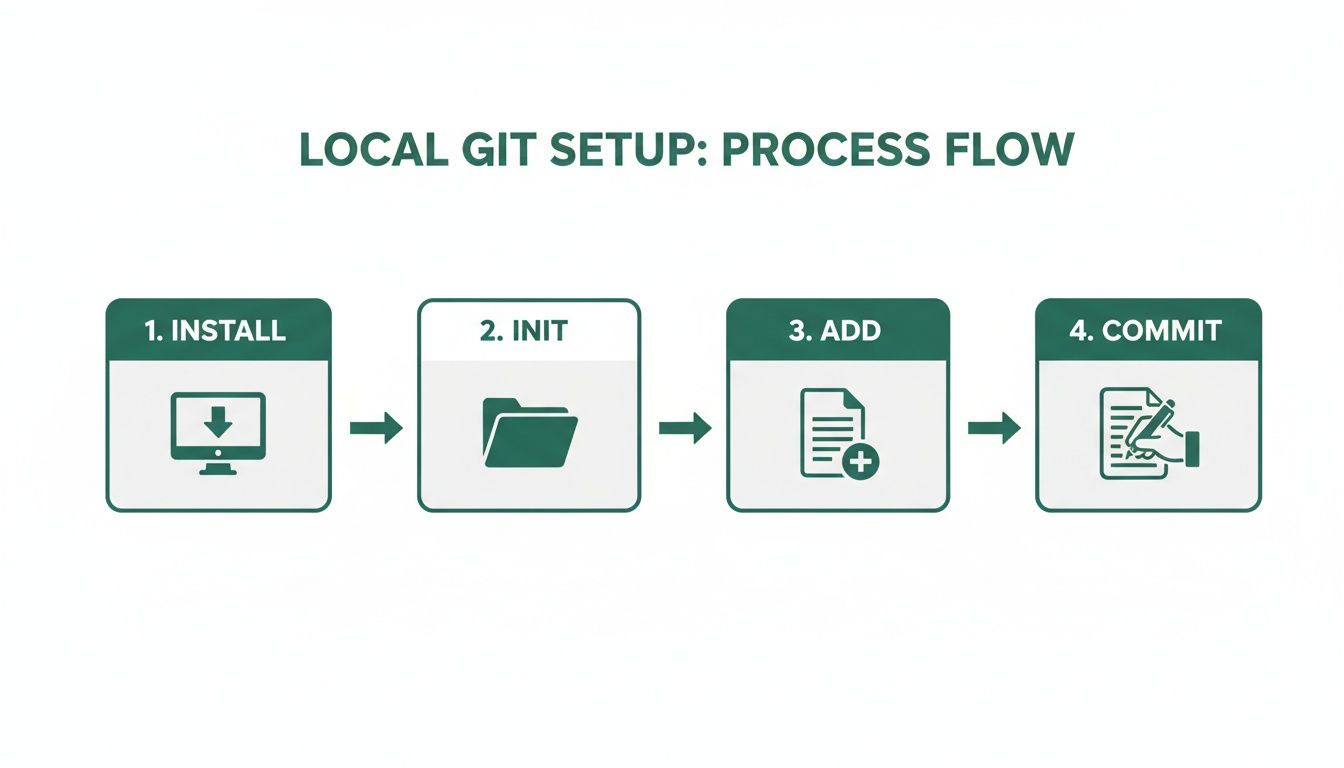
You install Git, initialize a repository, add your files to the staging area, and commit them. Each of these commits builds the history of that specific branch, creating a clear and isolated record of the work being done.
I can't stress this enough: a disciplined branching strategy is what separates professional software development from hobbyist coding. It supports critical business needs, like weekly demos. You can show off progress from a feature branch without ever touching the live production code, creating a reliable and predictable build process for everyone.
Merging Features Back to Main
Okay, so the new feature is built, tested, and everyone on the team has given it the thumbs-up. What now? It’s time to bring that work back into the main project.
This is done through a process called merging. Git is smart about this; it analyzes the changes made in your feature/user-auth branch and carefully integrates them into the main branch. Just like that, your stable codebase is updated with the new functionality.
It’s no surprise that this flexible model is why Git holds 93% of the distributed version control market share in 2024. This workflow is incredibly practical. For instance, a developer might run git checkout -b sprint-week1/data-migration to work on a tricky database schema update. After a few days and a successful demo, they simply git merge it back.
For complex projects, like migrating a no-code app to a full-stack solution, this structured approach has been shown to cut down migration times by as much as 50%. Even non-technical founders benefit, as the branch history provides a clear, visual story of the project's progress. You can dive deeper into the market trends in this Grand View Research report.
This cycle—branch, build, test, and merge—is the heartbeat of a professional development team. It ensures your main branch always represents a stable, tested, and true version of your application. This is how you use Git for version control like a pro.
Collaborating With Your Team Through GitHub
So far, everything we've done has been on your local machine. That’s great for solo work, but real software development is a team sport. This is where a platform like GitHub steps in, serving as the central hub where everyone’s work comes together.
Think of it this way: Git is the tool tracking changes on each person's computer. GitHub is the cloud-based clubhouse where everyone syncs up. Your private GitHub repository becomes the single source of truth for the entire project—the definitive, secure home for your intellectual property.
Pushing Code to the Remote Hub
When a developer finishes a task on their machine and has a clean set of commits, they don't just leave it there. They need to share it. The next step is to "push" their branch from their local computer up to the shared GitHub repository.
Pushing a branch makes it visible to the rest of the team. It doesn't touch the main codebase just yet. Instead, it’s like raising a flag that says, "Hey, I have some new work ready for review." This is the real starting point for collaboration.
The Power of the Pull Request
Once a branch is pushed to GitHub, the magic begins with a Pull Request (you'll hear it called a PR all the time). A Pull Request is exactly what it sounds like: a formal request to "pull" the new changes from a developer's feature branch and merge them into the main main branch.
This is the absolute heart of modern code review. It’s far more than a technical step; it’s a critical communication tool that sparks a conversation around the new code.
A solid Pull Request always includes:
- A Clear Title: A quick summary, like "Add User Authentication with Google SSO."
- A Detailed Description: This explains the what and the why behind the change, often linking back to a specific task or bug report.
- A Link to the Changes: A complete "diff" showing every single line of code that was added, removed, or modified.
As a founder, the Pull Request is your window into the development process. You don't need to understand every line of code. By reading the PR descriptions, you can track progress, ensure the work aligns with your business goals, and participate in the review process at a high level.
Your Role in the Review Process
While your developers will be the ones doing the line-by-line technical review, your input is still incredibly valuable. You can read the PR's description to confirm the new feature does what you asked for. You can even check out a live preview of the changes to test it yourself before it ever gets merged.
Often, you'll be the one to give the final approval. Once the team has reviewed the code and all the automated checks pass, you can give the final nod. The developer then merges the Pull Request, and just like that, the new feature officially becomes part of the main branch. This structured workflow is what ensures quality and keeps everyone on the same page.
For anyone managing this process, knowing how to properly update a GitHub repository is an essential skill in your toolkit.
How Git Powers Automated Workflows and Deployments
Git isn't just a fancy way to save your work; it's the heart of modern, reliable software delivery. When you connect your Git repository to automated services, you can swap out fragile manual steps for a powerful system that catches bugs, ensures quality, and ships new features fast. This is the world of Continuous Integration and Continuous Deployment (CI/CD).
At its core, CI/CD is really just a series of automated workflows—often called pipelines—that kick off based on Git events. The moment a developer pushes code or opens a pull request, a pipeline springs into action, running through a whole checklist of critical tasks without anyone needing to lift a finger.
These pipelines are your safety net, creating a fast yet stable development cycle that protects your live application from unintended consequences.
Building a Quality and Security Gate
Picture this: a developer has a new feature ready for review. As soon as they run git push, the CI/CD pipeline can automatically start a whole battery of tests. This isn't just about finding bugs; it's about creating a comprehensive quality gate that every single change has to pass through.
A typical CI/CD pipeline runs through a few key stages:
- Automated Tests: It runs your entire test suite to confirm the new code works as intended and, just as importantly, doesn’t break anything that was already working.
- Security Scans: The pipeline scans for common vulnerabilities, making sure you aren't accidentally introducing a security hole.
- Performance Checks: It can even analyze the code to check if it's going to slow down your application or gobble up too many resources.
If any of these checks fail, the pipeline stops dead in its tracks. The pull request is blocked from being merged, and the team gets an instant notification. It’s a proactive approach that means problems get found and fixed before they ever have a chance to affect your users.
By automating these essential checks, your team can stop worrying about tedious manual testing and focus on what they do best: building great features. It turns your development process from a high-wire act into a reliable, repeatable system that can grow with your business.
From Code Push to Live Deployment
For founders moving a project into production, integrating Git with CI/CD is a total game-changer. Consider that 73% of GitLab communities use native pipelines, which helps them slash audit times by a massive 40%. For a startup migrating from a no-code MVP, a simple git push origin main after a sprint could trigger tests that verify critical user authentication or payment flows are still solid before a single line of code goes live. This Mordor Intelligence report on the version control market highlights how cloud-hosted repos now manage 62% of projects, underscoring this trend.
This link between version control and automated deployment is foundational for building real, production-grade software. It's also vital for managing other critical pieces, like your database schema. To see how it all connects, you might find our guide on managing database changes with version control helpful. This is the kind of automation and reliability that proves you have a truly scalable tech stack.
Common Questions Founders Have About Git
Stepping from a no-code world into one driven by code naturally brings up questions. That's perfectly normal. Your job isn't to become a developer overnight, but to understand the process well enough to lead your technical team with confidence.
Let's walk through some of the most common things founders ask when they start learning how to use Git for version control.
Do I Really Need to Learn to Code to Use Git?
Nope, not at all. Your developers will live in the command line, but your role is much more about understanding the big picture. You can manage everything you need from a user-friendly platform like GitHub.
Think of your role as the project overseer. You'll focus on:
- Reviewing Pull Requests: You won’t be dissecting the code itself, but you'll read the descriptions to make sure the proposed changes align with your product goals.
- Following Progress: Reading commit messages is like looking at a real-time diary of your project. It’s a transparent log of what your team is building, moment by moment.
- Controlling Access: You'll be the one deciding who can contribute to the codebase, which is crucial for protecting your intellectual property.
What's most valuable for you is grasping the core ideas—what a branch is, what a commit does, and how pull requests work. Forget memorizing commands. This high-level knowledge is what lets you have intelligent conversations with your team and keep a firm hand on the project's direction.
What's the Real Difference Between Git and GitHub?
This is probably the most common question we get, and it's a great one. The two are tightly connected, but they do very different jobs. The easiest analogy? Think of Microsoft Word versus Google Docs.
Git is the software itself—the engine. It lives on each developer's computer and is responsible for tracking every single change made to the code. It's the tool that manages the project's history locally.
GitHub, on the other hand, is the cloud-based home for all those Git projects (or "repositories"). It's the central hub where your team stores the code, collaborates on features, and manages the project as a whole. It adds the teamwork layer on top of Git, with things like pull requests for code reviews, issue trackers for project management, and user permissions for security.
To put it simply: Git is the local tool that tracks changes. GitHub is the online platform where your team's code lives and collaborates. One is the engine; the other is the collaborative hub built around it.
How Exactly Does Git Help When It's Time for a Project Handoff?
Git and GitHub are the bedrock of a professional and seamless project handover. When the development work is done, you're not just handed a zip file full of code. You get the keys to the entire private GitHub repository.
What you're really receiving is a complete, chronological history of every line of code ever written for your application. It’s an irrefutable record of work, documenting everything from the very first file to the final bug fix. A simple command like git log reveals a full audit trail, which is incredibly powerful.
This clean history is a lifeline for any future developers who need to understand the codebase quickly. It's also a massive asset during technical due diligence with potential investors, as it proves you’ve followed a professional, well-documented process. The final transfer is a clean, simple, and verifiable exchange of a high-value digital asset.
At First Radicle, we specialize in turning promising no-code projects into production-grade software. We handle the entire migration, delivering a scalable backend, a modern frontend, and a clean GitHub repository that you own completely, setting you up for long-term growth and investment. Learn more about our guaranteed six-week migration service.