
A Practical Guide to Managing Database Changes for Scalable Apps
So, you've decided to move off a no-code platform like Bubble and onto a powerful, dedicated database like PostgreSQL. That’s a huge step forward for your product. While this move gives you incredible power and scalability, it also introduces a brand new, high-stakes challenge: managing database changes without breaking everything.
Without a rock-solid process, a seemingly simple change can spiral into data corruption, application crashes, and painful downtime. This is where your momentum can seriously stall.
Why You Suddenly Need to Care About Database Change Management
Switching from a no-code tool to a production-grade database is a fundamental shift in how you work with data. On platforms like Bubble or Airtable, you make changes through a friendly user interface. Click a button, add a field, and the platform handles all the messy details behind the scenes.
In a real production environment, that safety net is gone. Every single change—whether you're adding a new column, tweaking a data type, or creating an index—has to be intentional, tracked, and thoroughly tested. This isn't just a nerdy technical detail; it's a critical reliability issue for your business. One bad change pushed at the wrong time can bring your entire application to its knees.
This challenge isn't getting any simpler. The reality is that modern applications often rely on more than one database. In fact, one industry report found that the number of organizations using two or more database platforms shot up from 70% in 2021 to 79% in 2023. This just adds another layer of complexity to how teams need to think about managing their data infrastructure.

The Responsibility Is Now Yours
When you manage your own database, the buck stops with you and your team. The integrity of your data is entirely in your hands. This means you absolutely need a structured workflow that treats your database schema with the same discipline you apply to your application code.
That's what this playbook is all about. We’re going to give you that structure.
To see just how different this new world is, let's compare the old way with the new.
No-Code vs Production Database Change Management
This table gives a quick overview of the shift in mindset and process you'll be making.
| Aspect | No-Code Platforms (e.g., Airtable, Bubble) | Production Databases (e.g., PostgreSQL) |
|---|---|---|
| Change Method | Direct manipulation via a UI. Changes are instant. | Code-based migration scripts (e.g., SQL files). |
| Version Control | Limited or platform-managed. Difficult to track history. | Explicit versioning via migration files in Git. |
| Testing | Manual testing in the UI. No separate test environments. | Automated testing in CI pipelines against staging DBs. |
| Rollbacks | Often manual and difficult. May require restoring backups. | Scripted, automated rollbacks to previous versions. |
| Team Collaboration | Difficult to coordinate. "Last one to save wins." | Structured code review and pull request process. |
| Deployment | Changes are live immediately upon saving. | Controlled, often zero-downtime deployments. |
The takeaway is clear: the casual, on-the-fly approach that works for no-code tools is a recipe for disaster with a production database.
The core principles we'll focus on are simple but powerful:
- Automation: Get rid of manual, error-prone database changes. We'll integrate this process right into your CI/CD pipeline.
- Version Control: Every schema change should be tracked in Git as a migration script. This gives you a complete, auditable history of your database.
- Safety First: We'll cover crucial strategies like zero-downtime deployments and having a solid rollback plan to protect your users and your data.
The biggest mistake I see teams make is treating the database as an afterthought. A well-managed database isn't just a bucket for data—it's the very foundation of a scalable, reliable application.
By putting these practices in place, you’ll be able to evolve your product confidently, ship features faster, and build a system you can trust. Throughout this guide, we'll share more practical advice drawn from our experience with custom backend development.
Laying the Foundation: Schema and Migration Scripts
Moving from the forgiving world of no-code to a production database is all about building a solid foundation. The first real step is to formalize the ad-hoc structures you likely had in Bubble or Airtable. We start with schema mapping, but it’s so much more than just a 1:1 translation of column names.
This is where you translate that flexible data model into a strict, well-defined PostgreSQL schema. It’s a process that forces you to make tough, important decisions—the kind that will define your app's performance and reliability for years to come.

From "Whatever Works" to Rock-Solid Rules
No-code platforms are great because they’re flexible. They often let you get away with using a generic 'text' field for just about anything, from names and numbers to dates. In a real PostgreSQL database, that kind of ambiguity is a ticking time bomb.
A huge part of schema mapping is getting specific with data types. This is your first line of defense for data integrity. For example, that 'text' field you used for user sign-up dates? That needs to become a timestamp with time zone. Just that one change makes it impossible for bad data to even get into the database. This is a core concept when you learn how to build a database that's built to last.
While you're at it, you'll also be:
- Defining relationships: This is where you use foreign keys to explicitly connect tables. You’ll link your
orderstable to yourcustomerstable, telling the database that every order must belong to a real customer. - Setting constraints: These are the non-negotiable rules. Add a
NOT NULLconstraint to a column that must always have a value, or useUNIQUEto stop duplicate emails from ever appearing in youruserstable.
These aren't just helpful suggestions; they're hard and fast rules enforced by the database itself, protecting your data long before your application code ever has to.
Capturing Every Change with Migration Scripts
Okay, so you've mapped out your initial schema. Now what? You need a reliable way to manage every single change from this point forward. The absolute worst thing you can do is log into the database and start running manual SQL commands. It's a recipe for disaster—it's untracked, impossible to repeat, and will eventually break everything.
The right way to do this is with migration scripts. Think of these as tiny, version-controlled SQL files. Each file represents one small, atomic change to your database structure. By numbering them sequentially, you create a perfect, auditable timeline of how your database has evolved.
Migration scripts are to your database what Git commits are to your code. They provide a complete, chronological history of every change, who made it, and why. This is non-negotiable for collaborative development.
This is where tools like Flyway or Liquibase come in. They automate the entire process. They look at your folder of migration scripts, check the current version of the database, and apply only the new scripts in the right order. This disciplined workflow ensures your database schema stays perfectly in sync across every environment—from your laptop to staging and all the way to production. This is the stuff that separates fragile side-projects from resilient, scalable businesses.
Integrating Your Database into a CI/CD Pipeline
Manually running SQL scripts against a production database is a high-stakes gamble. I’ve seen it go wrong too many times. A simple typo can bring everything grinding to a halt. This is precisely why a Continuous Integration/Continuous Deployment (CI/CD) pipeline isn't just a nice-to-have; it's your safety net. It transforms a risky, manual process into a safe, automated, and repeatable workflow.
The whole idea is to start treating your database migrations exactly like you treat your application code. By plugging your migration tool directly into your CI/CD provider, like GitHub Actions, you ensure every single change is automatically tested and validated long before it ever touches your production data.
Automating Migrations with GitHub Actions
Let's walk through a common scenario. A developer on your team needs to add a new last_login column to the users table. They create a new migration script and push it to their feature branch. That simple git push is what kicks off the magic.
This automated process enforces a level of discipline that’s nearly impossible to maintain manually. It’s no surprise that by 2023, automated database management became a huge focus for companies trying to eliminate human error and ship faster. You can read more about these database management trends on Dataversity.
Your CI/CD pipeline should be configured to run a series of critical checks:
- Build the Application: First, it compiles your code to catch any immediate syntax errors.
- Run Automated Tests: Next, it executes your entire suite of unit and integration tests against the new code.
- Apply and Test the Migration: This is the most important part. The pipeline spins up a temporary, clean test database, applies the new migration script, and runs tests to confirm the schema change didn't break anything.
Only after every single one of these checks passes can the code be merged.
A CI/CD pipeline for your database forces you to prove a change is safe before it’s merged. It catches breaking changes when they are cheap and easy to fix, not when they’re causing a production outage at 2 AM.
To help you get started, here's a look at some of the tools that make this possible.
Essential Tools for Database Change Management
This table provides a quick overview of common tools used to automate and manage database migrations, breaking down their primary use cases.
| Tool Category | Example Tools | Key Function |
|---|---|---|
| Migration Frameworks | Flyway, Liquibase, Prisma Migrate | Version-control database schema changes using SQL or declarative files. |
| CI/CD Platforms | GitHub Actions, GitLab CI/CD, Jenkins | Automate the build, test, and deployment pipeline for your code and migrations. |
| Schema Linting & Review | SQLFluff, Bytebase | Enforce SQL style guides and detect anti-patterns before they get to production. |
| Version Control Systems | Git, GitHub, GitLab | Track every change to your application code and migration scripts. |
Choosing the right combination of these tools is the first step toward building a truly robust and reliable deployment process.
From Staging to Production with Confidence
Once a feature branch is successfully merged into your main branch, the pipeline should automatically deploy those changes to a staging environment. This environment needs to be a near-perfect clone of production, giving your team a final opportunity for manual quality assurance and real-world testing.
When you're ready, promoting the change to production becomes a simple, low-stress event. With the click of a button, the very same validated script that passed all your automated tests is applied to the production database. This completely removes the "fat-finger" errors that are so common with manual deployments.
If you're still getting comfortable with Git, check out our guide on how to update a GitHub repository to brush up on the fundamentals. By making automation the gatekeeper for all database changes, you empower your team to ship new features with confidence, knowing a solid safety net is always there.
Executing Zero-Downtime Deployments and Rollbacks
Once you have users depending on your application, uptime becomes everything. The days of throwing up a "down for maintenance" banner every time you need to tweak a database table are long gone. This is where you move into more sophisticated techniques for managing database changes without your users ever noticing a thing.
A powerful strategy for this is the expand and contract pattern. It’s a multi-step approach that can feel a bit backward at first, but it's one of the safest ways to handle potentially disruptive changes. Instead of making one big, risky change, you break it down into smaller, safer pieces across multiple deployments.
The Expand and Contract Pattern in Action
Let's walk through a real-world scenario. Say you need to rename the email_address column in your users table to just email. If you just run a RENAME COLUMN command, your live application will immediately break because it's still coded to look for the old column name.
Here’s the safer way to do it over a few deployments:
Expand (Deployment 1): First, you add the new
emailcolumn, but you don't touch the oldemail_addresscolumn yet. You then update your application code to write new data to both the old and the new columns. For reading data, the app should still consideremail_addressthe source of truth.Migrate Data (Background Task): Now, you run a simple, one-off script. This script goes through your existing user records and copies all the data from the
email_addresscolumn into the newemailcolumn.Switch Over (Deployment 2): In the next deployment, you change your application code to start reading from the new
emailcolumn. At this point, the old column isn't being read from anymore, but your app might still be writing to it just in case.Contract (Deployment 3): Once you’ve confirmed everything is working perfectly with the new
emailcolumn, you can finally create one last migration to safely drop the oldemail_addresscolumn.
This deliberate, patient method ensures your application remains fully functional at every single stage. It completely eliminates downtime for most common schema changes.
Your Safety Net: A Well-Tested Rollback Plan
Even with the most careful planning, deployments can go sideways. A migration might fail midway through, or a change could introduce a subtle but nasty bug. That's why having a solid rollback strategy isn't just a "nice-to-have"—it's your essential insurance policy.
A good rollback plan begins with writing reversible migrations. Tools like Flyway or Liquibase support both an "up" script (to apply a change) and a "down" script (to undo it). You have to test your "down" scripts just as thoroughly as your "up" scripts.
Never assume a rollback will just work. A failed deployment is a high-stress situation, and the last thing you want is to discover your undo script has a syntax error. Test your rollbacks in staging, every time.
For an added layer of safety, always wrap your migration scripts inside a database transaction. This treats the entire migration as a single, all-or-nothing operation. If any command in the script fails, the database automatically reverts all the changes made by that script, leaving your schema exactly as it was before you started.
This CI/CD process flow gives you a visual of how database changes can move through a safe, automated pipeline.
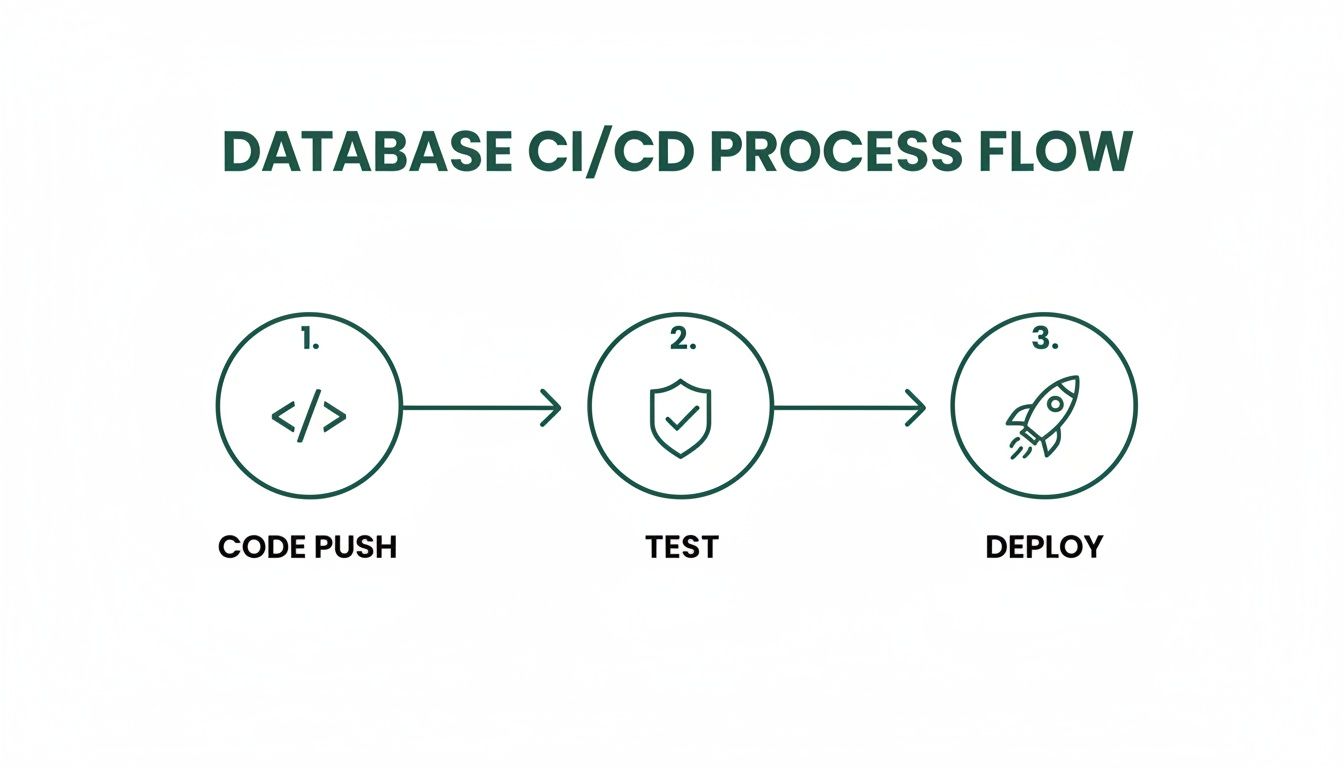
The journey from a code push through automated testing to the final deployment shows the crucial checkpoints that stop bad changes from ever making it to production. When you combine zero-downtime patterns with battle-tested rollback plans, you build the confidence to ship changes quickly and safely.
Building a Culture of Database Best Practices
Tools and automation are fantastic, but they only get you so far. The real secret to managing database changes successfully over the long haul comes down to your team's habits and mindset. A slick CI/CD pipeline is great, but it can't think critically for you. This is where a culture of careful, deliberate action becomes just as important as the tech you're using.
So, where do you start? With one simple, unbreakable rule: every single database migration script needs a peer review. No exceptions. You do it for your application code, and let's be honest, it’s even more critical for the database.
The Power of a Second Look
A second pair of eyes is your best insurance policy against those subtle, dangerous mistakes that sneak past automated checks. A linter will catch a syntax error, sure, but it won't ask why you're making a change.
A teammate, on the other hand, might spot a missing index that’s about to tank your site's performance. Or they could see a logical flaw that will corrupt data for a small but important group of users. This whole process forces communication and creates shared ownership. It's not about pointing fingers; it's about everyone taking collective responsibility for keeping the lights on.
When a migration script is up for review, the key question isn't "Does this work?" but "What could this break?" This simple shift in mindset forces the team to think about downstream impacts and what could go wrong.
Handling Sensitive Data and Validating Deployments
Another non-negotiable is how you handle sensitive information. Your production database has real user data in it, and that data has absolutely no business being in your development or testing environments. Ever. Here are a few solid ways to manage this:
- Data Masking: Use tools that automatically swap out sensitive fields (like emails, names, or phone numbers) with realistic-looking fake data.
- Data Subsetting: Create a much smaller, anonymized version of your production database that's safe to use for testing.
- Seed Scripts: Write scripts that can spin up a clean database and populate it with a standard set of dummy data. This makes tests repeatable and predictable.
Using these methods means your team can test migrations against a realistic data structure without ever putting private user information at risk.
Finally, remember that a deployment isn't done just because the script finished running. You have to validate the outcome. Right after a migration hits production, run a few quick checks. It could be as simple as querying the new schema or just spot-checking a few records to make sure the migrated data looks right. This quick sanity check can save you from a world of hurt.
Look, building this kind of culture is tough. You'll likely run into resistance, and sometimes the organization just isn't ready. Research shows that only 26% of employees really get on board with change management practices. Confidence in these kinds of initiatives has also taken a hit, dropping from 60% in 2019 to just 43% in 2023. If you're interested in digging deeper, you can review key change management statistics to see how to get ahead of these challenges.
By setting up clear, consistent processes, you build the confidence and discipline your team needs to manage the database successfully for years to come.
Got Questions About Managing Database Changes? We've Got Answers
Stepping up from a no-code tool to a production-grade database always kicks up a few questions. It’s a big shift, especially for smaller teams. Let’s tackle some of the most common hurdles you'll likely face.
What Do We Do When a Database Migration Fails?
First, don't panic. A failed migration needs a swift and clean rollback, and there are established ways to handle this.
The gold standard is to wrap every migration script inside a database transaction. Think of it as an all-or-nothing deal. If any part of your script chokes and fails, the database automatically undoes everything it just did, leaving your schema exactly as it was. No harm, no foul.
Some changes are just too complex for a single transaction. For those, your migration tool needs a buddy system: for every "up" script that applies a change, you need a "down" script that reverses it. Your CI/CD pipeline should be smart enough to run this "down" script automatically if things go sideways, and it absolutely must ping your team immediately.
A high-pressure outage is the worst possible time to find a bug in your rollback script. Never, ever deploy a migration without testing its rollback procedure in a staging environment first.
What's the Single Biggest Mistake We Could Make?
It's a classic, and it's so tempting: applying a manual "hotfix" directly to the production database to solve an urgent problem. It feels like a quick win, but it almost always leads to a much bigger headache down the road.
That one manual tweak causes your database schema to drift. It's now out of sync with what your version-controlled migration scripts believe to be true. The very next automated deployment will almost certainly fail because the database isn't in the state it expects. Cue the frantic debugging and needless downtime.
Set a non-negotiable, team-wide rule: all changes, no matter how small or urgent, must go through the version-controlled migration process.
Is Zero-Downtime Possible for Every Single Change?
For the vast majority of changes, yes, you can absolutely avoid downtime.
For common tasks like adding a new table or a new column, you can rely on proven patterns like the expand-and-contract method. This clever strategy lets your application support both the old and the new schema at the same time during the transition, making the final switchover seamless for your users.
But let's be realistic. Some destructive changes are just tricky to pull off without a brief maintenance window. Things like renaming a critical, heavily-used table or dropping a column that's referenced everywhere often require a quick, scheduled pause.
The trick is to design your changes to be additive and backward-compatible whenever you can. Save those disruptive, downtime-inducing changes for rare, well-communicated events. A well-designed system might only need one or two of those a year, if that.
Ready to trade your brittle no-code app for a scalable, production-grade foundation? First Radicle specializes in migrating fragile projects to modern, reliable tech stacks in just six weeks. We build systems you can trust, complete with a proper workflow for managing database changes from day one.