
Migrate database to cloud: Build a scalable, investment-ready tech foundation
It's the classic paradox of success: the very no-code platform that helped your app go viral is now the thing holding you back. You know it’s time to migrate your database to the cloud when the patchwork of automations and platform limits starts costing you more in time and money than they're worth. This isn’t just about fixing technical debt; it’s about reclaiming control and building a scalable, long-term asset.
Recognizing When Your No-Code App Has Hit a Wall
You probably started on a platform like Bubble or Airtable, and for good reason. They’re fantastic for rapid prototyping and getting an MVP into the market, fast. But as your user base explodes, that initial agility often grinds to a halt, creating serious bottlenecks. Suddenly, the launchpad feels more like a ceiling. This shift, from asset to liability, is the clearest sign you need a more robust solution.

This isn't an isolated problem. By 2025, an estimated 62% of all business data will live in the cloud, a figure that's been climbing steadily. What’s more telling is that by 2026, experts predict 95% of new digital workloads will be built on cloud-native platforms. This massive shift is forcing teams of all sizes to confront their brittle, no-code automations and think bigger. You can find more data on this trend over at softjourn.com.
The Financial Drain of Scaling on No-Code
Often, the first sign you're in trouble is a financial one. That monthly bill for tools like Zapier or Make starts to climb, then spiral, as your app’s usage grows. Each "Zap" or automation run, once a trivial cost, morphs into a significant operational expense that eats away at your runway.
Hitting API rate limits is another painful red flag. Platforms like Airtable impose strict caps on how many requests you can make per second. Once your app’s success pushes you against these limits, you're looking at slowdowns, failed operations, and a genuinely frustrating experience for your users.
The breaking point isn't a single event. It's the slow burn of rising costs, lagging performance, and the growing realization that you don't truly own your core technology. You're renting your foundation, and the landlord is raising the rent while shrinking the space.
To put this in perspective, here's a quick look at where no-code platforms struggle and cloud databases excel.
No-Code Limits vs. Cloud Database Capabilities
| Challenge | No-Code Platform (e.g., Airtable/Bubble) | Cloud Database (e.g., PostgreSQL) |
|---|---|---|
| Data Scalability | Fixed record limits (e.g., 50,000 records per base on Airtable Pro). | Virtually unlimited; scales with your cloud provider's resources. |
| Performance | API rate limits (e.g., 5 requests/second) bottleneck high-traffic apps. | High throughput; can handle thousands of concurrent queries with proper tuning. |
| Query Complexity | Limited to basic filtering, sorting, and pre-defined views. | Full SQL support for complex queries, joins, and aggregations. |
| Data Ownership | Data is stored in a proprietary format on a third-party platform. | You have complete control and ownership of your data and schema. |
| Cost Structure | Per-user or per-automation pricing that scales poorly with usage. | Usage-based pricing for compute and storage, offering better long-term TCO. |
This comparison makes it clear: while no-code tools are great for starting out, they simply aren't built for the demands of a growing application.
Security and Ownership: The Real Long-Term Risks
Beyond performance, that patchwork of third-party integrations creates a sprawling and fragile security surface. Every connection is a potential point of failure or, worse, a vector for a data breach. As your user data becomes more valuable, relying on a dozen services with different security standards is a risk you can't afford to take. You can learn more about building a solid foundation in our guide on choosing the right no-code web app builder.
Ultimately, it all comes down to ownership. When your core business logic and data are locked inside a proprietary platform, you don't own your intellectual property in a way that investors recognize. Securing that next funding round often hinges on demonstrating a defensible, ownable tech stack. Migrating to a production-grade PostgreSQL database on the cloud isn't just a technical upgrade; it's a strategic move that builds lasting value and ensures your app can actually handle its own success.
Your Pre-Migration Blueprint for Success
Trying to move a database to the cloud without a solid plan is a recipe for disaster. I've seen it happen. The most successful migrations are won or lost long before a single byte of data is transferred. This initial phase—all about discovery and mapping—is your architectural blueprint. It's what stands between you and the data integrity nightmares that can tank a project.
First things first: you need to conduct a thorough audit of your current setup, whether it's in Airtable, Bubble, or another no-code platform. You have to become the world's leading expert on your own data. That means identifying every single table, field, and relationship. This isn't just about listing column names; it's about deeply understanding the purpose behind the data and how it all connects.
This process almost always uncovers things you forgot existed, like convoluted multi-select fields or "magic strings" someone used years ago to link records. Documenting everything gives you a single source of truth that will guide every decision you make from here on out.
Translating No-Code Looseness to Relational Structure
No-code platforms are incredibly forgiving when it comes to data types. A field in Airtable might hold a simple text string today and a lookup record tomorrow. A real relational database like PostgreSQL, on the other hand, is built on precision and strict rules. Your main job here is to translate that "loose" data into a well-defined, relational schema.
This means mapping every field from your source to a specific data type in the destination. Think of it as a deep data hygiene exercise that will pay off massively in performance and reliability down the road. You’ll have to make some smart calls on how to handle the quirky data structures common in no-code tools.
A few classic mapping challenges you'll almost certainly run into include:
- Text Fields: That generic "text" field in your no-code tool will likely become a
VARCHAR(255)for short strings or aTEXTtype for longer, free-form descriptions in Postgres. - Linked Records: Airtable's "Linked Record" fields are just foreign key relationships in disguise. You’ll need to create corresponding
INTEGERorUUIDcolumns in your new tables and set up formal foreign key constraints to enforce that relational integrity. - Attachments and Files: Any fields with file attachments require a totally new strategy. The standard playbook is to move the files to a cloud object store like Amazon S3 and then store the URL or object key in a
TEXTcolumn in your database.
The real goal of schema mapping is to bring order to chaos. You're defining the non-negotiable rules for your new database, making sure every piece of data has a proper home and a clear definition. This upfront work is what separates a clean, successful migration from a costly data cleanup project six months from now.
Thinking through these details is non-negotiable. For a deeper dive, our guide on how to prepare a database walks through more advanced strategies for this stage.
A Practical Example: Mapping a Users Table
Let's make this real. Take a simple 'Users' table in Airtable. The mapping process is what transforms it from a flexible spreadsheet into a robust, structured database table.
After your discovery work, you might find these Airtable fields:
- Name (Single line text)
- Email (Email type)
- Signup Date (Date type)
- Profile Picture (Attachment)
- Status (Single select: 'Active', 'Pending', 'Inactive')
- Projects (Linked record to a 'Projects' table)
Here’s how you’d map this to a PostgreSQL schema for a new users table:
| Airtable Field | PostgreSQL Column | PostgreSQL Data Type | Notes |
|---|---|---|---|
| (Auto-ID) | id |
UUID |
Primary Key. Using UUIDs from the start is a best practice for scalability. |
| Name | full_name |
VARCHAR(255) |
A standard character field with a sensible length limit. |
email |
VARCHAR(255) |
Stored as text, but you'll add a UNIQUE constraint to prevent duplicates. |
|
| Signup Date | created_at |
TIMESTAMPTZ |
Always use a timestamp with time zone. It's crucial for accuracy. |
| Profile Picture | profile_picture_url |
TEXT |
This will store the URL to the image file now living in S3. |
| Status | status |
user_status_enum |
Create a custom ENUM type (CREATE TYPE user_status_enum AS ENUM ('active', 'pending', 'inactive');) to lock in data integrity. |
| Projects | (Handled by a separate table) | N/A | This many-to-many relationship needs a user_projects join table with user_id and project_id foreign keys. |
This detailed map is now your definitive guide for the entire migration. It gives you absolute clarity when writing transformation scripts and building the new backend, guaranteeing that your data lands exactly where it belongs in its new, structured, and scalable home.
Getting Your Hands Dirty: The Migration Itself
Alright, you've got your schema map. Now comes the fun part: making it real. This is where we get into the nuts and bolts of moving the data, a process the industry calls ETL: Extract, Transform, and Load. Think of it as a three-act play. Each part is distinct, and you need to nail all three to ensure the data that arrives in your new cloud database is clean, correct, and ready for action.
This isn't just a technical exercise; it's a structured workflow. The blueprint you've created from auditing and mapping is the foundation for everything that comes next.
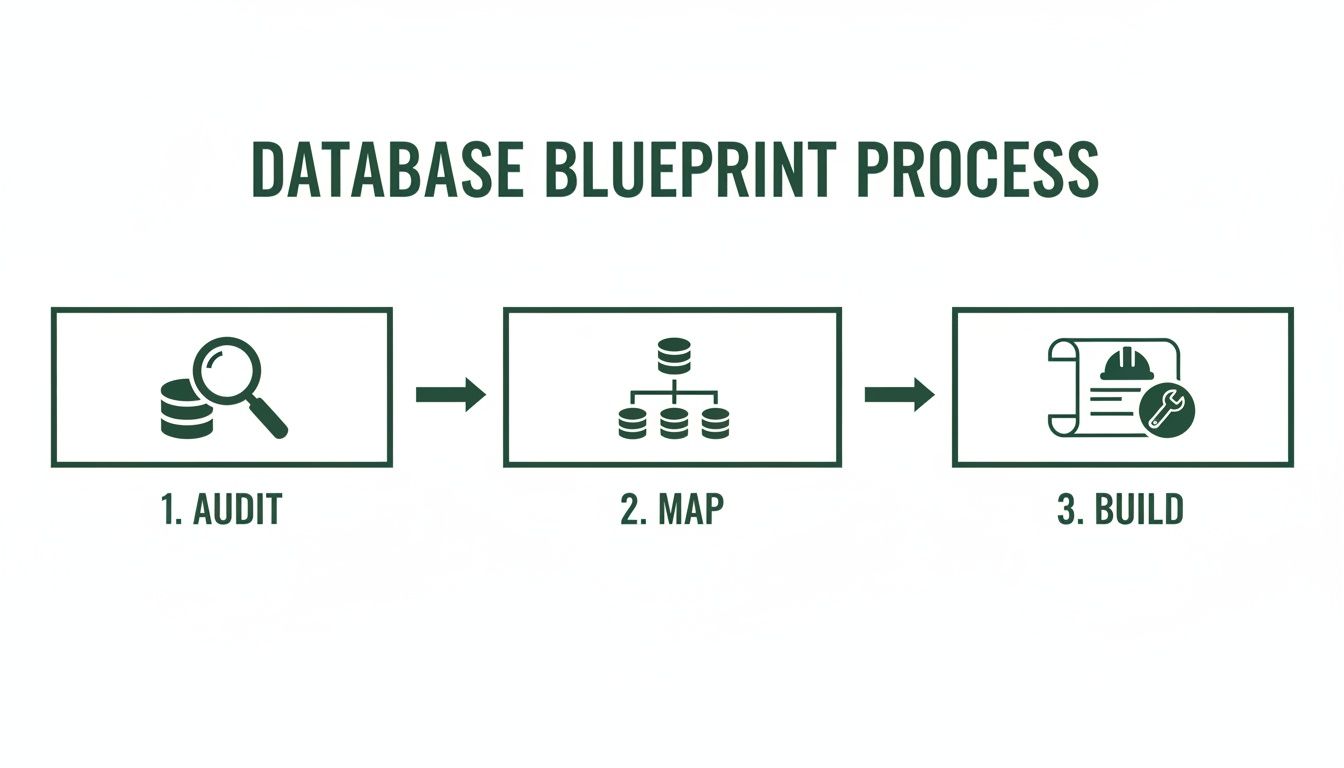
As you can see, the build phase is the final step, not the first. That methodical approach is what separates a successful migration from a chaotic one.
Act I: Extracting Data From the Source
First things first, you need to get your data out of its current home. With no-code tools like Airtable, you generally have two options: hit their API or do a bulk CSV export. While an API gives you live data, it's often slow and comes with rate limits—a real headache for a large, one-time transfer.
This is why I almost always recommend starting with a full CSV export. It's a clean snapshot of your entire dataset at a single point in time. Most platforms make this easy, but a word of advice: export each table individually. It keeps things far more organized and manageable down the line.
Act II: Transforming the Data to Fit
This is where the magic—and the real work—happens. Your raw CSV files are not going to slot neatly into your new PostgreSQL database. You'll need to write scripts to massage that data into shape based on the schema map you built.
For this, your best friends will be a scripting language like Python and its incredible Pandas library. Pandas lets you load CSVs into "data frames," which are essentially powerful, in-memory spreadsheets that you can manipulate with code.
Your transformation scripts will need to be pretty versatile. Expect them to handle tasks like:
- Renaming Columns: You’ll be changing "human-friendly" names from your no-code tool (like "Signup Date") to your new, standardized schema names (like
created_at). - Fixing Data Types: This is a big one. You’ll be converting text-based dates into a proper
TIMESTAMPTZformat that PostgreSQL can actually understand and query efficiently. - Wrangling Special Cases: Here's where you'll tackle the tricky bits. A common scenario is handling file attachments. You’ll need a script to download files from Airtable, upload them to a cloud storage bucket like Amazon S3, and then replace the old attachment data with the new S3 URL.
- Generating Foreign Keys: When dealing with linked records, your script will need to find the new primary key (like a
UUID) of a record in one table and insert it as a foreign key in another. This is how you rebuild your relationships.
This transformation stage is where a migration lives or dies. Don't rush it. Cutting corners here will inevitably lead to corrupt data and a broken application. My advice? Test your scripts relentlessly on small chunks of data before you even think about running them on the full dataset.
Data quality is not a "nice-to-have." In fact, studies show poor data quality sinks 77% of migration projects. On the flip side, getting this right is a huge win. A well-executed migration and a modernized data pipeline can deliver a 2.5x greater impact on your analytics—a stat that should make any founder's ears perk up.
Act III: Loading Data Into the Cloud
With your data cleaned and perfectly formatted, it's time for the final act: loading it into your PostgreSQL database. You might be tempted to write a script that runs a bunch of INSERT statements, but please, don't. It's painfully slow for any significant amount of data.
The real pro move here is to use PostgreSQL's native \copy command. It's a powerhouse tool optimized for bulk-loading data directly from a file, bypassing a ton of overhead. We're talking thousands of records per second.
The workflow is beautifully simple:
- Your Python transformation script spits out a final, clean CSV for each of your tables.
- You connect to your cloud database using the
psqlcommand-line tool. - You run the
\copycommand, telling it which CSV to use and which table to fill.
For example, to load your squeaky-clean user data, the command is as straightforward as this:\copy users(id, full_name, email, ...) FROM 'path/to/transformed_users.csv' WITH (FORMAT csv, HEADER true);
This one-liner tells Postgres to slurp up the data from your CSV, using the first row as the header to match the columns correctly. This kind of efficiency is what makes it possible to migrate a database to the cloud without pulling your hair out.
By taking a methodical approach to each step—Extract, Transform, and Load—you're setting yourself up for a smooth and accurate transfer. Of course, the work doesn't stop once the data is in; you'll need a plan for what comes next. For more on that, take a look at our guide on managing database changes.
Achieving a Seamless Zero-Downtime Cutover
Let’s be honest: taking your application offline to migrate a database to the cloud just isn't a real option for a growing business. Your users demand 24/7 availability. Any noticeable downtime doesn't just disrupt service; it chips away at user trust and can hit your bottom line hard. This is where a well-planned, zero-downtime cutover isn't just a nice-to-have, it's a necessity.
The whole point is to ditch the high-stakes, "flip the switch and hope for the best" nightmare scenario. Instead, we'll walk through a strategy that builds confidence and ensures the transition is practically invisible to your users.
Embrace the Parallel Run
The secret to a smooth cutover is the parallel run. In simple terms, you'll be running your new cloud database alongside your old no-code system for a short but crucial period. The goal is to get your new database to a state where it’s a perfect, real-time mirror of the old one before you even think about making the final switch.
This approach massively de-risks the entire project. You're not just throwing data into a black box. You're migrating to a live system that you can test, validate, and watch under real-world conditions without touching your production environment.
Keeping Your New Database in Sync
A parallel system with stale data is useless. While your old Airtable or Bubble instance is still handling live traffic, users are constantly adding and updating records. You need a rock-solid way to capture these changes and feed them into your new cloud database.
This is where delta synchronization comes in. Instead of trying to re-migrate the entire database over and over, you'll run scripts that only grab the data that has changed since the last sync.
I've found the most reliable methods for this are:
- Timestamp Tracking: This is your go-to. Your script simply queries the source for any records created or updated since the last time it ran. It's straightforward and incredibly effective for most no-code platforms.
- Change Data Capture (CDC): While powerful, CDC tools that stream changes in real-time are usually overkill when moving from a no-code source. Stick with timestamps unless you have a truly massive write volume.
- Running it on a Schedule: You can set up these delta scripts to run as often as you need. For most apps, every hour is fine, but for high-traffic systems, you might crank it up to every 15 minutes.
The outcome? Your new PostgreSQL database stays consistently fresh, trailing the live data by just a few minutes. This sync process is the true engine of a zero-downtime migration.
The real magic of the parallel run and delta sync is that you shrink the final cutover from a terrifying, multi-hour ordeal into a calm, controlled process that takes minutes. You're swapping out uncertainty for a predictable, practiced procedure.
Executing the Final Switch
With your new database humming along in perfect sync with the old one, the final cutover becomes a simple, almost anticlimactic sequence of steps. All the heavy lifting is already done.
Here’s how the final sequence plays out in practice:
- Activate Read-Only Mode: First, you’ll temporarily put your old application into a maintenance or "read-only" mode. This stops any new data from being written to the old system, effectively freezing it in its final state. This is the only brief moment of impact your users will see, and it should only last a few minutes.
- Run the Final Delta Sync: With the source database now static, you execute your synchronization script one last time. This is critical—it ensures every single last-second change is captured, bringing your new database to 100% data parity.
- Point Your App to the New Database: Now for the main event. You update your application's configuration—usually just an environment variable or API endpoint—to point away from the old no-code platform and toward your new production PostgreSQL database.
- Lift Read-Only Mode: As soon as traffic is flowing to the new system, you can turn off the maintenance mode. From your users' perspective, nothing happened. They are now seamlessly interacting with your faster, more scalable cloud backend.
This methodical approach turns what could be a high-anxiety event into a manageable operation. One final piece of advice: a full "dry run" of this entire sequence in a staging environment is absolutely non-negotiable. It builds muscle memory, flushes out any weird edge cases, and gives your team the confidence to nail it on launch day.
Post-Migration Validation and Performance Tuning
You’ve flipped the switch and pointed your app to the new cloud database. It’s a huge moment, but don't pop the champagne just yet. The work isn't over. The first few hours and days are absolutely critical for validating the move and starting the ongoing process of tuning your new environment for growth. I’ve seen teams rush this final step, and it’s a classic mistake that can quickly undermine weeks of hard work.
Think of it like moving into a new house. Before you throw a housewarming party, you walk through every room, flip every light switch, and run every faucet. You have to be just as diligent when you migrate a database to the cloud. This is your final, exhaustive quality check.
A Checklist for Immediate Post-Cutover Validation
Right after the cutover, your one and only priority is confirming data integrity and application functionality. You need a systematic way to prove the migration was a 100% success. Don't wing it. Work through a methodical checklist to cover every base.
Here are the non-negotiables I run through immediately after a go-live:
- Data Integrity Checks: This is ground zero. Start simple by comparing row counts between the old and new tables. Then, dig deeper by running checksums or hash functions on critical columns in both databases to ensure the data is truly identical, bit for bit.
- Functional Testing: It's time to put your application through its paces. Can users sign up? Can they log in and perform their core tasks? Get your product team involved to run through real-world user workflows and hammer on every feature.
- Performance Benchmarking: Your new cloud database should be faster, but you need to prove it with data. Run the same suite of performance tests you ran before the migration, measuring query response times and comparing them against your baseline. This gives you cold, hard facts, not just a gut feeling.
This validation phase is precisely where you’ll uncover those tricky, hidden issues. It's a surprising statistic, but a staggering 77% of organizations hit data quality problems during migrations. Automated validation scripts and thorough reconciliation checklists are your best defense, especially for startups graduating from the constraints of tools like Airtable.
As a McKinsey report points out, modernized data pipelines deliver a 2.5x greater business impact. This move isn't just about technical debt; it's about turning your new PostgreSQL database into a strategic asset for everything from analytics to real-time features. You can dive deeper into these trends in this data migration insights article.
To keep things organized, a structured checklist is invaluable. Here’s a template you can adapt for your own team to ensure nothing gets missed in the crucial moments after cutover.
Post-Migration Validation Checklist
This checklist provides a structured approach to verifying the integrity, functionality, and performance of your newly migrated database.
| Check Category | Action Item | Success Metric |
|---|---|---|
| Data Integrity | Compare row counts for all major tables. | Row counts match 100% between source and target. |
| Data Integrity | Run checksums/hashes on key data columns. | Checksum values are identical for all sampled records. |
| Application Functionality | Execute end-to-end user workflow tests (e.g., user signup, purchase). | All core application features function without error. |
| API Endpoints | Test all critical API endpoints with a suite of automated tests. | All endpoints return expected 200-level status codes and data. |
| Performance | Run pre-defined benchmark queries against the new database. | Average query latency is equal to or better than pre-migration baseline. |
| Configuration | Verify database user roles and permissions were migrated correctly. | Users have appropriate access levels; no unintended privileges exist. |
Completing a methodical check like this gives you the confidence to officially call the migration a success and shift your focus to long-term health.
Establishing Proactive Monitoring and Alerting
Once you’ve confirmed the migration was successful, your mindset has to shift from reactive checks to proactive monitoring. You can't just set it and forget it. You need a system that alerts you to potential trouble before it spirals into a real problem for your users.
Thankfully, most cloud providers have fantastic built-in tools for this. If you’re on AWS, for instance, Amazon CloudWatch will become your new best friend.
The goal of monitoring isn't just to collect data; it's to gain actionable insights. A dashboard full of pretty charts is useless without alerts that tell you when a critical metric has crossed a dangerous threshold.
At a minimum, you should set up alerts for these key performance indicators (KPIs):
- High CPU Utilization: An alert for sustained CPU usage above 80% is a classic early warning for inefficient queries or an under-provisioned instance.
- Low Freeable Memory: This can signal memory leaks in your application or simply that it's time to scale up your database instance.
- Query Latency: Configure alerts for any query that takes longer than a set threshold (e.g., 500ms) to complete. This is the fastest way to pinpoint performance bottlenecks as they emerge.
Long-Term Strategies for Performance Tuning
With a solid monitoring foundation in place, you can finally move on to long-term optimization. This isn't a one-time task but an ongoing process of refining your database to ensure it gracefully handles a growing user load.
One of the single most impactful optimizations you can make is indexing. An index is essentially a table of contents for your database, allowing it to find data dramatically faster without having to scan every single row in a table. Look for columns frequently used in WHERE clauses or JOIN conditions—these are your prime candidates. A single, well-placed index can often turn a query that takes seconds into one that runs in milliseconds.
Another crucial habit is regular query analysis. Use your cloud provider’s tools to periodically review your slowest and most frequently executed queries. You'll often be surprised at what you find. Sometimes, a small tweak to the SQL logic or adding a new index can yield massive performance gains. This continuous improvement cycle is what elevates a successful migration into a truly scalable foundation for the future.
Your Migration Questions, Answered
Even with a solid playbook, the thought of migrating a database to the cloud naturally brings up a lot of questions. If you're coming from a no-code background, these usually boil down to time, cost, and complexity. Let's tackle some of the most common concerns we hear from founders making this leap.
Getting straight answers helps set the right expectations and prepares you for what's really involved.
How Long Does a Typical Migration Take?
This is the big one, and the honest answer is: it depends. But for a typical MVP-level app built on a platform like Bubble or Airtable, a well-executed migration is often a matter of weeks, not months. The actual moment of data transfer might just be a few hours, but that's just a tiny piece of the puzzle.
Your timeline is almost entirely dictated by two things: how complex your data is and how well you plan. The real work—and where most of your time will go—is in the schema mapping and data transformation stages. Nailing these upfront is what separates a smooth project from a painful one.
What Are the Biggest Hidden Migration Costs?
It's rarely the cloud hosting bill that'll surprise you. The real budget-killers are almost always engineering time and the business impact of downtime. When you're forecasting costs, don't just look at your AWS or Google Cloud estimate.
Watch out for these common surprises:
- Data Janitor Duty: The hours your engineers spend writing scripts to clean up messy or inconsistent data from forgiving no-code tools can pile up fast.
- Endless Testing Loops: A poorly planned schema map inevitably creates bugs. These often don't show up until you're deep into testing, forcing you back to the drawing board and burning valuable time.
- The Feature Freeze: While your team is focused on the migration, all new feature development usually grinds to a halt. That's a real opportunity cost to your business.
The best way to control your migration budget is to over-invest in planning. Think of that detailed discovery phase not as an expense, but as an insurance policy against the far bigger, unplanned costs of a chaotic migration.
This upfront work is what makes the whole project predictable.
Can I Just Switch the Database and Keep My No-Code Front-End?
You can, but it’s usually not a good idea. While platforms like Bubble technically let you connect to an external database, it's a band-aid solution that often creates a new set of headaches. You might solve the immediate database scaling issue, but you'll still be wrestling with front-end performance bottlenecks and other platform limitations. It's like putting a race car engine in a minivan—you're just not getting the full benefit.
The real win comes from pairing your powerful new database with a modern front-end (like React or Next.js) and a custom API. This full-stack approach gives you:
- Freedom from Vendor Lock-In: You're no longer at the mercy of a third party's performance quirks, pricing changes, or feature roadmap.
- Total Control: From query optimization to pixel-perfect UI rendering, every dial and lever is now in your hands.
- An Ownable Tech Asset: This is huge for fundraising. Investors want to see that you own 100% of your core technology, not just rent the data layer.
A full migration builds a defensible, scalable asset that is exponentially more valuable in the long run.
What Is the Single Biggest Mistake to Avoid?
By far, the most damaging mistake we see is skimping on testing. Teams get hyper-focused on the mechanics of just moving the data, but they fail to rigorously test the entire application from end to end with the new database. You can win the data-moving battle but still completely lose the war.
This oversight can lead to a nightmare scenario after you go live: broken features, subtle data corruption, and a flood of angry support tickets. A botched launch can instantly destroy the user trust you spent years building.
Your migration plan has to treat testing as a non-negotiable, top-level priority. Make sure it includes:
- Data Integrity Checks: Use checksums and row counts to mathematically prove that every last piece of data made it over perfectly.
- Load and Stress Testing: Hammer the new system with simulated user traffic to see how the database and API hold up under real-world pressure.
- User Acceptance Testing (UAT): Get real users (or at least internal team members) to run through their everyday workflows to catch any functional bugs or weird behavior.
Cutting corners on any of these testing phases is the biggest gamble you can possibly take.
Feeling overwhelmed by the complexity of a migration? First Radicle specializes in turning fragile no-code projects into production-grade software in just six weeks, guaranteed. We handle the entire process so you can focus on your business. Learn more about our fixed-scope, fixed-price migration service.