
Mobile App Development Python: A Founder's Guide

Let's get right to it. Can you build a mobile app with Python? The short answer is yes, but the real question is how you should use it.
Python is an absolute powerhouse for your app's backend—the engine that runs everything behind the scenes. But when it comes to the user interface (the part your users actually see and touch), you'll want to look elsewhere.
Think of your app like a high-end restaurant. Python is the world-class kitchen. It's where all the magic happens: sourcing ingredients (data), preparing complex dishes (business logic), and ensuring every order that goes out is perfect. The dining room, however, where your customers experience the final product, is handled by a native-friendly framework like React Native or Flutter.
Choosing Python for Mobile App Development
Splitting your app into a distinct backend and frontend lets each part do what it does best. Python is a champion of server-side logic and building clean, fast APIs. Meanwhile, dedicated mobile frameworks are built to deliver the polished, responsive UI that users have come to expect on their phones.
To make this crystal clear, here’s a quick breakdown of where Python fits in a modern mobile app stack.
Python's Role in Mobile App Development at a Glance
This table quickly summarizes where Python is a perfect fit and where you should opt for native-focused solutions.
| Application Layer | Python's Suitability | Recommended Technology | Why It Matters for Founders |
|---|---|---|---|
| Backend API | Excellent for data handling and business logic | Django or FastAPI | Creates a powerful, scalable server engine that investors trust. |
| Frontend UI | Limited native look and feel | React Native or Flutter | Delivers the polished, high-performance user experience that retains customers. |
The takeaway? Let each technology play to its strengths. Your backend API is the perfect place for Python, handling things like user authentication, database queries, and all the core business rules. The UI layer, on the other hand, needs smooth animations and direct access to native phone features like the camera or GPS—that's where native frameworks shine.
Trying to force a Python-based UI often leads to performance bottlenecks and a clunky feel that can frustrate users and drive them away.
Frontend Frameworks Versus Python UI
So, what's the real difference? Frameworks like React Native and Flutter are designed to compile down to native code, giving your app that fluid, "built-for-the-device" experience.
Python UI libraries like Kivy and BeeWare are fantastic for rapidly building prototypes or simple internal tools. But when it comes to a consumer-facing app, they often struggle with deep native integration and can feel a step behind in performance and aesthetics.
"A Python-only frontend feels like putting plastic furniture in a fine dining room. It just doesn't match the quality of the kitchen."
This disconnect means your app might load slower, feel less responsive, or simply look out of place compared to apps built with platform-specific tools.
The Power of a Decoupled Architecture
The best practice here is a decoupled, or "headless," model. This architecture cleanly separates your Python backend from the mobile frontend. They communicate through a well-defined API, but otherwise, they are completely independent.
This separation is a massive win. Your backend and frontend teams can work in parallel, building and optimizing their respective parts without stepping on each other's toes. Investors love this approach, too—it leads to a cleaner, more maintainable codebase and a server that's built for performance from day one.
For a real-world example, a startup could use FastAPI to serve user profiles and manage data, while the mobile app, built with React Native, provides a slick, interactive feed. This kind of setup can scale to support millions of users with minimal changes required on the backend.
In short, keep Python in the kitchen where it belongs. Use it for its incredible data processing and API capabilities, and pair it with a true mobile framework to give your users the best possible experience.
Performance Testing and Deployment
Once your backend API is up and running, you need to know how it will perform under pressure. Load testing is non-negotiable—it's how you find your app's breaking point before your users do. Luckily, the Python ecosystem is packed with great tools for this.
- Stress Testing: Use tools like Locust or JMeter to simulate thousands of users hitting your API at once.
- Automation: Integrate CI/CD pipelines with GitHub Actions or GitLab CI to automate your tests and deployments, catching bugs early.
By setting up clear metrics and monitoring, you'll know exactly when it's time to scale up your servers or optimize a specific piece of code.
Your Action Plan
Ready to move from a no-code MVP to a scalable, production-ready app? Here’s a straightforward plan:
- Audit Your Logic: Review your no-code backend and create a detailed map of all the data models and API endpoints you'll need to replicate.
- Choose Your Backend: Select a Python framework like Django (for a batteries-included approach) or FastAPI (for pure speed) and set up a robust database like PostgreSQL.
- Select Your Frontend: Pick a mobile framework like React Native or Flutter that aligns with your team's skills and your app's UI requirements.
By combining Python's server-side strengths with a native-focused frontend, you get the best of both worlds: the flexibility to iterate quickly on your backend logic and the high-end performance your users demand.
Why Python Is a Powerhouse For Your App's Backend
If you've ever felt the pain of hitting an Airtable API limit or found yourself tangled in a web of costly Zapier automations, you know the ceiling of no-code tools all too well. They're fantastic for getting an idea off the ground and testing the waters. But they were never meant to be the permanent foundation for a serious business.
This is precisely where Python comes in. Not as a total replacement for your app, but as the industrial-strength engine your mobile app needs to truly scale.
Think of your backend as the central nervous system of your entire operation. It handles all the heavy lifting: securing user data, managing complex business logic, and talking to your database. In mobile app development, Python has become the go-to for this critical layer, loved by developers for its clean syntax, rapid development speed, and sheer power.
When you build your backend with a Python framework like Django or FastAPI, you're creating a private, ownable asset. This is a crucial distinction for any founder. Unlike a no-code setup where your core logic is tied to a third-party platform, a custom Python backend means you own 100% of your intellectual property (IP). This isn't just a technical detail—it's a must-have for most venture capital investors who want to see a defensible, scalable technology asset.
From Brittle Automations to a Robust API
At its core, a Python backend's main job is to serve data and logic to your mobile front-end through an Application Programming Interface (API). The API is the bridge that connects the "kitchen" (your backend) to the "dining room" (your app's user interface). Your mobile app, whether built with React Native or Flutter, simply makes requests to your Python API, which then does the work and sends back the results.
This decoupled architecture gives you several massive business advantages:
- Scalability: A well-built Python API can handle millions of requests without breaking a sweat. This ensures your app stays fast and responsive, even when you get that viral growth spike you've been dreaming of.
- Security: You get full control over user authentication, data encryption, and access permissions. You can implement professional-grade security that meets tough industry standards like those from OWASP.
- Flexibility: The exact same backend API can power your iOS app, your Android app, and even a web version of your platform—all at the same time. This saves an immense amount of development time and money down the road.
For a deeper dive into this topic, you might be interested in our guide on the specifics of Python app development. This approach essentially future-proofs your business, letting you add new features or platforms without having to rebuild your core logic from scratch.
Real-World Giants Powered by Python Backends
This isn't just theory; it's the proven model used by many of the world's biggest tech companies. Python's popularity has soared, with recent data showing that 51% of developers globally used it for creating apps in 2024.
Take Spotify, for example. It relies on a massive Python backend to manage its sprawling music library and power the complex data algorithms that generate personalized recommendations for hundreds of millions of users. Pinterest uses Python frameworks like Django to handle the incredible scale of its platform, managing everything from pin creation to customized user feeds. You can discover more insights about Python's role in mobile frameworks on vinsys.com.
These examples prove a critical point: Python isn't just for startups. It's an enterprise-grade solution capable of handling complex, data-heavy operations at a global scale.
Its enormous ecosystem of libraries for data science, machine learning, and big data makes it the perfect choice for building intelligent, feature-rich applications that users love.
By moving your core logic from a patchwork of no-code tools to a unified Python backend, you transform your clever MVP into a defensible business. You shift from a system that is rented and limited to one that is owned and infinitely scalable—laying the proper groundwork for sustainable growth and attracting the investment you need to bring your vision to life.
The Native UI Dilemma: A Look at Kivy and BeeWare
After seeing how powerful Python is for the backend, you're probably thinking, "Why not just use it for the whole app, front-end included?" It's a great question, but this is where the path of mobile app development with Python gets a bit complicated. Frameworks like Kivy and BeeWare promise exactly that: one Python codebase to rule them all.
And for certain jobs, they’re genuinely fantastic. If you’re building a simple internal tool, a quick-and-dirty prototype to validate an idea, or a niche scientific app, these frameworks let you get a cross-platform graphical user interface (GUI) up and running fast.
But when you’re building a commercial, consumer-facing mobile app, leaning on these frameworks for your UI is a huge gamble. It’s a risk that could undermine your user experience and, ultimately, stunt your growth. The heart of the issue is that users expect a truly "native" experience.
The Uncanny Valley of Mobile UIs
Think about it. When someone downloads your app from the Apple App Store or Google Play Store, they come with a built-in, subconscious set of expectations. They know how a button should feel when tapped, how a list should scroll, and how a menu should slide into view. These are the ingrained patterns of their operating system.
Python-native UI frameworks often have a tough time getting this feel just right.
- Kivy: Kivy’s approach is to draw its own widgets from scratch. It’s a bit like a game engine painting buttons and text boxes onto the screen. This offers incredible freedom for custom designs, but those elements almost never feel exactly like the standard iOS or Android components your users are used to.
- BeeWare: This project tries a different tactic. It attempts to wrap the device’s native UI components, letting your Python code talk to the real buttons and sliders on the platform. It's a noble goal, but this extra layer of abstraction can be leaky, imperfect, or a step behind the latest OS updates.
The result is often an app that just feels slightly… off. It’s what designers call the "uncanny valley" of user interfaces. A button's animation might be a fraction of a second too slow, or the font might look subtly out of place. For a user, these tiny inconsistencies can make an otherwise brilliant app feel clunky, cheap, or untrustworthy.
For a startup, user trust is everything. A non-native UI can introduce just enough friction to make a user question the quality of the entire product, even if the backend is rock-solid.
The Trade-Offs in Performance and Support
It’s not just about looks. There are real-world performance costs to consider. Because these frameworks create an extra layer between your Python code and the phone’s hardware, you can run into bottlenecks. This might show up as a slower app launch, a laggy response to a tap, or choppy animations, especially on older devices. That's a deal-breaker for any app that needs to feel fast and fluid.
Finally, you have to think about the ecosystem. The communities around Kivy and BeeWare are filled with smart, passionate developers, but they are tiny compared to the worlds of React Native or Flutter. This has direct consequences for your business:
- A Smaller Talent Pool: Finding developers with deep, production-level Kivy or BeeWare experience is tough. Finding seasoned React Native or Flutter developers is not.
- Fewer Off-the-Shelf Solutions: You’ll spend more time building common features from scratch because the library of third-party packages is much smaller.
- Slower Problem Solving: When you hit a weird, OS-specific bug, getting an answer on Stack Overflow or GitHub can take days instead of minutes.
So while the dream of a pure mobile app development python stack is incredibly appealing, the reality is that the front-end is a different beast. For any founder aiming to build a top-tier commercial app, the trade-offs in user experience, performance, and developer velocity make Python-native UI frameworks a very risky bet.
The Winning Formula: A Python Backend With a Native Frontend
After digging into the limitations of Python-native UI tools, the right path for building a serious, scalable mobile app becomes much clearer. The industry standard, and the architecture we build for our founders, is a powerful decoupled model. This is the blueprint for turning a fragile prototype into production-grade software ready for real growth.
Think of your app like a high-end electric car. The frontend is the sleek body, the comfortable interior, and the responsive dashboard—everything the driver sees and touches. The backend is the sophisticated battery and motor—the unseen powerhouse that delivers instant, reliable performance. You wouldn't build the motor from the same materials as the steering wheel; you use specialized components for each job.
Separating Power From Presentation
This decoupled—or "headless"—architecture works the same way. It means creating two distinct but connected systems:
- A High-Performance Python Backend: This is your app's central nervous system, built with a robust framework like FastAPI or Django. It handles all the heavy lifting—user authentication, data processing, and core business logic.
- A Stunning Native Frontend: This is the beautiful, interactive app your users download, built using a dedicated mobile framework like React Native or Flutter. These tools are masters at creating fast, fluid user experiences.
These two pieces talk to each other through a clean and efficient Application Programming Interface (API). The frontend simply asks the backend for the data it needs, and the Python server delivers. This separation is the gold standard because it allows each part to do what it does best, without compromise.
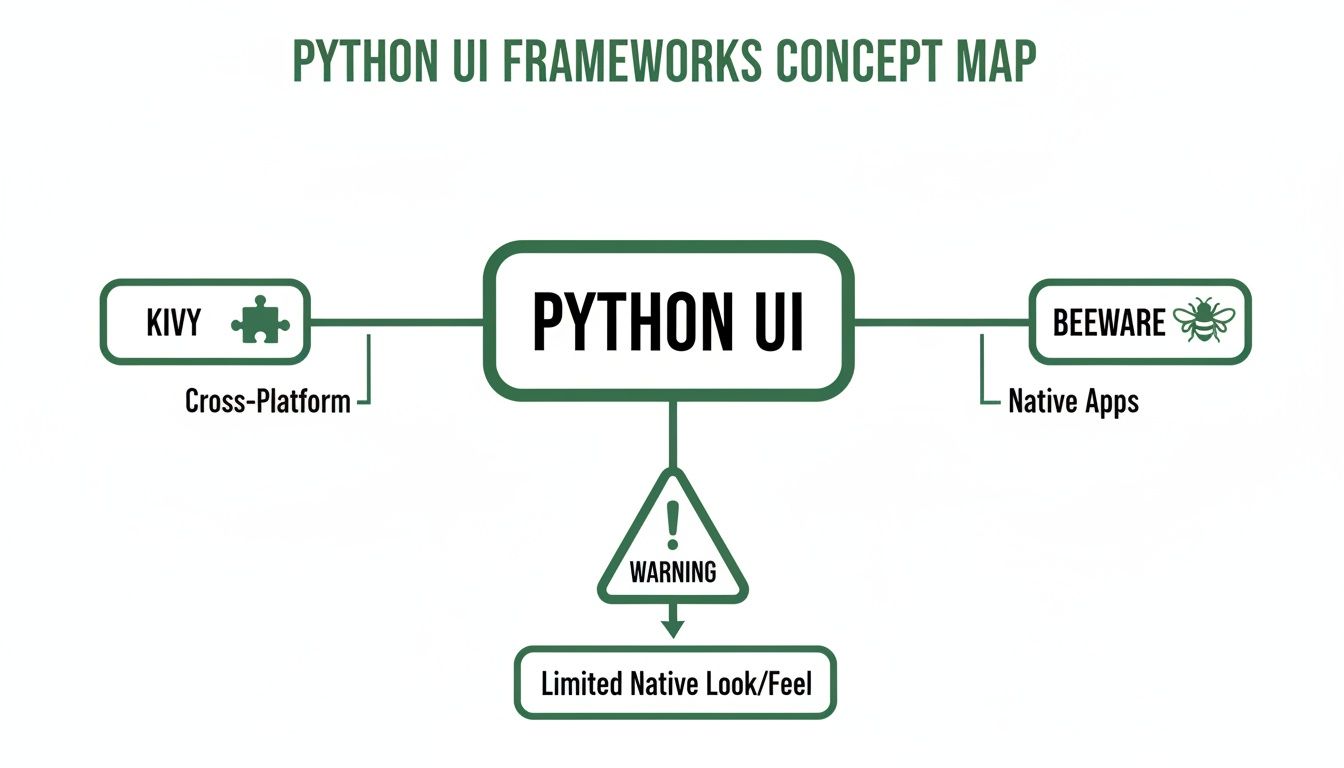
This setup avoids the non-native feel you often get with Python-only UI tools, making the decoupled strategy a much safer bet for commercial success.
Comparing Mobile App Architectures
To make this concrete, let's compare the two approaches side-by-side. The differences in user experience, scalability, and talent acquisition are stark.
| Attribute | Python-Only (Kivy/BeeWare) | Decoupled (Python + React Native) | Founder Takeaway |
|---|---|---|---|
| User Experience | Often feels "off" or generic; struggles to match native UI norms. | Fully native look, feel, and performance on both iOS and Android. | A great UX is non-negotiable. Decoupled wins here, which directly impacts user retention. |
| Talent Pool | Niche. Finding experienced Kivy/BeeWare developers is difficult. | Massive. Millions of developers specialize in Python and React Native. | It's far easier and faster to hire skilled talent for a decoupled stack. |
| Scalability | Monolithic structure makes it harder to scale individual parts. | Frontend and backend can be scaled independently for efficiency. | The decoupled model is built for growth and won't buckle under heavy user load. |
| Development Speed | A single developer can prototype quickly, but complexity slows it down. | Teams can work in parallel, accelerating the overall timeline. | Parallel workstreams mean you can get to market faster and iterate more quickly. |
The choice is clear: for any app with serious ambitions, a decoupled architecture is the only way to go.
The Business Case For a Decoupled Stack
For founders, the benefits here aren't just technical—they hit the bottom line. This is a strategic business decision that positions your company for long-term success.
First, you get a truly native user experience. Your app will feel snappy, responsive, and perfectly at home on both iOS and Android. That polish is critical for keeping users around; studies consistently show that 88% of users are less likely to return after a bad app experience.
Second, this model is incredibly efficient. The same Python backend API can effortlessly power multiple frontends at once. That means you can serve your iOS app, Android app, and a web platform from a single source of logic. This "write once, use everywhere" approach for your backend dramatically cuts development time and costs. If you're exploring this, our guide on how to turn your site into an app dives deeper into this multi-platform strategy.
A decoupled architecture gives you maximum flexibility. You can completely redesign your mobile app's frontend without ever touching the backend, or upgrade your server technology without disrupting the user-facing application.
This separation also lets your teams move faster. Your frontend and backend developers can innovate and deploy updates independently. In a competitive market, that kind of agility is a massive advantage. Ultimately, this approach is what savvy investors look for: a scalable, maintainable, and defensible tech asset built for the future.
Building a Production-Ready Application
Picking the right architecture is a massive step, but it’s far from the finish line. To build a professional mobile app—the kind users trust and investors take seriously—you have to think beyond the basic scaffolding. It's about adding the mission-critical elements that most no-code setups just can't provide.
This is the real transition: turning a clever prototype into a reliable, scalable business asset.
When you finally break free from a daisy-chain of no-code tools, you're leaving behind a world of frustrating limitations. No more bumping up against API rate limits or watching your app grind to a halt under pressure. A custom Python backend puts you in the driver's seat, giving you complete control over speed and responsiveness. You're no longer renting—you own the entire system.
Fortifying Your Application Security
Let's be blunt: in today's world, security isn't a feature. It's the bedrock of user trust. While no-code platforms offer some basic protections, a custom codebase lets you build a fortress tailored to your app's specific risks. This is absolutely non-negotiable if you handle any kind of sensitive user data.
Here’s what that looks like in practice:
- Secure Authentication: You can implement battle-tested solutions like OAuth 2.0 or token-based authentication (JWTs) to slam the door on unauthorized account access.
- Data Protection: This means encrypting sensitive information both while it's traveling over the network (TLS) and while it's sitting in your database. It's like sending a message in a locked box and storing it in a vault.
- Input Validation: Every piece of data a user submits gets thoroughly checked on your backend. This simple step is your best defense against common attacks like SQL injection and cross-site scripting (XSS).
Owning your codebase means you can run comprehensive security audits and follow rigorous industry standards, like the guidelines from OWASP (Open Web Application Security Project). This kind of control is crucial for building a product that protects both your users and your business.
Adopting these measures is fundamental to building a system that doesn't just work, but lasts. If you want to dive deeper into this, you can learn more about crafting a resilient foundation by reading our guide on software architecture best practices.
Ensuring Reliability with Automated Testing and Deployment
A production-ready app has to be dependable. Period. Manually clicking through your app before every release is slow, full of human error, and simply won't work as you grow. This is where automated testing and modern deployment pipelines become your best friends. They are the backbone of professional software development.
A CI/CD (Continuous Integration/Continuous Deployment) pipeline is an automated workflow that tests and releases new code. Every time a developer commits a change, an automated system kicks in and runs a whole suite of tests to make sure the new code didn't accidentally break something else.
This automated safety net gives you a few powerful advantages:
- Increased Reliability: It catches bugs early and often, long before they have a chance to frustrate your users.
- Faster Releases: Automation lets you ship updates and new features with confidence, knowing you haven't introduced a new problem.
- Improved Code Quality: When you build a culture around rigorous testing, your codebase naturally becomes more stable and easier to manage over time.
By focusing on these three pillars—performance, security, and automated deployment—you truly graduate from a fragile no-code project to a robust, production-grade asset. You gain the control, transparency, and technical maturity needed to support real growth and attract serious investment.
Your Migration Plan From No-Code to Python
Moving your app from a no-code platform like Bubble to a custom Python solution feels like a huge leap, but it’s a great problem to have. It means you’ve validated your idea, found your market, and are ready to build a scalable, investment-ready foundation for the future. This isn't just a rebuild; it's about translating your hard-won business logic into an asset you truly own.
The very first step? Become an archaeologist of your own product. Before anyone writes a single line of code, you need to map out every nook and cranny of your existing application. Think of it as creating the architectural blueprints for a new skyscraper—you wouldn't start pouring concrete without them.
Don't just make a list of features. Your job is to document every critical user flow, from the moment someone signs up to the core actions that make your app valuable.
Documenting Your Business Logic
Your goal is to get the "secret sauce" out of the visual editor and onto paper. The clearer you make this documentation, the faster and more accurately any development team can bring your vision to life.
- User Flow Diagrams: Grab a tool like Miro or Whimsical and create visual maps of how users move through your app. Show every screen, every button, and every decision point.
- Business Rules: Write down all the "if this, then that" logic. For example, "If a user's subscription status is 'active,' then they can access the premium dashboard."
- Triggered Events: What happens behind the scenes? Document every automated email, push notification, or third-party action currently handled by a tool like Zapier. What kicks them off? What data do they need to run?
This documentation package is the single most valuable thing you can bring to a new development partner. It cuts through the fog and dramatically reduces guesswork.
From Airtable to a Real Database
Next up is the data. Your current setup, likely a mix of Bubble’s internal database and spreadsheets like Airtable, got you this far. Now, it's time to design a proper schema for a robust PostgreSQL database, which is pretty much the industry standard for applications built to scale.
Think of it like this: you're moving from a jumbled filing cabinet where papers are stuffed into random folders to a meticulously organized library. Every piece of information will have a specific, logical home, making it faster to find and easier to manage.
You'll work with your technical team to map every field from your old system to a new, clean structure. This is also the perfect time to spot redundancies and fix data inconsistencies, ensuring your new backend starts on a solid foundation. This structured approach to mobile app development with Python makes sure your data is secure, scalable, and ready for whatever complex features you dream up next.
Frequently Asked Questions About Python App Development
As you think about moving from a no-code MVP to a real, scalable asset, a few key questions always seem to pop up. Getting straight answers is the only way to make confident decisions for your tech roadmap, especially when you're looking at Python for mobile development. Let’s tackle the most common concerns we hear from founders.
How Long Does It Take to Build a Backend?
This is the classic "how long is a piece of string?" question, but we can give you a pretty good idea. With powerful Python frameworks like FastAPI or Django, a solid development team can knock out the core API in just a few sprints—often in as little as six weeks.
This speed is a huge advantage, especially when you compare it to the technical debt and maintenance headaches that pile up with complex no-code projects. The whole point is to quickly build a robust foundation that you actually own.
Is Python Fast Enough for a Mobile App?
Yes. The old idea that Python is "slow" is mostly a myth in the context of a mobile app backend. In the real world, what makes an app feel fast or slow almost always comes down to smart database design and optimized queries, not the raw speed of the language itself.
For the overwhelming majority of mobile apps, the end-user will never notice a difference in speed between a Python backend and one built in another language. Performance is an engineering problem, not a language problem.
Modern tools like FastAPI are built from the ground up for serious speed, capable of handling thousands of requests per second with ease. Your app's responsiveness is going to depend on how well the system is put together, not on your choice of Python.
Can I Move My Data From Bubble or Airtable?
Absolutely. A professional data migration is a standard, essential part of graduating from a no-code platform. An experienced development partner will have no trouble moving your user data, product lists, and other critical info from tools like Bubble or Airtable.
The process involves mapping your old data structure to a new, much more scalable PostgreSQL database. We take meticulous care to make sure nothing gets lost and that the data stays consistent during the move. You end up with a clean, reliable foundation to build on.
Why Is Owning My Codebase Important for Fundraising?
For venture capitalists, a custom codebase isn't just code—it's a defensible business asset. When you own your own code, you're signaling technical maturity and removing the massive platform risk that comes with relying on a third-party no-code tool.
It proves your business is built on a solid, scalable foundation and tells investors you're ready for serious growth. That makes you a much more credible—and fundable—investment.
Ready to build a scalable, investment-ready app? First Radicle specializes in migrating fragile no-code projects to production-grade Python and React stacks in just six weeks. Own your IP and build a foundation for growth by visiting us at https://www.firstradicle.com.