
When Your No Code Web App Builder Hits a Wall
A no-code web app builder lets you create and launch software visually, without having to write a single line of code. Think of it like building with high-tech digital Legos—you drag, drop, and connect pre-built components to assemble a fully functional application. It's a game-changer that drastically cuts down the time and money needed to get an idea off the ground.
Why Founders Start with a No-Code Web App Builder
For any startup founder today, speed is everything. The biggest hurdle between a great idea and a real product is often the sheer technical complexity of building it. This is exactly where a no-code web app builder steps in, offering a strategic launchpad that completely rewrites the old startup rules.
Instead of burning through months of time and piles of cash to hire developers, founders can build their own Minimum Viable Product (MVP). Getting your hands dirty like this means you can make changes fast, based on what actual users are telling you. An idea that was once just a slide in a pitch deck can become a working prototype in days or weeks, not months.

The Power of Rapid Validation
The real magic of no-code is how quickly and cheaply it lets you validate a business concept. By building and launching a working app, founders can get an answer to the most important question of all: "Will people actually use this and pay for it?" Getting that early validation is priceless.
Here’s why:
- Real Market Feedback: You get direct insights into what features users love and which ones they couldn't care less about.
- Early Customer Acquisition: You can start marketing, signing up your first users, and even generating revenue almost immediately.
- Investor Confidence: A working product with real, active users is infinitely more convincing to investors than just an idea on paper.
Democratizing Tech Innovation
This isn't just a fleeting trend; it's a massive shift in how software gets made. The no-code development space has exploded, with projections showing the market will hit $264.40 billion by 2032.
In fact, a stunning 65% of all apps were built using no-code or low-code methods in 2024, proving they’ve gone completely mainstream and can deliver an average ROI of 362%. You can dig deeper into no-code market growth statistics to see just how much these tools are shaping the future.
Platforms like Bubble, Webflow, or Airtable provide a visual canvas where logic is built through intuitive workflows and connections, not lines of dense code. They make software creation accessible to anyone with a vision.
Recognizing the Scaling Limits of No-Code Platforms
The very things that make a no-code web app builder so fantastic for getting your startup off the ground—simplicity and raw speed—are often the exact things that will eventually hold you back.
I like to think of it like building a house. You can put up a solid, functional cabin in a weekend with a pre-fab kit, which is amazing. But you can't use that same kit to build a skyscraper. At some point, the very foundation has to change to support your ambition.
Hitting these limits isn't a failure. It’s a rite of passage, a clear signal that you're growing and succeeding. As your user base balloons and your feature requests get more sophisticated, you'll start to feel the original framework groaning under the new weight.
When Flexibility Becomes a Bottleneck
Usually, the first crack to appear is performance. The no-code platform that felt lightning-fast with 100 beta testers can start to feel agonizingly slow with thousands of daily active users. Database queries that were once instant might now take several seconds to load, creating a painful experience for your customers.
Then there's the integration puzzle. The ability to plug in third-party services was a massive win early on, but now it can be a huge operational headache. Every integration is another potential point of failure, another monthly bill, and another dependency. Your once-simple tech stack can morph into a tangled web that’s expensive to manage and a nightmare to debug when something inevitably breaks.
"As your app grows, you move from needing a simple, all-in-one solution to requiring specialized tools for performance and data management. The initial convenience of a no-code platform can evolve into a constraint on your app's potential."
Understanding the Trade-Offs
The fundamental difference between a no-code platform and a custom-coded solution boils down to one word: control.
With a no-code web app builder like Bubble or Webflow, you’re essentially renting a powerful, pre-built environment. With custom code, you own the entire thing, from the pixels your user sees all the way down to the deepest levels of the backend.
Making this distinction clear is essential for founders. If you want to get a better handle on the components you'll eventually own, our guide on the differences between a database vs server is a great place to start. Understanding this unlocks the "why" behind the technical freedom a migration provides.
To help you see where your business is heading, let's put these two approaches side-by-side.
No-Code Platform vs. Custom Code Scalability Comparison
This table offers a direct look at how no-code builders compare to a custom-coded application across the factors that matter most to a scaling startup.
| Factor | No-Code Builder (Bubble/Webflow) | Custom Code (React/Python/PostgreSQL) |
|---|---|---|
| Performance | Optimized for general use, but can slow dramatically with high traffic or complex queries. | Can be finely tuned for specific tasks, offering superior speed and reliability under heavy load. |
| Data Control | Data lives on the platform's infrastructure, often with limits on direct access, export, and analytics. | You have complete ownership and control over your database, enabling complex queries and integrations. |
| IP Ownership | The platform's code is proprietary. You own your data and workflows, but not the core technology. | You own 100% of the intellectual property—a critical asset for valuation and fundraising. |
| Customization | Limited to the platform's features and available plugins. "What you see is what you get." | Unrestricted freedom to build any feature or integration you can imagine, creating a true competitive edge. |
The takeaway is pretty clear: what gets you from 0 to 1 isn't always what will get you from 1 to 100. No-code is the perfect launchpad, but custom code is the engine you need for interstellar travel.
The Founder's Checklist for When to Migrate
So, you've hit a crossroads. The no-code builder that got you off the ground is starting to feel a little... tight. Deciding to move on is a huge step, but it's not a sign of failure. Far from it. It’s proof that you’ve built something successful enough to outgrow its first home.
This isn't a purely technical decision; it's a business one, driven by clear signals that you're ready for the next level. To help you make the call with confidence, I've put together a practical checklist. Think of it as a way to diagnose your startup's growing pains and figure out if you're dealing with temporary hiccups or fundamental platform limits.
This decision tree gives you a great visual of the core question: do you optimize what you have, or is it time for custom code?
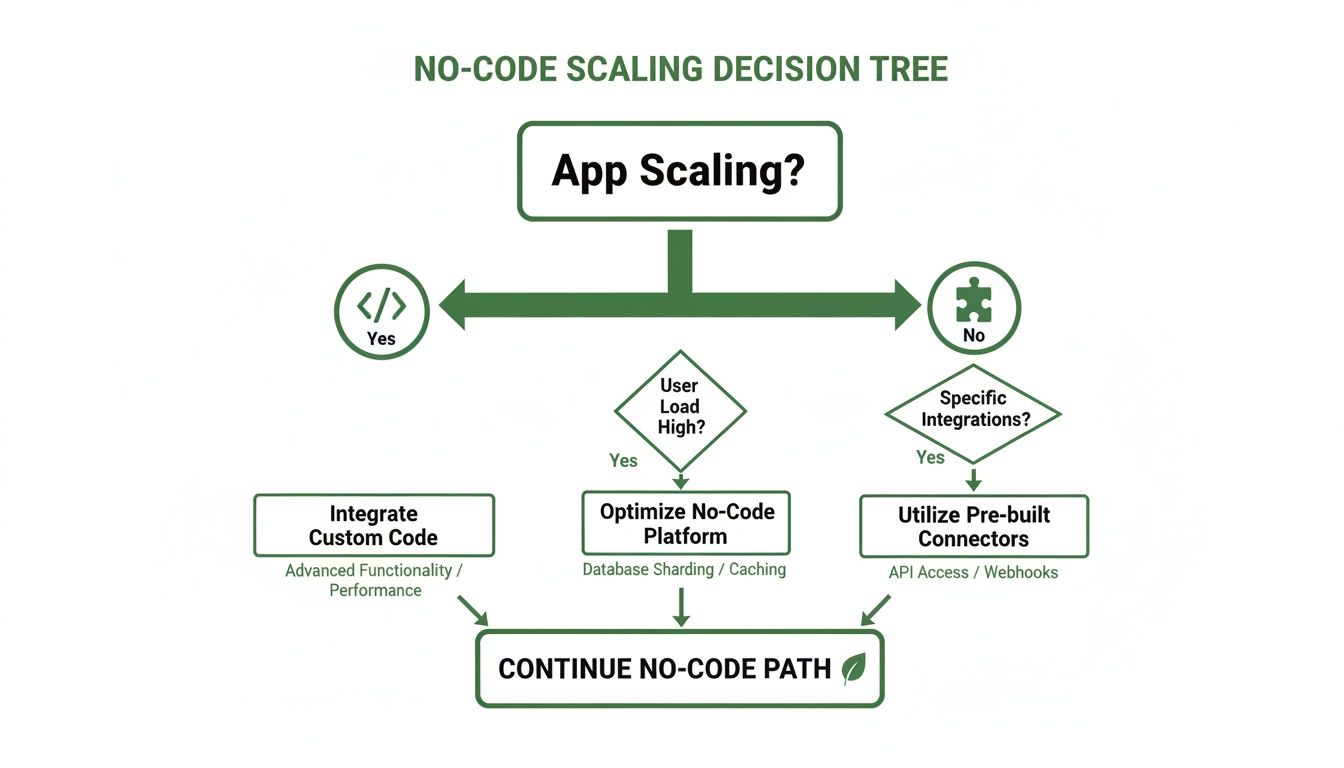
As you can see, the first answer isn't always to jump ship. Sometimes a little optimization can buy you more time. But when true growth is on the line, a custom path often becomes unavoidable.
Financial and Operational Health Check
First up, let's look at the money and the day-to-day grind. Are you spending a small fortune on workarounds just to keep the lights on?
Are your integration costs spiraling? Take a hard look at your monthly bill for tools like Zapier or Make. It shouldn't look like a mortgage payment. If you're spending hundreds—or even thousands—cobbling systems together, a custom backend could do the same job for a fraction of the long-term cost.
Is your team drowning in workarounds? Be honest. Are people manually exporting CSVs all day? Are they running overly complicated, multi-step "Zaps" that feel like they could break at any moment? Are you using Airtable as a primary database for a complex application? These are all "duct tape" solutions that scream inefficiency and are ripe for human error.
User Experience and Performance Signals
Your users are your most honest critics. If they're feeling the pain, you've got a serious problem.
A slow or buggy application isn't just a minor annoyance; it's a direct threat to your customer retention. In a crowded market, users have zero patience for bad performance. App reliability isn't a feature—it's the foundation of growth.
Ask yourself these two questions:
Does your app slow to a crawl during peak hours? You get a shout-out on social media or a marketing campaign goes viral, and... your app crashes. That's a classic sign that your infrastructure can't handle success. Users expect a snappy, reliable experience every single time.
Are you unable to build critical features? Has your product team heard "we can't build that" because of a platform limitation? When your no-code tool stands in the way of a key feature that your users are begging for, it's no longer an enabler. It's an obstacle.
Strategic and Investment Readiness
Finally, think about the bigger picture. As you gear up for serious growth or your next funding round, your tech stack will be put under a microscope.
- Are investors questioning your tech stack? Sharp investors and VCs will dig into your scalability, security, and intellectual property. Having to explain that your core technology is essentially "rented" from a third-party platform can be a major red flag. It raises questions about your company's long-term value and defensibility. Owning 100% of your IP is a massive asset.
If you found yourself nodding "yes" to a few of these points, it's a pretty strong sign. It's time to start planning your migration.
How to Navigate Your Migration to Custom Code
Deciding to move on from a no-code platform is a huge step. You've proven your concept, found product-market fit, and now it's time to build for the future. But how do you actually do it without derailing the business you've already built?
It’s a big job, no doubt. The key is to treat it like a well-defined project, not a frantic scramble.
Think of it this way: you’re moving your popular, successful street-food cart into a full-scale, custom-built restaurant. You wouldn't just close the cart one day and hope the restaurant is ready the next. You'd plan everything meticulously—the kitchen build-out, the menu, hiring staff, and letting your loyal customers know about the grand opening. The goal is a seamless transition that keeps the business humming.
Choosing Your Migration Strategy
There’s no one-size-fits-all approach here. The right strategy really depends on your app's complexity, how much risk you're willing to take on, and your timeline. Generally, you have two main paths.
A phased rollout is almost always the safer route. Here, you migrate your application piece by piece, not all at once. For example, you could start by building out a new, robust backend to handle just user authentication. For a time, both your old no-code app and your new system would rely on this single, scalable service. This approach is great because it minimizes risk by letting you test new components in a live environment before you've moved everything over.
The alternative is a lift-and-shift migration. This is the "all at once" approach. You rebuild the entire application on the new tech stack and then, on launch day, you flip the switch. It gives you a clean break from the old platform but comes with a much higher risk of something going wrong on day one. This strategy is really only a good fit for simpler applications where a phased migration would be more trouble than it's worth.
The Core Technical Steps
No matter which strategy you pick, a successful migration is built on a few critical technical pillars. Getting these right ensures your new app has a rock-solid foundation for growth.
Data Mapping and Migration: This is the most delicate and critical part of the entire project. You have to carefully map every single data field from your no-code tool (like a Bubble database or an Airtable base) to your new database schema, like PostgreSQL. You absolutely need a bulletproof plan for exporting, cleaning, and importing this data without losing a single record.
Infrastructure Setup: It's time to move into a professional hosting environment. This means choosing a cloud provider like AWS or Google Cloud and setting up servers, databases, and a CI/CD pipeline. That pipeline is key—it automates testing and deployment, making your future development process much smoother.
Frontend and Backend Development: This is where the magic happens and your new app comes to life. Your developers will take your designs and turn them into a fully functional user interface and the powerful server-side logic that runs it. To see what this part of the process entails, check out our guide on turning a web design to code.
A well-planned migration isn't just about rebuilding what you already have. It's about architecting for your company's future. By focusing on a clean data model and scalable infrastructure from day one, you're not just rebuilding an app—you're building a long-term business asset.
Ultimately, by managing the migration in agile sprints with clear milestones, you can turn a potentially chaotic process into a controlled and predictable one. That frees you up to focus on what matters most: launching your new, more powerful application with complete confidence.
What You Really Gain When You Own Your Tech Stack
Moving off a no-code builder isn't just a technical task you check off a list; it's a massive leap forward for your entire business. Think of it as moving from renting an apartment to owning your own building. You're not just getting a better version of your app—you're building a valuable, defensible asset that's 100% yours.
The single biggest win here is gaining complete ownership of your intellectual property (IP). When you’re on a no-code platform, sure, you own your data. But the underlying engine, the core technology that makes it all work? That belongs to the platform. Investors see this and immediately question your company's long-term value and defensibility. Owning your code turns your app from a temporary setup into a hard asset on your balance sheet.
No More Limits on Performance or Features
Beyond just owning the IP, a custom tech stack gives you the keys to the kingdom. You're no longer stuck working within the guardrails of a third-party platform's features, plugins, or performance ceilings.
- Build Exactly What You Want: If you can dream up a feature, your team can build it. You’ll never have to say "the platform can't do that" again, which is a huge competitive advantage.
- Cut Down on Operational Costs: Are you seeing those monthly bills from Zapier, Make, and other tools adding up? A custom backend can handle all those integrations and workflows in-house, often slashing your operational overhead.
- Get Ready for Viral Growth: A custom app can be built from the ground up to handle a sudden flood of users without breaking a sweat. When you hit that viral moment, you want to capitalize on it, not have your site crash.
Owning your tech stack means you're no longer just a tenant in someone else's ecosystem. You become the architect of your own, with the power to build, scale, and innovate without limits, turning your technology into a core business asset.
Ultimately, this is about taking the driver's seat. You’re swapping out a patchwork of tools and workarounds for a single, streamlined system that you control completely. For founders preparing for this jump, getting familiar with the ins and outs of custom backend development is the perfect place to start. A custom backend is the engine that powers all this new freedom, letting you build a truly scalable—and valuable—company.
Common Questions About Migrating Your No Code App
Deciding to move on from your first no-code app builder is a huge step. It’s a sign of growth, but it’s also natural to have some big questions swirling around. You see the limitations, but pulling the trigger on a major technical project is another thing entirely.
Let's get straight to the point and tackle the most common concerns we hear from founders. The idea isn't to sugarcoat the process, but to give you clear, honest answers so you can make a plan that feels predictable, not terrifying.
How Much Does a Migration Cost?
This is almost always the first question, and the honest answer is: it depends. The final price tag is tied directly to how complex your app is, how much data needs to be moved, and the development team you work with.
A straightforward migration can start in the low five-figures. But if you're running a complex platform with different user roles and tangled workflows, the cost will be higher. It’s critical, though, to see this as a capital investment—not just another line-item expense.
Think about it this way:
- Long-Term Savings: Add up what you're currently paying for your no-code subscription, plus all the glue that holds it together—Zapier, Make, and a dozen other plugins. A custom backend often wipes out a huge chunk of those recurring operational costs.
- Increased Valuation: When you own 100% of your IP, your company is instantly more attractive to investors. This isn't just a nice-to-have; it's a hard asset that strengthens your entire business.
Will There Be Downtime for My Users?
The thought of your app going dark and alienating your customers is a legitimate fear. But a properly managed migration should have little to no downtime that your users will ever see. This is where having a professional migration strategy makes all the difference.
Experienced teams don't just flip a switch and hope for the best. They use a phased approach, building and rigorously testing the new application in a completely separate "staging" environment. The final handover is planned with military precision, usually scheduled for a low-traffic window, like late on a Saturday night. When done right, it's so seamless most of your users won't even notice anything changed.
A professional migration isn't a chaotic, risky maneuver. It's a carefully orchestrated process designed from the ground up to protect your user experience and ensure a smooth transition.
How Long Will the Whole Process Take?
Just like the cost, the timeline is tied to your app's complexity. For a well-defined migration, you can typically expect about six to eight weeks of focused development work. That timeframe covers everything from the initial discovery and data mapping to building the new front and back ends and, finally, executing the data transfer.
The key is to work with a partner who operates in agile "sprints"—short, one or two-week development cycles. This method keeps you in the loop with constant progress updates and regular demos. You'll never be left guessing what's going on. It’s a transparent, collaborative way to ensure the final product is exactly what your business needs, without any nasty surprises at the finish line.
Ready to build a scalable, valuable asset that you fully own? First Radicle specializes in turning fragile no-code projects into production-grade software in just six weeks, guaranteed. We handle the entire migration so you can focus on growth. Learn more about our process at First Radicle.