
Security best practices for web applications: A practical guide
Getting security right isn't about reacting to problems; it's a strategic shift you make from day one. It means weaving security into the very fabric of your application, not just bolting it on as an afterthought. This is how you protect your users, lock down your IP, and build a service that stays reliable as you grow.
Why Security Is a Whole New Ballgame After Your No-Code MVP
Your no-code MVP was brilliant for proving your idea had legs. It let you test the waters, get feedback, and validate your business model without writing a single line of code. But the security model that worked for a prototype is worlds away from what a real, production-grade application demands.
Think of your MVP as a detailed architectural blueprint. It shows exactly how the house will look and function, but you wouldn't try to live in it during a storm. A live production app is the actual house. It needs a concrete foundation, deadbolts on the doors, and a proper alarm system to protect everything inside. As you move off platforms like Bubble, Webflow, or Airtable, you become the general contractor responsible for building that fortress.
From Blueprint to Fortress
This transition from a managed platform to your own codebase introduces risks that were previously invisible. Your no-code tool handled them for you. Now, your growing business has a lot more to lose: sensitive user data, payment details, and your own hard-won intellectual property. These assets make your application a much juicier target for attackers.
On top of that, investors and potential enterprise clients will absolutely kick the tires on your tech. They expect to see a secure, scalable, and defensible stack. Showing that you take security seriously isn't just a "nice-to-have" anymore—it’s a non-negotiable for closing deals and building trust.
The stakes are terrifyingly high.
Nearly six in ten organizations experienced an application breach in the past year, showing why secure development must be baked into any production migration.
This isn't just a scare tactic; it’s the reality of the landscape. According to the 2025 Web Application Security Report, 56% of organizations were breached in the last 12 months, a sharp jump from the previous year. You can dig into more data on rising application threats, but the message is clear: neglect this at your peril.
This guide gives you a clear path forward, helping you build the essential controls to protect your business. This also means planning for the technical nitty-gritty; check out our guide on database migration best practices to get ready for one of the most critical steps in the process.
When you ditch the safety of a no-code platform for your own custom app, you suddenly inherit all of the security responsibility. It’s a daunting shift. Instead of just guessing where the monsters are hiding, there’s an industry-standard playbook you can lean on: the OWASP Top Ten.
Think of it as the FBI's "Most Wanted" list, but for web application vulnerabilities.
This isn't some abstract list for security nerds. It's a practical roadmap that helps you and your dev team focus on the real-world risks attackers are actually using to break into apps. Understanding these threats lets you put your limited resources where they'll have the biggest impact.
For example, Broken Access Control isn't just jargon; it's the nightmare scenario where User A can somehow see User B's private data. This is how massive, company-killing data breaches happen. Likewise, Cryptographic Failures means you're storing sensitive info like passwords or API keys in plain text, basically leaving the front door unlocked.
The Modern Threat Landscape
The way people attack web apps is constantly changing. The OWASP Top Ten gets updated every few years using real data from security pros on the front lines, reflecting what's actually happening out there. The latest list puts a huge emphasis on the risks that come with modern, API-driven applications—exactly the kind of app you're building when you migrate off a no-code tool.
The journey from a simple prototype to a resilient, production-grade system requires a parallel evolution in your security mindset.
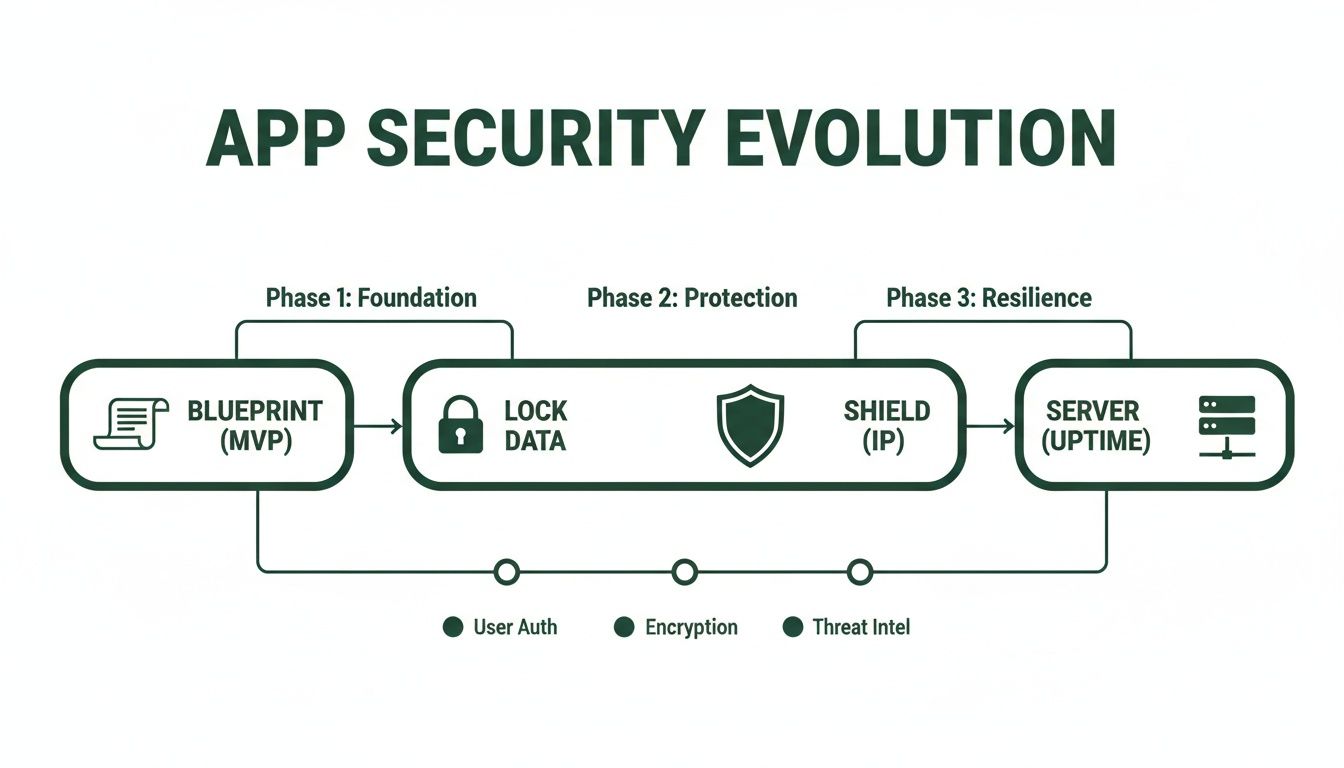
This visual shows it perfectly. As your application grows up, your security has to mature right alongside it—moving from a basic blueprint to active defenses that protect your data, your intellectual property, and your reputation.
The OWASP list is your guide. You can dig into the full OWASP Top Ten 2025 update to see the detailed breakdown, but for now, let's focus on the big ones you'll face during your migration.
Key OWASP Risks for Production Migrations
While you should be aware of all ten, a few stand out as especially critical when you’re moving an app into the wild for the first time. Here’s a look at the top three risks and how they stack up against the walled garden of a no-code platform.
OWASP Top 3 Risks vs. No-Code Limitations
| OWASP Top Risk | Common No-Code Platform Limitation | Required Production-Grade Control |
|---|---|---|
| Broken Access Control | You get what the platform gives you. Granular, field-level permissions are often impossible, leading to accidental data leaks between user types. | Implement strict Role-Based Access Control (RBAC). Every single API endpoint must check if the authenticated user has permission to see or change that specific piece of data. |
| Cryptographic Failures | Encryption is a total "black box." You have zero control over how passwords are hashed or how sensitive data is stored. You just have to trust them. | Use strong, industry-standard hashing like bcrypt or Argon2 for passwords. All sensitive data must be encrypted both in transit (TLS 1.2+) and at rest (AES-256). |
| Insecure Design | The platform is the architecture. You can't introduce fundamental security practices like threat modeling because you don't control the design. | Adopt a Secure Development Lifecycle (SDLC). This means thinking about potential threats before a single line of code is written, not just trying to patch holes later. |
See the pattern? Moving to production is a transfer of ownership. You are now directly responsible for the critical security controls that your no-code platform used to handle for you. It's a huge shift.
The most effective security isn't a feature you bolt on at the end; it's a principle you build in from the start. Frameworks like the OWASP Top Ten help you weave security into your application's DNA.
Ultimately, using the OWASP list gives you a shared language to have productive conversations with your engineers. It turns "we need to make this secure" from a vague, intimidating goal into a concrete checklist of risks to methodically eliminate, ensuring your new app is built to last.
Implementing Secure Authentication and Session Management
Authentication is your app’s digital bouncer—it decides who gets past the velvet rope. Session management is the hand stamp that lets them re-enter without showing their ID every time. When you’re moving off a no-code platform’s built-in user system, nailing this is non-negotiable. You’re building the front door to your fortress.
Think of it like this: authentication is the passport check at the border. It verifies you are who you say you are. Session management is the temporary visa you get—it grants specific access for a limited time and has to be renewed to extend your stay. Get either one wrong, and you’ve left the gate wide open.

This goes way beyond a simple username and password form. A truly secure system stacks multiple layers of defense to shut down common attacks. After all, user accounts are the crown jewels for most attackers.
Building Your Digital Fortress Door
Your first line of defense is just making sure the user is who they claim to be. This is where you implement the security fundamentals that will save you from a world of hurt later. Weak authentication is one of the most common ways breaches happen.
Here are the absolute must-haves for a strong authentication system:
- Secure Password Storage: Never, ever store passwords in plain text. This is a rookie mistake that can destroy your company's reputation overnight. Passwords must be hashed using a strong, slow algorithm like bcrypt or Argon2. On top of that, each password needs a unique salt (a random string) added before hashing. This simple step means that even if two users pick "Password123", their stored hashes will be completely different.
- Multi-Factor Authentication (MFA): Passwords get stolen. It’s a fact of life. Adding a second factor—something the user has, like a code from their phone—is your best defense. MFA can block over 99.9% of account compromise attacks. It's the single most effective security measure you can add.
- Brute-Force Protection: Attackers use bots to slam your login page with thousands of password guesses a second. You need to shut that down. Implement rate limiting to lock an account for a few minutes after five failed attempts. A simple CAPTCHA can also stop most automated scripts in their tracks.
Keeping Sessions Safe and Sound
Once a user is in, your app creates a "session" to remember them as they click around. Securing these sessions is just as critical as the login itself. If you mess this up, an attacker can hijack an active session and waltz right in, completely bypassing your shiny new login system.
A secure session is a temporary trust agreement between the user and your application. The goal is to make that agreement strong enough to prevent forgery but flexible enough not to frustrate the user.
Most modern apps use JSON Web Tokens (JWTs) for this. Think of a JWT as a secure, self-contained digital ID card. After login, the server issues this "card" to the user, who then flashes it with every subsequent request to prove they're still the same person.
But just using JWTs isn't enough. You have to implement them correctly:
- Set Short Token Expirations: That visa shouldn't last forever. Access tokens (the JWTs used for most requests) should have a short lifespan, usually 15 to 60 minutes. This dramatically shrinks the window of opportunity for an attacker if a token is ever stolen.
- Use Refresh Tokens: You can't ask users to log in every 15 minutes—they'll hate you for it. The solution is a long-lived refresh token. This separate, more secure token is used only to request a new, short-lived access token when the old one expires.
- Store Tokens Securely: Where you put the token matters. Storing JWTs in secure,
HttpOnlycookies is the gold standard. This makes them inaccessible to client-side JavaScript, which helps shut down a whole class of attacks like Cross-Site Scripting (XSS).
By getting these details right, you’re not just building a login form. You're building a system that actively defends your users and protects the integrity of your entire application.
Adopting a Secure Development Lifecycle
Security isn't something you can just bolt on at the end. When you move from a no-code MVP to your own application, you’re no longer just a passenger—you’re the pilot. This shift means you need a completely different mindset, one that bakes security into every single stage of development. This is what we call a Secure Development Lifecycle (SDLC).
Think of it like building a house. You don’t frame the entire structure, install the drywall, and then decide where to put the plumbing and electrical wiring. That would be insane. The pipes and wires are planned from the very first blueprint. The SDLC brings that same proactive thinking to software. Security becomes a core part of your requirements, design, coding, and testing—not a panicked afterthought.
Adopting this process turns security from a frantic, last-minute checklist into a predictable part of your team's rhythm. You'll catch vulnerabilities early, when fixing them is cheap and fast, instead of discovering them after a data breach has already happened.
Integrating Automated Security Testing
Let's be real: no one has time to manually inspect every line of code for potential flaws, especially not a small team moving at startup speed. This is where automated security testing becomes your secret weapon. These tools work like a tireless security guard, constantly scanning for weaknesses 24/7.
You’ll want to plug a few key types of tools right into your development pipeline:
- Static Application Security Testing (SAST): Think of SAST tools as a grammar checker for your source code. They analyze your code before it’s even running to spot common bugs like SQL injection risks or sloppy error handling.
- Dynamic Application Security Testing (DAST): If SAST checks the blueprints, DAST tries to kick down the doors of the finished house. It attacks your running application from the outside, mimicking how a real attacker would, to find vulnerabilities that only show up in a live environment.
- Software Composition Analysis (SCA): Modern apps are built using mountains of open-source code. SCA tools are like a librarian for your dependencies, scanning all third-party packages to make sure you’re not using one with a known, published vulnerability.
By running these scans automatically every time code is pushed, security becomes a natural part of your workflow. This "shift-left" approach catches problems early and ensures security doesn’t get left behind as you build.
Hardening Your Infrastructure
Your application code is only half the battle. The infrastructure it runs on—your servers and cloud services on AWS, Vercel, or anywhere else—is the foundation of your entire product. If that foundation is cracked, the whole thing comes tumbling down. Infrastructure hardening is the process of configuring your cloud environment to be as tough as possible.
Security is a continuous process, not a one-time achievement. A secure lifecycle ensures that as your application evolves, your defenses evolve with it.
The golden rule here is the principle of least privilege. It’s a simple concept: every user, every service, every part of your system should only have the absolute minimum permissions it needs to do its job, and nothing more. Your user management service has no business reading the billing database, so don't give it access.
Key practices for hardening your infrastructure include:
- Network Security: Lock down your firewalls and network access rules. Only allow traffic from trusted sources on the specific ports you absolutely need. Anything else gets blocked by default.
- Secrets Management: Never, ever hardcode API keys, database passwords, or other secrets in your code. It's the digital equivalent of leaving your house key under the doormat. Use a dedicated secrets manager like AWS Secrets Manager or HashiCorp Vault to inject them securely at runtime.
- Regular Patching: Just like your app's dependencies, your servers and operating systems have vulnerabilities. Automate security patches to make sure known exploits are closed before an attacker finds them.
For a much deeper look at building security in from day one, check out this A Founder's Guide to the Secure System Development Life Cycle. Making the SDLC part of your culture is the single biggest step you can take toward building a product that’s secure by design, not by accident.
Defending Your APIs and Managing Dependencies
When you leave the walled garden of a no-code platform for a custom stack, your application suddenly speaks a new language: APIs. Think of an API (Application Programming Interface) as the bustling service entrance to your business—it's how different parts of your system talk to each other and how you connect to the outside world. This is incredibly powerful, but it also paints a giant, flashing target on your back.
Your API isn't just another feature; it's the new front line of your security. Attackers absolutely love hammering APIs because they offer a direct, programmatic line to your most valuable asset: your data. A single unsecured endpoint is like leaving that service entrance wide open for anyone to walk through.
This isn't just a hypothetical threat. The numbers are staggering. The 2025 State of Application Security report found that defenders blocked over 7.7 billion attacks in 2024 alone. Even more alarmingly, API-targeted DDoS threats skyrocketed by 166%. These aren't just statistics; they're a clear signal that your security strategy has to be API-first. You can dig into the findings on rising application threats to see just how hostile the environment has become.
Securing Your API Endpoints
You can't just put one lock on the door and call it a day. Protecting your APIs requires a defense-in-depth approach. Every single request hitting every single endpoint needs to be scrutinized to make sure it's legitimate, authorized, and not part of some larger attack.
When it comes to API defense, these security best practices for web applications are completely non-negotiable:
- Robust Authorization: Authentication is "who you are," but authorization is "what you're allowed to do." Every endpoint must check both. Don't assume an authenticated user should have access to everything. Implement strict role-based access controls (RBAC) to enforce the principle of least privilege.
- Strong API Key Management: Treat API keys like you would a root password. They need to be generated with high entropy, stored securely in a vault (never, ever hard-coded in your repository), and rotated on a regular schedule. You must have a clear process to revoke a compromised key instantly.
- Rate Limiting: This is your bouncer. Rate limiting prevents attackers from flooding your service with requests in a denial-of-service attack or trying to brute-force a login endpoint with millions of password attempts.
Taming Your Dependencies
Your application isn't built in a vacuum. It's assembled from dozens, maybe hundreds, of open-source packages and libraries. This is a massive accelerator for development, but it also opens you up to what’s known as supply chain vulnerability. A security hole in one of your dependencies is a security hole in your app.
Think of your dependencies as the ingredients in a recipe. If you use a contaminated ingredient, the entire dish becomes unsafe, no matter how carefully you prepared the rest of it.
Managing this risk is no longer optional in modern development. You need a systematic way to track, scan, and update every third-party component you pull in. This same discipline applies to larger system components during a migration—our articles on Postgres migration, for example, touch on the critical importance of managing versions and dependencies carefully.
Here’s how you get a handle on your supply chain:
- Maintain a Software Bill of Materials (SBOM): An SBOM is just a fancy name for an inventory list. It details every single third-party component in your application. You can't secure what you don't know you have.
- Use Automated Scanning Tools: Integrate Software Composition Analysis (SCA) tools directly into your CI/CD pipeline. These tools automatically check your dependencies against databases of known vulnerabilities and will fail your build if you try to ship code with a known critical flaw.
- Establish a Patch Management Process: When a vulnerability is found, the clock starts ticking. You need a clear, rehearsed plan for testing and deploying patches for critical issues to minimize your window of exposure.
Your Production-Ready Security Checklist
Knowing the theory is one thing, but translating it into action is what actually protects your app. This isn't just a list of tasks; it's a battle-tested checklist designed to turn the overwhelming job of securing a new application into a series of clear, manageable steps.
Use this to kick off conversations with your dev team. Think of it like a pilot's pre-flight checklist. Each item is a critical safety check to ensure your app is ready to handle real-world pressures, protecting both your users and your business from day one.
Pre-Migration and Design Phase
Before your team writes a single line of production code, the security foundation has to be solid. This phase is all about proactive planning, not reactive patching. Skipping these early steps is like building a house on sand—it might look fine at first, but it won’t survive the first storm.
- Run a Threat Modeling Session: Don't just talk about vague threats. Get specific. Map out your exact authentication and payment flows and ask, "What could go wrong here?" at every single step. This is how you find attack vectors before they become real vulnerabilities.
- Define Your Data Classification Policy: Not all data is created equal. Clearly label what’s sensitive (PII, payment info) versus what’s public. This simple exercise dictates exactly where you need to apply the strongest encryption and the tightest access controls.
- Establish Secure Coding Standards: Create a living document that outlines the baseline security practices for your developers. It should cover the non-negotiables: input validation, proper error handling, and, most importantly, how to manage secrets.
The goal of a security checklist isn't to build an impenetrable fortress—that's a fantasy. It's about systematically making an attacker's job so expensive and difficult that they move on to an easier target.
Development and Testing Phase
As your application starts to take shape, security must be woven directly into the development process. It can't be an afterthought. This is where you bring in automated tools and rigorous human reviews to turn your security policies into tangible code.
- Set Up Automated Dependency Scanning: Integrate a Software Composition Analysis (SCA) tool directly into your code repository. It will automatically scan every open-source package you use for known vulnerabilities, flagging risks before they ever get deployed.
- Implement Static Code Analysis (SAST): A SAST tool acts like an automated peer reviewer that never sleeps. Configure it to run on every single code commit to catch common security flaws like SQL injection vectors or hardcoded secrets early and often.
- Enforce Secure Branching and Review Policies: This is non-negotiable. Mandate that all code changes go through a pull request and require at least one other developer to review and approve it before it gets merged into the main branch.
Getting these development practices right is crucial, especially for teams planning for growth. For more on this, you can dig into our articles on application scaling.
Deployment and Post-Launch Phase
Once you go live, the mission shifts from building defenses to actively monitoring and maintaining them. Security is never a "one-and-done" project. It’s a continuous process of vigilance.
- Configure a Web Application Firewall (WAF): This is your front line of defense. A WAF sits in front of your application, filtering out malicious traffic and blocking common attacks like SQL injection and cross-site scripting (XSS) before they ever reach your servers.
- Implement Centralized Logging with Alerts: Don’t let your logs sit in silos. Funnel all application and server logs into a single, searchable system. Then, set up automated alerts for critical events like repeated failed logins or sudden spikes in errors.
- Schedule Your First Penetration Test: Don't wait for a breach to find your weaknesses. Within the first 3 to 6 months after launch, hire a third-party security firm to conduct a professional penetration test. This gives you an unbiased, expert-level assessment of your real-world defenses.
As you button up your security strategy, a solid guide on how to secure web applications can offer more detailed context and actionable steps.
Migration Security Checklist
This table provides a high-level, actionable checklist to ensure security is top of mind at every stage of your move from a no-code platform.
| Phase | Task | Why It's Critical |
|---|---|---|
| Before Migration | IP & Asset Ownership Review | Confirm you own all the code, design assets, and data exports. No-code platforms can have tricky terms of service. |
| Before Migration | Data Classification & Mapping | Identify all Personal Identifiable Information (PII) and map how it will move to the new system to ensure GDPR/CCPA compliance. |
| During Migration | Secure Data Transfer | Encrypt data both in transit (using TLS) and at rest (in temporary storage) during the entire migration process. |
| During Migration | Authentication System Cutover | Plan the exact moment you switch from the old login system to the new one. This is a high-risk step for account takeovers. |
| After Migration | Run a Full Data Validation | After the move, run scripts to verify that all user data, especially sensitive fields, was transferred completely and without corruption. |
| After Migration | Decommission Old Platform | Don't just stop paying for it. Fully delete all data and close the account to eliminate the old platform as a potential attack surface. |
Treat this checklist not as a one-time task, but as the beginning of your new, more mature security posture. It's an ongoing commitment that pays dividends in user trust and business resilience.
A Few Common Questions
When you're moving from a no-code MVP to a full-blown application, security questions can feel overwhelming. Most founders I talk to are trying to figure out where to start and how to balance moving fast with staying safe. Here are the most common concerns I hear.
How Much Security Is "Enough" for a Startup?
Look, your goal as an early-stage company isn't to build an impenetrable digital fortress on day one. It's about making yourself a difficult and expensive target. The idea is to convince opportunistic attackers to just move on to easier prey.
Start by mastering the fundamentals—the very things we've covered in this guide. They're designed to shut down the vast majority of automated, low-effort attacks.
- Lock down user accounts with strong, multi-factor authentication.
- Encrypt all sensitive user data, both when it's moving (in transit) and when it's stored (at rest).
- Use automated tools to constantly scan your dependencies for known vulnerabilities and patch them.
- Set up basic logging and alerting so you know when something suspicious is happening.
The most practical security strategy for a startup isn't about perfection. It's about making a breach so annoying and time-consuming that attackers give up. Using the OWASP Top Ten as your roadmap is the single most effective way to prioritize your time and money.
Can I Actually Handle Security as a Non-Technical Founder?
Absolutely. You won't be in the weeds writing security patches, but your role is arguably more important. You're the one who decides that security is a core business priority, not an afterthought. You control the budget and the timeline, and you set the standard by asking the right questions from the very beginning.
Your job is to be an informed leader, not a coder. Use the checklists in this guide to have productive conversations with your engineers. Asking a specific question like, "How are we defending against the OWASP Top Ten?" or "What's our game plan if we have a security incident?" changes the entire dynamic. It makes you an active defender of your company, not just a passive observer.
What's the Single Biggest Security Mistake Startups Make?
Without a doubt, it's treating security as a feature you can just "add later." This is a catastrophic mindset. Real security isn't a coat of paint you slap on at the end; it has to be part of the architectural blueprint from the first line of code.
Trying to bolt security onto an existing application is exponentially more expensive and painful than building it in from the start. It's also far less effective. Making security a priority from day one of your migration is the most important decision you'll make for the long-term health and trustworthiness of your business.
Ready to move past your no-code limits and build an application that’s secure and ready to scale? First Radicle specializes in turning fragile MVPs into production-grade software in just six weeks, with security baked in from the start. https://www.firstradicle.com