
Turn Your Site Into an App A Founder's Guide to Scaling

Let's be honest, the quickest way to get an app into the store is to use what you've already built. We're talking about a native wrapper or converting your site into a Progressive Web App (PWA). Both routes leverage your existing web code to deliver an app-like experience without the massive time and cost of a full rebuild. It's the smart way to get an app store presence and unlock new features fast.
Knowing When to Turn Your Site Into an App

Your no-code MVP was a brilliant move. It got you to market, proved your concept, and brought in those crucial first users. But the very platforms that gave you that speed—like Webflow, Bubble, or Airtable—are likely starting to feel tight around the collar.
You know the feeling. The site lags. Integration costs are creeping up. You live with a low-grade fear that one good traffic spike could bring the whole thing down. This is a classic founder inflection point. The patchwork of Zapier automations that once felt so clever now seems fragile, expensive, and a real liability. If you're spending more time firefighting than shipping new features, that's your cue. It’s time to graduate from a prototype to a production-grade application.
Identifying the Breaking Points
This isn't just a technical upgrade; it's a strategic business decision. You're building a defensible asset that can handle real scale, properly secure user data, and give investors the confidence that you actually own your IP.
So, what are the tell-tale signs you've outgrown your no-code stack?
- Performance Bottlenecks: Your site grinds to a halt during peak hours. Users are dropping off, and carts are being abandoned.
- Scalability Ceilings: You’re hitting hard limits on API calls or database records (a familiar pain point for Airtable users), physically capping your growth.
- Integration Sprawl: Your monthly bill for Zapier and other "glue" services is starting to look like a payroll expense. The whole system is a house of cards.
- Lack of IP Ownership: Investors are asking tough questions about building a business on a rented platform where you don't own the core codebase.
The Conversion Rate Advantage
Beyond just plugging leaks, moving to a dedicated app opens up a massive opportunity for growth. App users are simply more engaged and convert at a ridiculously higher rate. Just look at the numbers.
Here’s a quick breakdown of how app performance stacks up against a typical website. The difference is stark.
Website vs App Key Performance Metrics
| Metric | Average Website Performance | Average App Performance |
|---|---|---|
| Conversion Rate (e.g., Purchase) | 1-3% | 15-20% |
| Session Length | 2-3 minutes | 10-15 minutes |
| User Retention (30-day) | <10% | 25-40% |
| Push Notification Opt-in | N/A (Browser-based is low) | 40-60% |
| Cart Abandonment Rate | ~70% | ~20% |
The data speaks for itself. Apps provide a stickier, more direct channel to your most valuable users. In the first half of 2024, the US App Store saw average page-view-to-install rates of 25-27%. That means for every four people who land on your app store page, one of them installs it. For a deeper dive, you can explore detailed app store conversion statistics yourself.
This shift isn't just about improving performance; it's about building a stable, scalable foundation for your business's future. It’s the move from a prototype held together with digital tape to a robust asset that can handle viral growth and secure your market position.
Choosing Your Path: PWA vs. Native vs. Full Rebuild
Making the jump from a website to an app is a critical strategic choice. This isn't just about code; it's a commitment of time and capital that will define your user experience, budget, and speed to market. Get this decision right, and you set yourself up for scalable growth. Get it wrong, and you could be facing a costly rebuild in a year.
Let’s break down the three main routes without getting bogged down in jargon. We’ll focus on the business outcomes to help you align your vision with the right technology.
The Quickest Route: Progressive Web Apps (PWAs)
A Progressive Web App (PWA) is essentially your existing website supercharged with app-like features. It can be "installed" on a user's home screen, works offline, and sends push notifications—all without ever touching an app store.
This path is a no-brainer for content-heavy platforms, simple e-commerce stores, or early-stage MVPs where speed and cost are everything. If your main goal is to offer a better mobile experience right now without a massive investment, a PWA is your best first step. It's an immediate, tangible upgrade over a standard mobile website.
A PWA leverages your current codebase to deliver an app-like feel directly through the browser. It's the fastest and most affordable way to enhance your mobile presence, bypassing app store gatekeepers entirely.
The App Store Shortcut: Native Wrappers
What if being listed on the App Store is non-negotiable for your brand's credibility? A native wrapper is your answer. This approach takes your existing web application and "wraps" it in a native container, which lets you submit it to the Apple App Store and Google Play.
Your users download what looks and feels like a real app, but the content they're seeing is still your website. It’s a clever way to get the best of both worlds: a discoverable app store listing and the ability to leverage your existing web code. It’s a pragmatic compromise that gets you into the ecosystem without starting from scratch.
A native wrapper is the right call for founders who need to:
- Establish credibility with an official app store presence.
- Access native device features like the camera or GPS that PWAs might struggle with.
- Move faster than a full rebuild while still offering a downloadable app.
The Ultimate Upgrade: A Full Rebuild
Then there’s the full rebuild. This is the most intensive option by far, where we build a new application from the ground up using modern frameworks like React Native. It means completely moving away from your no-code platform and building on a robust foundation with a real database like PostgreSQL.
This path is for businesses that are hitting serious scalability ceilings. If your SaaS platform is buckling under user load or your complex workflows are held together by a fragile web of automations, a rebuild isn't just an option—it's a necessity. It delivers unparalleled performance, security, and a completely custom user experience.
While it's the biggest investment, it also provides the highest long-term value and positions you for serious growth. Making this leap requires careful planning, which you can learn more about by exploring software architecture best practices.
To make this choice clearer, we’ve put together a decision matrix comparing the three paths across the factors that matter most to a founder.
Decision Matrix: PWA vs. Native Wrapper vs. Full Rebuild
| Factor | Progressive Web App (PWA) | Native Wrapper | Full Rebuild (e.g., React Native) |
|---|---|---|---|
| Cost | Lowest ($) | Low-Medium ($$) | Highest ($$$$) |
| Timeline | Fastest (Weeks) | Fast (Weeks to a few months) | Longest (Months) |
| Performance | Good | Dependent on web performance | Highest (Native feel) |
| App Store Access | No | Yes | Yes |
| Ideal Scenario | Content sites, simple tools | Existing web apps needing store presence | Scaling SaaS, complex platforms |
Each of these paths is a valid strategy, but only one is the right strategy for your specific stage and goals. The key is to be realistic about your needs today while planning for where you want to be tomorrow.
Your Migration Playbook: From No-Code to Production Grade
So, you’ve picked your path—native wrapper or full rebuild. The next logical question is always, "Okay, what does this actually look like?" Moving from a no-code setup to a real, production-grade application isn't just a technical swap. It’s a carefully managed process designed to get you to market cleanly, with zero disruption for your users.
Let's walk through the playbook we use to make this happen.
The whole thing kicks off with a professional handover. This is more than just us getting your Bubble or Adalo logins; it's about translating your existing app's logic into a concrete engineering plan. We map your current database schema from platforms like Airtable into a proper, robust system—usually PostgreSQL. Getting this foundation right from the very beginning is non-negotiable. For a deeper dive on why this matters, check out our guide on building scalable web applications.
This flowchart breaks down the decision points that lead you here.
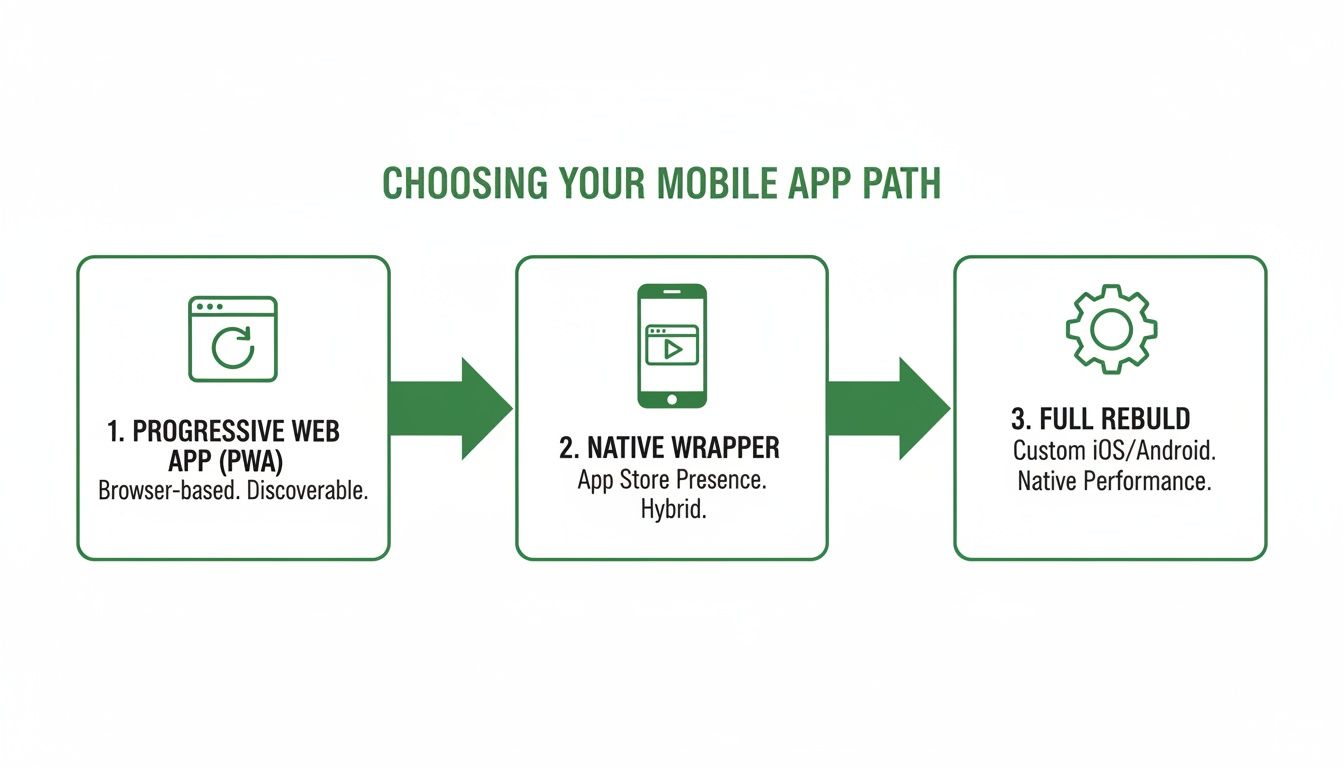
Each path demands a different level of investment and technical commitment, which in turn shapes the migration strategy we'll follow.
Engineering Your Backend and Core Systems
Once we have a clean schema map, our focus shifts to building out a powerful backend. This is where we systematically replace all those brittle, expensive Zapier automations with efficient, custom code. We often use technologies like Python to build a backend that isn't just faster, but also dramatically cheaper to run as you scale. This new engine handles everything your no-code tools did, but with far greater speed and reliability.
Next, we tackle the essentials: authentication and payments. Securely managing user logins and processing payments are the bedrock of any serious application. This means setting up industry-standard auth flows and integrating directly with providers like Stripe. We build these systems correctly from day one, adhering to security best practices from organizations like OWASP to protect both your users and your business.
Managing the Data Migration Sprint
This is probably the most sensitive part of the entire project: moving your existing user data. A flawless migration means your loyal users can log into the shiny new app with their old credentials, completely unaware of the massive upgrade that just happened behind the scenes.
We handle this entire phase within a structured sprint model. It's an intense, focused period—typically six weeks—with weekly demos to show you our progress and get your feedback. This agile approach means no surprises; you're in the loop the entire time, ensuring the final product is exactly what you envisioned.
The payoff for this transition is huge. Broader 2025 benchmarks show websites average a 2.9% conversion rate. In contrast, the App Store's page-to-install rate is a staggering 33.7% (Google Play is at 26.4%). The data is clear: apps convert visitors nearly 10x better. A focused migration gets you a secure React app ready to capture that growth, leaving behind the friction of slow-loading, Zapier-dependent sites.
At its core, a successful migration is about translating your existing business logic and user data into a new, scalable environment without breaking the user experience. It's a methodical process of de-risking the move from a fragile MVP to a durable, valuable asset.
Mapping Your Project Timeline and Budget
Let's talk about the two things every founder has on their mind: time and money. When you decide to ditch your no-code setup for a real app, you're not just buying a piece of software. You're investing in a new foundation for your entire business, and vague estimates won't get you very far. You need to know the real costs and what to expect at each stage.
The investment isn't one giant lump sum. It breaks down into clear phases. You'll start with strategy and discovery sessions. This is where your dev partner really gets under the hood of your existing setup, maps out your data schema, and creates the technical roadmap. Spending a few thousand dollars here is the single best way to avoid a $20,000 mistake down the line. It sets the stage for the main event: the build itself.
A Tangible Six-Week MVP Timeline
To make this real, let's use a six-week MVP timeline as our benchmark. This isn't some theoretical exercise; it's a focused, sprint-based approach we use to get a functional, production-ready app into your hands, fast. A typical MVP build in this timeframe will run you somewhere between $10,000 and $25,000, and the goal is to absolutely nail the core features your business can't live without.
So, what can you actually get done in six weeks?
- Secure User Authentication: A rock-solid system for user sign-up, login, and password management. No more depending on a third-party service you don't control.
- Direct Payment Integration: We're talking a proper integration with a provider like Stripe, ripping out those clunky, expensive no-code payment plugins.
- Core Feature Replication: Rebuilding the primary function of your no-code app—the thing your users actually pay for—on a backend that can handle real traffic.
- Full Data Migration: A seamless transfer of all your user and product data into a new, clean PostgreSQL database.
This tight scope allows a small, dedicated team to move incredibly fast. The result? You get a tangible asset in less than two months—a massive upgrade from a system that was probably holding you back.
The point of an MVP isn't to replicate every single bell and whistle from your old site. It's to build a solid, secure foundation with the core functionality your users depend on. This gets you to market faster and on a predictable budget.
Planning for Life After Launch
Your initial investment gets you to launch day, but the work doesn't stop there. A production-grade application is a living thing; it needs ongoing care and maintenance. Once the initial build is done—which should always include a 30-day bug-fix window—you need a plan for what comes next.
This usually looks like a monthly support retainer. And this isn't just for fixing things when they break. It covers continuous security updates, performance monitoring, and, most importantly, building out new features. Budgeting for this post-launch support ensures your new app remains a reliable asset that grows with your business, rather than slowly turning into technical debt. It’s this kind of foresight that separates a short-term project from a long-term strategic win.
Navigating a Successful Launch and Beyond
Getting your app built is a huge win, but the launch and the days that follow are where the real work begins. This final stretch is all about rigorous testing and a smart deployment strategy. It’s what ensures your decision to turn your site into an app pays off with a smooth, professional user experience right out of the gate.
Before a single user gets their hands on it, the app needs to go through the wringer. This isn't just about clicking a few buttons; we're talking about a structured process to hunt down bugs in a controlled environment. We deploy the application to a staging server—an exact replica of the live production environment—to simulate real-world usage without putting any of your actual data at risk.
Mastering the App Store Submission
Once testing clears, it's time to face the gatekeepers: Apple's App Store and Google's Play Store. Honestly, this part can be a massive bottleneck if you’re not prepared. Both platforms have strict—and sometimes frustratingly vague—review guidelines that can lead to rejections and painful delays.
We've seen apps get rejected for all sorts of reasons. The most common culprits are:
- Incomplete Information: Things like a missing privacy policy link, a weak app description, or blurry screenshots.
- Performance Issues: The app crashes on launch, freezes on a specific device, or just feels sluggish.
- User Account Headaches: Forgetting to provide a test account login for reviewers when your app requires users to sign in.
Getting through this requires meticulously preparing your store listings, metadata, and testing notes. Having a partner who's been through the process dozens of times means you can anticipate and fix these issues before they cause a delay, paving a much faster path to launch day.
The whole point of migrating to an app is for better conversions. Websites struggle with an average 2.7% conversion from organic search. In contrast, targeted app campaigns can see trial-to-paid rates hitting around 45%. A proper launch is how you unlock that potential. You can see more conversion rate optimization statistics over at Wordstream.
Planning for Post-Launch Support
Your app is live. Great! But the journey is far from over. A successful launch is immediately followed by a plan for ongoing maintenance and growth. The digital world is always in flux—new OS versions drop, security threats emerge, and user expectations are constantly rising.
Any solid post-launch plan has to start with a 30-day bug-fix window. This ensures any unexpected issues that pop up in the wild are squashed immediately, at no extra cost to you.
Beyond that initial period, a support retainer is crucial for the app's long-term health. This covers the essential but unglamorous work like applying security patches, updating dependencies, and keeping an eye on performance. If you want to dive deeper into why this is so critical, check out our guide on security best practices for web applications at https://blog.firstradicle.com/security-best-practices-for-web-applications/. Proactive support keeps your app a valuable, secure asset that continues to grow right along with your business.
Your Questions, Answered
Deciding to move off your no-code platform feels like a huge step—and it is. You're talking about pouring a proper foundation for your business. Naturally, a lot of questions come up. Here are the straight answers to the most common ones we hear from founders.
When Is the Right Time for This Move?
The tipping point is usually when performance issues start actively costing you users or when you're hitting a hard scalability wall.
If you find yourself spending more time patching together complex Zapier workflows than actually shipping new features, that's a huge signal. Another major trigger is needing to own your technology outright for a funding round. Many investors see reliance on no-code platforms as a serious liability.
Will I Lose My Existing User Data?
Absolutely not. A professional migration isn't about starting over; it's about upgrading your engine. Any real migration process includes a meticulous data handover phase.
We carefully map every user account, product entry, and all the other critical data from your current setup (whether it's Bubble or Airtable) into a new, powerful database like PostgreSQL.
The goal is a zero-impact transition for your users. They should be able to log in to the new, faster application with their existing credentials, completely unaware that a complex backend overhaul just happened. This protects the community you’ve worked so hard to build.
What Does Owning 100% of the IP Actually Mean?
Building your app on a no-code platform is like renting your company's foundation. You don't own the underlying code, and that's a big red flag for savvy investors. True IP ownership means the entire codebase—frontend, backend, and database schema—is your company's exclusive property.
This isn't just a concept; it's a tangible asset delivered to you in a private GitHub repository.
It makes your startup more valuable and defensible. It also allows any future developer to jump in and build on a clean, well-documented foundation. You're no longer just running a business on someone else's platform; you're building a real asset that you completely control. This is the move from a temporary setup to a permanent, scalable enterprise.
Ready to build a scalable, defensible asset for your startup? First Radicle specializes in turning fragile no-code projects into production-grade software in just six weeks, guaranteed. Schedule your Unblock Session and start building a real app today.